

How Much Do Clicks Cost?
The cost of a click in Google Ads is not a fixed price; it’s determined by a real-time auction system and can vary dramatically depending on a number of factors. Instead of a flat rate, you’ll pay a Cost Per Click (CPC), which is the amount you are charged each time a user clicks on your ad.
Based on recent data from 2025, the average CPC for the Google Search Network is around $2.69 USD, while the average for the Google Display Network is significantly lower at approximately $0.63 USD. However, these are just averages. Most businesses can expect to pay anywhere from $0.01 to $1 per click, but this range can extend much higher, with some highly competitive keywords costing well over $100 per click. For context in Australia, some top-end keywords can range from AUD $35 for accounting services to over AUD $42 for a criminal defence lawyer in major cities like Melbourne.
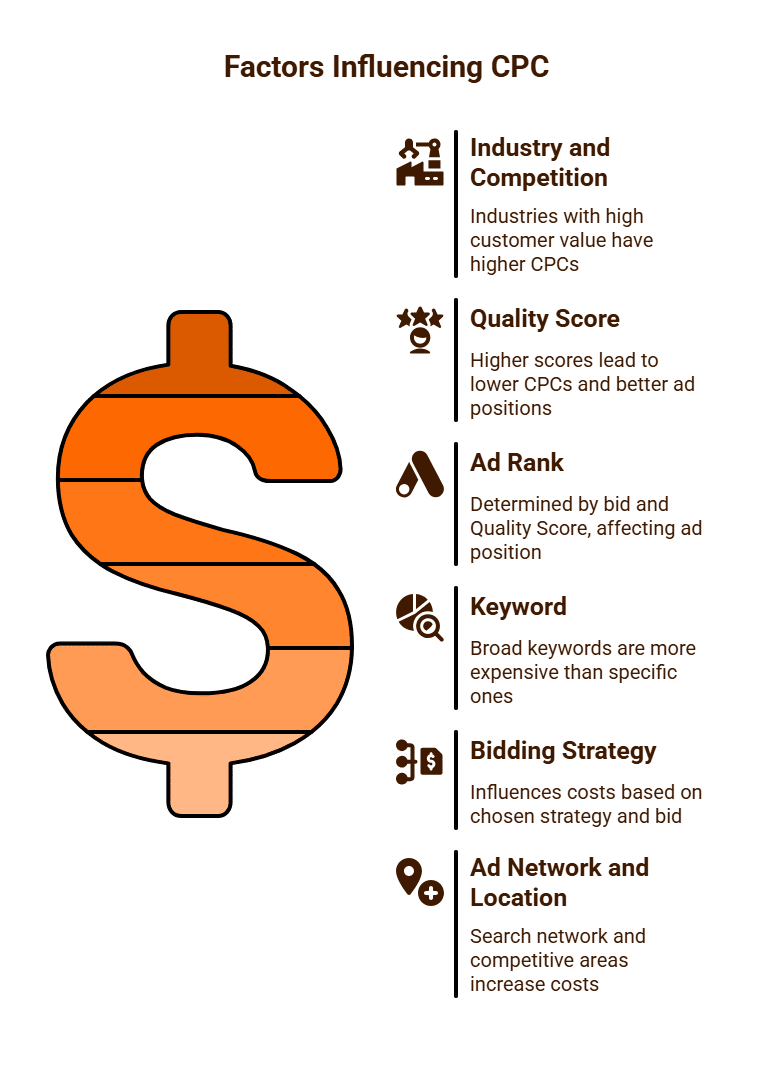
Key Factors Influencing CPC:
- Industry and Competition: This is the most significant factor. Industries with a high customer lifetime value, such as legal services, finance, and home services, have the highest CPCs. A single client can be worth thousands of dollars, so businesses are willing to bid more for a click. For example, legal keywords can average $6.75 USD per click on the Search Network, while industries like e-commerce or travel are much lower, around $1.16 USD and $1.53 USD, respectively.
- Quality Score: This is a crucial metric that Google uses to determine your ad’s relevance and quality on a scale of 1 to 10. A high Quality Score (based on your ad relevance, expected click-through rate, and landing page experience) can lead to a lower CPC and a better ad position. A high Quality Score can allow you to outrank a competitor who bids more, but has a lower Quality Score.
- Ad Rank: Your ad’s position in the search results is determined by its Ad Rank, which is calculated based on your maximum bid and your Quality Score. You only pay what’s minimally required to beat the Ad Rank of the competitor below you.
- Keyword: Broad, highly searched keywords are generally more expensive than specific, “long-tail” keywords. For instance, “lawyer” will be far more costly than “family lawyer in Melbourne’s northern suburbs.”
- Bidding Strategy: Your chosen bidding strategy (e.g., Manual CPC, Maximise Clicks, Target CPA) and your maximum bid will directly influence your costs. You set the maximum you’re willing to pay per click, but the actual cost is often lower.
- Ad Network and Location: Clicks on the Google Search Network are typically more expensive as they represent users with high intent. Clicks on the Google Display Network (ads on other websites) are much cheaper. Additionally, bidding in highly populated or competitive geographic areas, like Melbourne CBD, can increase costs.
While you can set a daily or monthly budget, your cost per click is a dynamic figure that you have significant influence over through strategic keyword selection, ad quality optimisation, and smart bidding.
How Do We Calculate a Daily Budget for Google Ads?
Calculating an effective daily budget for a Google Ads campaign is a fundamental step in ensuring your advertising spend is efficient and aligned with your business objectives. It’s not a one-size-fits-all formula, but rather a strategic process that involves understanding your goals, estimating key metrics, and continuous optimisation.
Here’s a systematic approach to determining a suitable daily budget for your Google Ads campaigns:
1. Define Your Campaign Goals and Value Per Conversion
Before allocating any budget, clearly articulate what you want your Google Ads to achieve. Are you aiming for:
- Leads: (e.g., form submissions, phone calls, newsletter sign-ups)
- Sales: (e.g., e-commerce purchases)
- Brand Awareness: (though this typically uses different metrics like impressions or reach, rather than clicks for budget calculation)
Crucially, determine the value of a single conversion to your business. For a sale, it might be the average order value. For a lead, it could be the percentage of leads that convert into customers multiplied by the average customer lifetime value. This understanding helps establish your Target Cost Per Acquisition (CPA) or Cost Per Lead (CPL) – the maximum you are willing to pay to acquire one customer or lead profitably. For instance, if a new customer is worth $100 in profit, you might set a target CPA of $30.
2. Estimate Your Conversion Rate (CVR)
Your conversion rate is the percentage of website clicks that result in a desired conversion (e.g., a purchase, a form submission).
- If you have historical data: Use your existing website’s conversion rates for similar traffic sources or products.
- If you’re new to Google Ads or a specific product: Research industry benchmarks. Conversion rates can vary significantly by industry (e.g., e-commerce typically 1-3%, B2B lead gen 5-10%). A realistic starting point for many e-commerce campaigns might be 2%, while a service-based business could aim for 5-10%.
Formula: Conversion Rate (CVR) = (Number of Conversions / Number of Clicks) x 100
3. Calculate Your Target Cost Per Click (CPC)
Knowing your target CPA and estimated conversion rate allows you to determine how much you can afford to pay per click while remaining profitable.
Formula: Target CPC = Target CPA x Conversion Rate (as a decimal, e.g., 2% = 0.02)
Example: If your Target CPA is $30 and your estimated CVR is 2% (0.02), then your Target CPC = $30 x 0.02 = $0.60. This means, on average, you can afford to pay $0.60 per click to achieve your profitability goals.
4. Determine Your Desired Daily Conversions
Next, decide how many conversions you want to generate on a daily basis to meet your overall business objectives.
Example: If your goal is to generate 5 sales per day.
5. Calculate Required Daily Clicks
With your desired daily conversions and estimated conversion rate, you can work out how many clicks you need per day.
Formula: Required Daily Clicks = Desired Daily Conversions / Conversion Rate (as a decimal)
Example: If you want 5 sales/day and your CVR is 2% (0.02), then Required Daily Clicks = 5 / 0.02 = 250 clicks per day.
6. Calculate Your Initial Daily Budget
Finally, multiply your required daily clicks by your calculated target CPC to arrive at your initial daily budget.
Formula: Initial Daily Budget = Required Daily Clicks x Target CPC
Example: If you need 250 clicks/day and your Target CPC is $0.60, then Initial Daily Budget = 250 x $0.60 = $150 per day.
Considerations and Refinements:
- Keyword Competition: Actual CPCs in Google Ads are determined by auction. Highly competitive keywords will cost more. Your calculated Target CPC should be cross-referenced with Google Ads’ Keyword Planner or other tools to see average CPCs for your chosen keywords. If the market CPCs are much higher than your target, you may need to increase your budget or refine your targeting.
- Google’s Spending Fluctuation: Google Ads is designed to spend up to 2x your daily budget on days when it sees more conversion opportunities, averaging out to your set daily budget over a 30.4-day billing cycle. Factor this flexibility into your financial planning.
- Seasonality: Your budget may need to increase or decrease during peak or off-peak seasons for your business.
- Testing and Optimisation: Start with a conservative budget. Once your campaigns are live, monitor performance closely. Adjust bids, targeting, and budget based on real-world data to optimise your CPA and maximise conversions. This initial calculation is a starting point, not a rigid rule.
By following this methodical approach, you can set a Google Ads daily budget that is not arbitrary, but strategically aligned with your profitability goals and market realities.

Why Does Google Ads Not Always Spend My Daily Budget?
It’s a common observation for advertisers to find that their Google Ads campaigns aren’t always utilising their full allocated daily budget. While initially puzzling, this phenomenon is often a deliberate outcome of Google’s sophisticated auction system and optimisation algorithms, designed to maximise your campaign’s performance rather than simply depleting your budget. Understanding the various reasons behind underspending is crucial for effective campaign management.
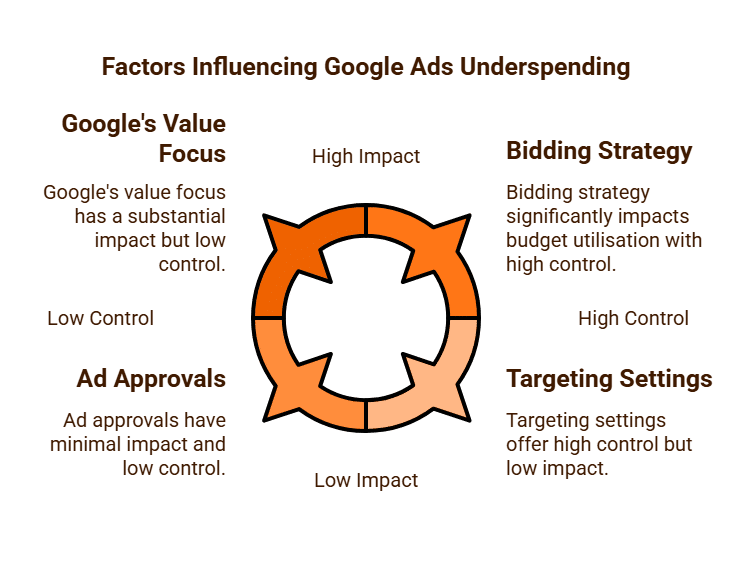
1. Google’s Focus on Value, Not Just Spend
Firstly, Google’s primary objective is to deliver conversions and valuable clicks for advertisers, not just to spend their money. If the system determines that there aren’t enough high-quality opportunities to achieve your campaign’s goals (e.g., sales, leads) within your specified parameters, it will intelligently hold back on spending. This means if the potential clicks are deemed unlikely to convert, or too expensive for your bid, Google won’t push your ads unnecessarily.
2. Bidding Strategy and Bid Competitiveness
Your chosen bidding strategy and the competitiveness of your bids play a significant role:
- Low Bids: If your maximum Cost-Per-Click (CPC) bids are too low, you might consistently be outbid by competitors in the ad auction. Your ads simply won’t win enough auctions to spend your budget.
- Automated Bidding Strategies: Strategies like “Maximise Conversions” or “Target CPA” need time and data to learn and optimise. In the initial phases, or if conversion opportunities are scarce for your target CPA, they might underspend as they seek the most efficient path to your goal. If the system can’t find conversions at your target CPA, it will hold back.
3. Limited Targeting and Low Search Volume
The specificity of your campaign’s targeting can restrict its reach:
- Niche Keywords: If you’re bidding on a very small set of highly specific or “long-tail” keywords that have limited search volume, there simply aren’t enough daily queries to generate sufficient clicks to meet your budget.
- Narrow Audience or Geographic Targeting: Highly restrictive audience demographics, interests, or very small geographic areas can severely limit the number of potential impressions and clicks your ads can receive.
- Ad Scheduling: If your ads are set to run only during specific hours or days, this naturally caps their potential exposure and spending.
4. Ad Quality and Relevance (Quality Score)
Google heavily prioritises ad quality. Your Quality Score (a rating of your ad relevance, expected click-through rate, and landing page experience) directly impacts your ad’s visibility and the CPC you pay.
- Low Quality Score: If your ads, keywords, or landing pages are deemed irrelevant or of low quality, Google will show them less frequently, even if your bid is high, leading to underspending. Google wants to provide the best user experience.
5. Ad Approvals and Policy Issues
Campaigns can underspend if:
- Ads are disapproved: Ads that violate Google’s advertising policies will not run, immediately halting spending for those particular ads.
- Frequent disapprovals: Repeated policy violations can lead to account suspensions, stopping all campaigns.
6. Monthly Spending Limit Flexibility
While you set a daily budget, Google Ads operates on a monthly spending limit. Google can spend up to twice your daily budget on any given day if it predicts strong opportunities for clicks and conversions. However, it balances this out over the entire billing cycle (approximately 30.4 days) to ensure your total spend does not exceed your daily budget multiplied by the number of days in the month. If the system overspends on some days, it will underspend on others to adhere to the monthly cap.
7. Competition and Auction Dynamics
The Google advertising landscape is a real-time auction.
- If competitors significantly increase their bids or improve their ad quality, they might start winning more auctions, leaving fewer opportunities for your ads to show and spend.
- Fluctuations in search demand can also impact daily spending.
Underspending in Google Ads is not necessarily a negative sign. It often indicates that Google’s system is trying to protect your budget from inefficient spending. However, it warrants investigation. By reviewing your Quality Scores, impression share metrics (lost due to rank or budget), targeting settings, and bid strategies, you can often identify the root cause and make adjustments to ensure your campaigns are spending effectively to meet your business objectives.
What is ROAS in Google Ads?
ROAS, an acronym for “Return On Ad Spend”, is a key performance indicator (KPI) used in digital marketing, particularly within platforms like Google Ads. It measures the amount of revenue generated for every dollar spent on advertising. Unlike other metrics that focus on clicks or impressions, ROAS provides a direct and powerful insight into the profitability and efficiency of your advertising campaigns. It is especially crucial for e-commerce businesses, where the direct link between ad spend and sales revenue is clear.
Calculating ROAS
The calculation for ROAS is straightforward:
ROAS = (Revenue from Ads / Ad Spend) x 100%
Let’s look at an example:
- If your Google Ads campaign generates $1,000 in revenue.
- And you spent $200 on Google Ads for that period.
- Your ROAS would be ($1,000 / $200) x 100% = 500%.
A 500% ROAS means that for every $1 you invested in advertising, you generated $5 in revenue.
Why ROAS is Crucial in Google Ads (Especially for E-commerce)
- Direct Profitability Indicator: ROAS directly tells you how effectively your ad spend is translating into sales revenue. It’s a clear, quantifiable measure of advertising success.
- Optimisation Metric: By tracking ROAS at the campaign, ad group, keyword, and even product level, you can identify which elements of your advertising strategy are most profitable (or unprofitable). This data empowers you to allocate your budget more effectively, scaling up what works and refining or pausing what doesn’t.
- Strategic Decision-Making: A high ROAS can justify increased ad spend, allowing you to scale successful campaigns. Conversely, a consistently low ROAS signals that your advertising strategy needs a significant overhaul to become viable.
- Foundation for Smart Bidding: Google Ads offers an automated bidding strategy specifically called Target ROAS. This strategy allows you to tell Google your desired ROAS percentage, and the algorithm will automatically adjust bids in real-time to try and achieve that target by optimising for conversion value. This is incredibly powerful for e-commerce and other businesses that assign monetary values to conversions.

ROAS vs. ROI (Return on Investment)
While often used interchangeably, ROAS and ROI are distinct metrics:
- ROAS is an advertising-specific metric. It focuses solely on the revenue generated directly from advertising spend. It doesn’t factor in other business costs like the cost of goods sold (COGS), operational expenses, shipping, or labour.
- ROI is a broader business profitability metric. It considers the profit generated (revenue minus all associated costs) relative to the total investment.
While ROAS is an excellent indicator of advertising campaign performance, ROI provides the true picture of your overall business profitability. A high ROAS is a good sign, but you need an ROI calculation to know if your business is genuinely making money after all costs are accounted for. Often, advertisers use ROAS as a leading indicator, aiming for a ROAS that is high enough to ensure a positive ROI after all other expenses are deducted.
Setting a Target ROAS
Your target ROAS is not an arbitrary number; it should be derived from your business’s profit margins. For example:
- If your average profit margin on a product is 20% (meaning for every $100 in revenue, you make $20 profit after COGS).
- And you want your advertising to be profitable.
- A 100% ROAS means you break even on ad spend (you generate $1 revenue for $1 spent), but you haven’t covered COGS or overheads.
- To be profitable, you might need a ROAS of 300% or 400% to cover COGS and other operational expenses, ensuring you make a profit on top of your advertising spend.
Calculating your necessary ROAS often involves considering your profit margin per sale. If your gross profit margin is, say, 50%, a ROAS of 200% would mean you’re breaking even at the gross profit level. You’d need a higher ROAS to cover other operating expenses and net profit.
ROAS is an indispensable metric for any business running Google Ads, particularly those focused on driving direct sales. It provides a clear, immediate measure of advertising effectiveness, empowering smarter bidding decisions and ultimately driving more profitable growth for your business.

How Do You Find the Best Keywords for Google Ads?
Finding the “best” keywords for Google Ads is a strategic exercise distinct from organic SEO keyword research. For paid advertising, the focus shifts from broad visibility to commercial intent and conversion potential. The goal is to identify terms that potential customers use when they are ready to buy, book, or enquire, ensuring your ad spend is efficient and generates a positive return on investment.
Here’s a methodical approach to uncovering high-performing keywords for your Google Ads campaigns:
1. Define Your Specific Campaign Goals and Target Customer
Before any keyword research begins, articulate what you want your ads to achieve (e.g., direct sales, lead generation, app downloads). Understand your ideal paying customer:
- What problems do they have that your product/service solves?
- What language do they use when searching for solutions?
- What are their “buying signals” or transactional phrases? This is crucial for paid search.
2. Brainstorm Seed Keywords from Your Perspective (and Your Customer’s)
Start with a broad list of terms related to your business:
- Your Products/Services: (e.g., “noise-cancelling headphones,” “emergency plumber Melbourne”).
- Brand Names: (Your own brand, competitor brands).
- Problem/Solution Terms: (e.g., “blocked drain repair,” “stop snoring solution”).
- Action-Oriented Verbs: “buy,” “price,” “cost,” “hire,” “service,” “quote,” “near me,” “download.” These terms often indicate high commercial intent.
3. Leverage Google Ads Keyword Planner (Your Primary Tool)
The Google Ads Keyword Planner is an indispensable, free tool for paid search.
- Discover New Keywords: Enter your seed keywords or website URL, and the Planner will generate hundreds of related ideas, including long-tail variations (more specific, multi-word phrases).
- Volume & Competition: View average monthly searches to gauge demand and a “Competition” rating (Low, Medium, High), which indicates how many other advertisers are bidding on that keyword. For paid search, “High” competition usually means higher bids.
- Top of Page Bid (Low/High Range): This is critical. It provides an estimated Cost-Per-Click (CPC) range you might pay to appear at the top of the search results for that keyword. This directly informs your budget and profitability calculations.
- Negative Keywords: Identify terms you don’t want to bid on (e.g., “free,” “cheap” if you sell premium products, or competitor names unless explicitly targeted).
4. Analyse Competitor Strategies
Use competitor analysis tools (like Semrush, Ahrefs) to see which keywords your rivals are successfully bidding on. This can uncover profitable keywords you might have overlooked and provide insights into their ad copy and landing page strategies.
5. Prioritise Based on Search Intent and Commercial Value
This is where “best” comes into play for Google Ads:
- Transactional Intent: Keywords like “buy running shoes online,” “plumber call out fee,” or “website design quote” are gold. Users searching these terms are often ready to convert. Prioritise these.
- Commercial Investigation Intent: Terms like “best running shoes,” “compare plumbers,” or “website design agency reviews” indicate users researching before a purchase. These are valuable but may require different ad copy and landing pages.
- Avoid Purely Informational: Unless your goal is pure brand awareness and you have a substantial budget, avoid keywords where the user is simply looking for information (e.g., “what is SEO?”). These are rarely profitable for direct ad campaigns.
6. Structure Your Keywords with Match Types
Google Ads offers different keyword match types to control how broadly your ads are triggered:
- Exact Match [keyword]: Very precise, low volume, high relevance, generally lower CPC.
- Phrase Match “keyword phrase”: More flexible than exact, but still relevant.
- Broad Match keyword: Broadest reach, highest volume, but requires careful use of negative keywords to avoid irrelevant clicks.
Using a combination of these, starting tighter and expanding cautiously, is often effective.
7. Continual Monitoring and Refinement
Keyword research for Google Ads is an ongoing process.
- Search Terms Report: Regularly review this report in Google Ads to see the actual queries that triggered your ads. Add valuable queries as new keywords, and add irrelevant queries as negative keywords.
- Performance Data: Focus on conversions, Cost Per Acquisition (CPA), and Return On Ad Spend (ROAS). Optimise bids and pause keywords that aren’t performing.
By meticulously researching keywords with a strong focus on commercial intent and leveraging Google Ads’ native tools, you can build a highly effective keyword portfolio that drives profitable results for your campaigns.

What Are Broad Match Keywords in Google Ads?
In Google Ads, keyword match types are a fundamental concept that dictates how closely a user’s search query must relate to your keyword for your ad to be eligible to show. Among the various match types, Broad Match is the default and broadest option. When you use broad match for a keyword, your ad is eligible to appear for searches that are related to your keyword, even if those searches don’t contain the exact words of your keyword.
The primary goal of broad match is to maximise reach and discover new, relevant search queries that you might not have explicitly considered.
How Broad Match Works
Google Ads uses various signals, including the user’s search query, other keywords in your ad group, your landing page content, and the overall context of the search (like location, past search activity), to determine the relevance of a broad match keyword.
Here’s what broad match can include:
- Synonyms: If your broad match keyword is running shoes, your ad might show for “jogging trainers.”
- Misspellings: “runing shooes.”
- Singular/Plural Forms: “shoe for running.”
- Stemmed Forms: “ran shoes.”
- Related Searches: Searches conceptually related to your keyword, even if the terms aren’t direct synonyms (e.g., sporting footwear).
- Relevant Variations: Other phrases Google deems relevant.
- Broad Matches to a Phrase: If your broad match keyword is men’s hats, it could show for “hats for guys.”
Essentially, broad match offers the most flexibility, allowing your ads to appear for a wider range of searches than other match types like Phrase Match or Exact Match.
Advantages of Using Broad Match
- Maximum Reach and Discovery: Broad match enables your ads to appear for a vast array of related queries, helping you capture traffic from searches you might not have explicitly targeted. This is excellent for discovering new, unexpected keyword opportunities.
- Increased Impressions and Clicks: Due to its wide reach, broad match can generate a higher volume of impressions and clicks compared to more restrictive match types, potentially leading to more conversions if managed effectively.
- Efficiency with Smart Bidding: Broad match keywords often work most effectively when paired with Google Ads’ automated Smart Bidding strategies (e.g., Maximise Conversions, Target CPA, Maximise Conversion Value). Google’s machine learning can then identify which broad match queries are most likely to convert, even if the keyword itself is very general, optimising your bids in real-time.
- Less Manual Work: You don’t need to predict and add every single possible keyword variation manually, as broad match covers a wide spectrum.
Disadvantages and Challenges
- Lower Relevance, Higher Irrelevance Risk: The primary drawback is the potential for your ads to show for highly irrelevant searches, leading to wasted ad spend on clicks that won’t convert. For example, apple pie recipe might trigger for a broad match keyword apple.
- Higher Cost-Per-Click (CPC) if not refined: If you’re getting many irrelevant clicks, your overall campaign efficiency will suffer, and your effective CPC for converting traffic can be very high.
- Requires Diligent Negative Keyword Management: To mitigate the risk of irrelevance, broad match necessitates extremely rigorous and ongoing negative keyword management. You must constantly review your “Search Terms Report” in Google Ads and add irrelevant queries as negative keywords to prevent future wasted spend.
Best Practices for Using Broad Match
- Pair with Smart Bidding: Broad match’s flexibility is best leveraged by Google’s Smart Bidding algorithms, which can identify conversion signals beyond just the keyword.
- Aggressive Negative Keyword Strategy: This is non-negotiable. Continuously add irrelevant search terms as negative keywords at the campaign or ad group level.
- Start with Specific Ad Groups: Use broad match within tightly themed ad groups with highly relevant ad copy and landing pages. This helps Google understand the context of your broad match keywords better.
- Monitor Search Terms Report: Regularly check which exact search terms are triggering your ads. This is your most valuable source of information for refining broad match keywords and discovering new exact/phrase match opportunities.
- Use Broad Match Modified (BMM) where appropriate: (Though Google is transitioning away from BMM, its principles are incorporated into updated Phrase Match behaviour). For now, it served as a middle ground. The updated phrase match behaviour now covers many former BMM use cases.
Broad match keywords offer unparalleled reach and discovery capabilities in Google Ads. However, their power comes with the critical need for vigilant management, particularly through aggressive negative keyword usage, to ensure that your ad spend remains focused on relevant, high-converting traffic. When used strategically and monitored closely, broad match can be a highly effective component of a comprehensive Google Ads strategy.

What Are Phrase Match Keywords in Google Ads?
In Google Ads, Phrase Match is a keyword match type that offers a more targeted approach than Broad Match, providing advertisers with a greater degree of control over when their ads appear. When you set a keyword to phrase match, you enclose it in quotation marks, like “running shoes”. This tells Google to show your ad for searches that include the exact keyword phrase or very close variations of it, preserving the order of the words, but allowing for additional words before or after the phrase.
How Phrase Match Operates
Google Ads has continually refined its match type definitions to better align with user intent. The current understanding of Phrase Match allows for:
Exact Phrase Inclusion: The user’s search query must contain your exact phrase.
- Example: If your phrase match keyword is “running shoes”, your ad could show for “best running shoes” or “running shoes for men.”
Close Variations: This includes singular/plural forms, misspellings, abbreviations, accents, and stemming (e.g., “run” vs. “running”). So, “running shoes” might also trigger for “run shoes” or “runner shoe.”
Implied Meaning (Newer Behaviour): Crucially, Google’s updated Phrase Match behaviour (which incorporates some of the flexibility previously found in Broad Match Modified) now allows for search queries that imply the same meaning as your keyword, even if the word order isn’t strictly identical, or if words are added in the middle, as long as the intent is preserved.
- Example: For “running shoes”, your ad could now potentially show for “shoes for running” if Google’s system determines the intent is the same. This makes it more versatile but also requires more careful monitoring.
Additional Words: The user’s query can include words before or after your specified phrase.

Advantages of Using Phrase Match
- More Targeted Traffic: Phrase Match significantly reduces irrelevant clicks compared to Broad Match, as it ensures a stronger semantic connection between the user’s query and your keyword. This leads to a higher quality of traffic.
- Improved Ad Relevance and CTR: Because ads are shown for more specific and relevant searches, they tend to have higher Click-Through Rates (CTR), which can positively impact your Quality Score.
- Greater Control Over Spend: By filtering out many irrelevant queries, Phrase Match helps to prevent wasted ad spend, making your budget more efficient.
- Good Balance of Reach and Specificity: It strikes a valuable middle ground between the wide, sometimes unpredictable reach of Broad Match and the strict limitations of Exact Match. It allows for discovery while maintaining a strong degree of relevance.
- Effective for Discovery of Exact Match Keywords: By monitoring the “Search Terms Report” for your phrase match keywords, you can often identify high-performing exact queries that you can then add as separate Exact Match keywords for even greater control and bid optimisation.
Disadvantages and Challenges
- Less Reach than Broad Match: While more flexible than Exact Match, Phrase Match will still miss some relevant long-tail variations that a broader match type might capture.
- Still Requires Negative Keywords: Despite being more precise, Phrase Match can still trigger for undesirable queries. For example, if you sell new shoes, “running shoes” might trigger “second hand running shoes.” Diligent negative keyword management is still essential.
- Updated Behaviour Requires Vigilance: The increased flexibility of Phrase Match means it might capture more variations than advertisers previously expected. This necessitates continuous review of the Search Terms Report to ensure relevance.

Best Practices for Using Phrase Match
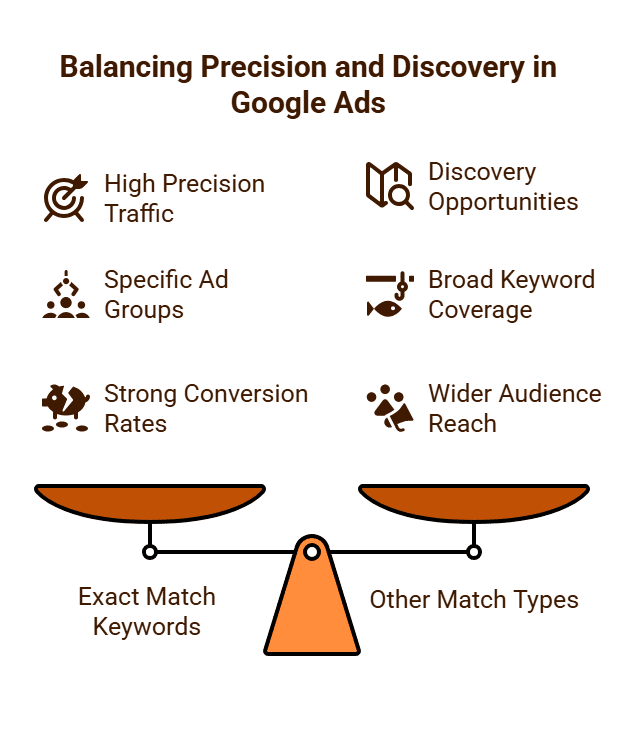
- Complement with Other Match Types: A balanced strategy often involves using Phrase Match for moderate reach and discovery, while employing Exact Match for highly converting, specific terms, and Broad Match (with careful negative keyword use) for maximum discovery in large campaigns.
- Aggressive Negative Keyword Strategy: Regularly review your Search Terms Report. Add any irrelevant queries that trigger your Phrase Match keywords as negative keywords to refine your traffic.
- Create Tightly Themed Ad Groups: Group closely related Phrase Match keywords into highly specific ad groups. This allows you to write ad copy and design landing pages that are hyper-relevant to those keywords, boosting your Quality Score and conversion rates.
- Monitor Performance Closely: Pay attention to CTR, conversions, and CPA for your Phrase Match keywords. Adjust bids and refine your keyword list based on performance data.
Phrase Match keywords are a versatile and essential tool in Google Ads. They offer a strong balance between reach and relevance, making them ideal for advertisers who want to capture significant traffic while maintaining control over their ad spend. When deployed strategically and managed proactively, Phrase Match can drive highly qualified leads and sales.
What Are Exact Match Keywords in Google Ads?
In Google Ads, Exact Match is the most precise keyword match type, offering advertisers the highest level of control over when their ads appear. When you use an exact match keyword, you enclose it in square brackets, like [running shoes]. This signals to Google that your ad should only be shown for searches that are either the exact keyword phrase itself or very close variations that carry the same meaning or intent.
The primary purpose of exact match is to capture highly qualified traffic from users whose search queries align almost perfectly with what you are offering.
How Exact Match Functions
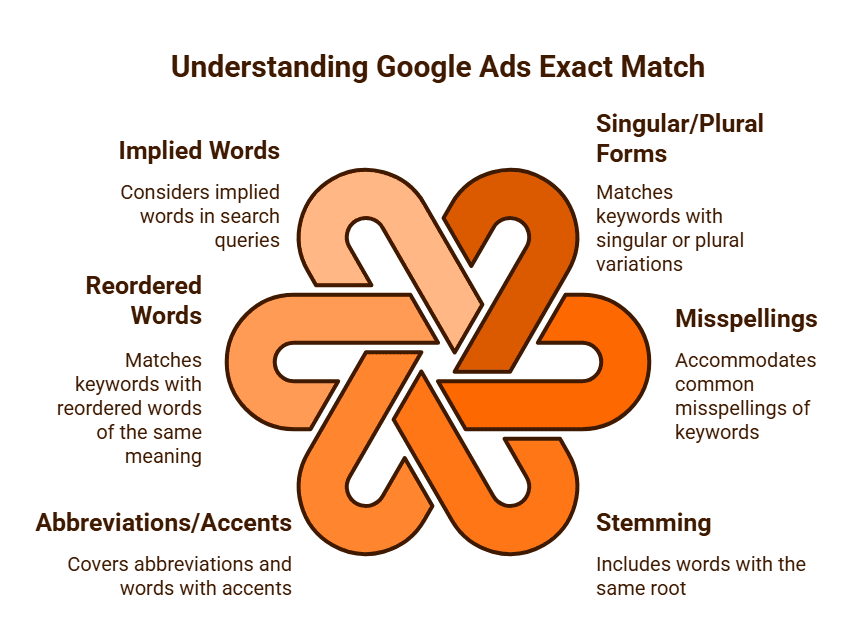
Despite its name, “exact match” isn’t always precisely exact due to Google’s inclusion of “close variants.” This ensures that you don’t miss out on valuable clicks due to minor linguistic differences. Close variants for exact match keywords include:
- Singular or Plural forms: [running shoe] might match “running shoes.”
- Misspellings: [running shoes] might match “runing shooes.”
- Stemming: Words with the same root (e.g., “run,” “running,” “ran”).
- Abbreviations and Accents: Common abbreviations or words with slight accent differences.
- Reordered Words with the Same Meaning: Crucially, if the reordering of words doesn’t change the original meaning of the keyword, it can still trigger an exact match. For example, [shoes running] could match “running shoes” if Google deems the intent identical.
- Implied Words: If a word is implied in the search, it can still be considered an exact match.
However, queries with additional words (before, after, or in the middle) or entirely different meanings will not trigger an exact match keyword. For instance, [running shoes] would generally not trigger for “best running shoes” or “buy running shoes online” unless those full phrases were also added as separate exact match keywords.
Advantages of Using Exact Match
- Highest Relevance: Ads are shown exclusively to users whose search intent is highly specific and directly matches your offering. This leads to exceptional targeting.
- Highest Click-Through Rate (CTR): Due to the precise alignment between search query and ad, users are much more likely to click. A higher CTR often leads to a better Quality Score.
- Lower Cost-Per-Click (CPC): While exact match keywords can sometimes appear expensive individually if competition is high, their high relevance and CTR typically result in superior Quality Scores, which often translate to lower actual CPCs over time.
- Highest Conversion Rates: Users who search for exact terms are often further down the purchasing funnel. They know what they want, leading to higher conversion rates and a more efficient return on ad spend (ROAS).
- Maximum Control and Predictability: Advertisers have granular control over which queries trigger their ads, making performance more predictable and easier to budget for.
Disadvantages and Challenges
- Limited Reach: The primary drawback is that exact match keywords will miss a significant volume of potentially relevant searches, especially those involving long-tail variations, synonyms, or slightly different phrasing that fall outside the “close variant” definition.
- Requires Extensive Keyword Lists: To achieve substantial traffic, you need to conduct thorough keyword research and build a very large list of exact match keywords to cover all relevant possibilities.
- Can Be Labour-Intensive: Managing and continually expanding a broad portfolio of exact match keywords and ensuring each has hyper-relevant ad copy can be time-consuming.
Best Practices for Exact Match
- Use for Core, High-Value Terms: Reserve exact match for your most important products or services and for keywords that have historically proven to convert well.
- Complement with Other Match Types: Never rely solely on exact match. Use Phrase Match and Broad Match (with a robust negative keyword strategy) to discover new, high-converting exact match opportunities in your “Search Terms Report.”
- Create Hyper-Relevant Ad Groups: For exact match keywords, create very tightly themed ad groups. This allows you to craft highly specific ad copy and direct users to the most relevant landing page, maximising Quality Score and conversion rates.
- Monitor Close Variants: Even for exact match, regularly review your Search Terms Report to ensure that Google’s “close variants” are still relevant. If any irrelevant close variants sneak through, add them as negative keywords.
Exact match keywords are the ultimate tool for precision and efficiency in Google Ads. They are essential for driving highly qualified traffic, achieving strong conversion rates, and optimising your ad spend on your most valuable search queries. While they require careful management and a broader keyword strategy, their ability to deliver strong ROI is unparalleled.
What Are Negative Keywords in Google Ads?
In Google Ads, negative keywords are a fundamental component of effective campaign management. They are specific words or phrases that you add to your campaigns or ad groups to prevent your ads from showing for irrelevant searches. Essentially, they act as a filter, telling Google Ads to not display your advertisement when a user’s search query includes the specified negative term.
The primary purpose of negative keywords is to refine your ad targeting, ensuring that your budget is spent on clicks from users who are genuinely interested in your products or services, thereby improving your campaign’s efficiency and return on investment (ROI).
How Negative Keywords Work
Negative keywords function similarly to regular keywords in that they can be applied with different match types, but their effect is inverse:
- Negative Broad Match: If you add free as a negative broad match keyword, your ad will not show if a user’s search query contains all the words in your negative keyword, regardless of the order. For example, a search for “free software download” or “download software for free” would block your ad.
- Negative Phrase Match: If you add “cheap shoes” as a negative phrase match keyword, your ad will not show if a user’s query contains that exact phrase in the same order. For instance, “where to find cheap shoes” would be blocked, but “shoes that are cheap” might not be.
- Negative Exact Match: If you add [used cars] as a negative exact match keyword, your ad will only be blocked if the user’s query is exactly “used cars” (or a very close variant, like a misspelling with the same intent). It would not block “second hand cars.”
It’s crucial to note that, unlike positive keywords, negative keywords do not block close variants (e.g., plurals, misspellings) unless you explicitly add them. So, if you add shoe as a negative keyword, it won’t block “shoes”; you’d need to add both.

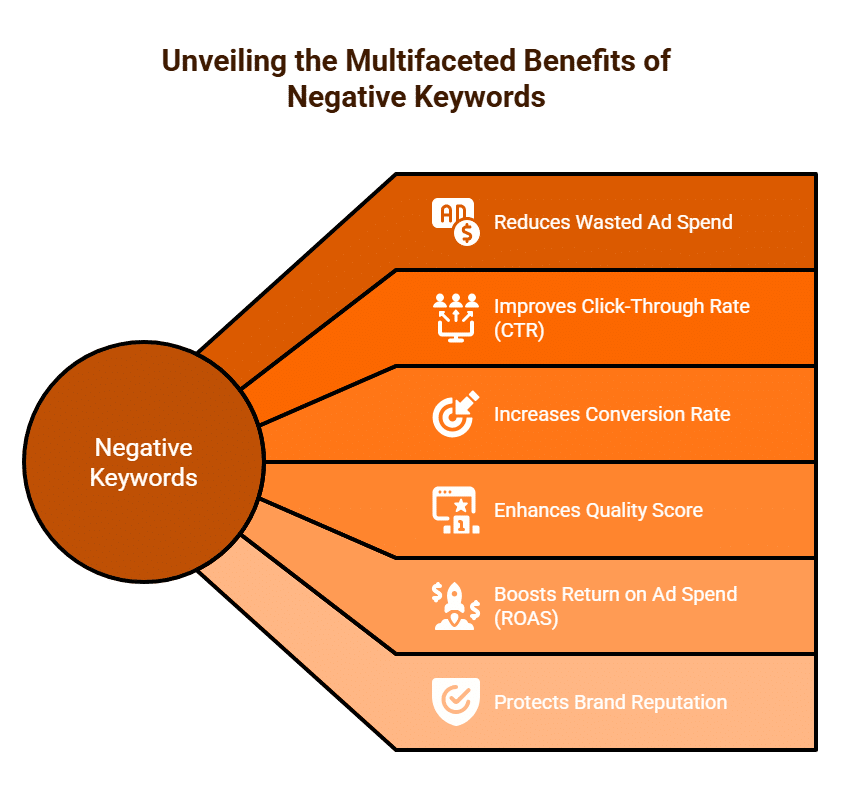
Benefits of Using Negative Keywords
Implementing a robust negative keyword strategy yields several significant advantages:
- Reduces Wasted Ad Spend: The most direct benefit. By preventing ads from showing for irrelevant searches, you avoid paying for clicks from users who have no intention of converting.
- Improves Click-Through Rate (CTR): When your ads are shown to a more relevant audience, they are more likely to be clicked. A higher CTR often leads to a better Quality Score.
- Increases Conversion Rate: By attracting more qualified traffic, your conversion rates will naturally improve, as a higher percentage of visitors are genuinely interested in what you offer.
- Enhances Quality Score: Higher CTRs and better ad relevance contribute to improved Quality Scores, which can lead to lower actual Cost-Per-Click (CPC) and better ad positions.
- Boosts Return on Ad Spend (ROAS): All the above benefits combine to make your advertising budget work harder and smarter, directly improving your overall ROAS.
- Protects Brand Reputation: Avoiding irrelevant or embarrassing ad placements ensures your brand is associated only with appropriate search contexts.
How to Find and Add Negative Keywords
The most effective way to identify negative keywords is through continuous monitoring:
- Search Terms Report: This is your goldmine in Google Ads. Regularly review the actual search queries that triggered your ads. Look for terms that generated impressions or clicks but are clearly irrelevant to your business, or those that led to a high bounce rate or no conversions.
- Initial Keyword Research: During your initial keyword research phase, brainstorm terms you definitely don’t want your ads to appear for. Common examples include “free,” “cheap” (if you’re a premium brand), “jobs,” “reviews” (if you want direct sales, not research), or competitor names if you’re not specifically targeting them.
- Competitor Analysis: Researching competitor ad strategies might reveal common irrelevant terms within your industry.
Once identified, negative keywords can be added at the campaign level (to apply to all ad groups within that campaign) or at the more specific ad group level (if the term is only irrelevant to that particular ad group). You can also create reusable Negative Keyword Lists to apply across multiple campaigns.
Negative keywords are not just a tool for blocking unwanted traffic; they are a critical strategic element that refines your targeting, boosts ad relevance, and ensures your Google Ads budget is invested as efficiently as possible for maximum business impact.

What is Conversion Tracking in Google Ads?
Conversion tracking in Google Ads is a vital tool that allows businesses to measure the specific, valuable actions users take on their website or app after interacting with an advertisement. It’s the critical link that connects your advertising spend directly to tangible business outcomes, moving beyond mere clicks and impressions to focus on what truly drives your objectives, whether that’s sales, leads, sign-ups, or phone calls.
Without conversion tracking, you’re essentially running an advertising campaign blind, unable to definitively determine which parts of your efforts are genuinely contributing to your bottom line.
What Constitutes a “Conversion”?
A “conversion” in Google Ads is any action that you define as valuable to your business. This can vary widely depending on your business model:
- E-commerce: A completed purchase, adding an item to a shopping cart, or reaching a specific checkout page.
- Service-Based Businesses: A form submission (e.g., “Request a Quote”), a phone call from an ad, or a download of a brochure.
- Software/App Developers: An app download, an in-app purchase, or a free trial signup.
- Publishers/Content Creators: A newsletter subscription, a prolonged visit (e.g., 5+ minutes on site), or a specific video view.
The flexibility of conversion tracking allows you to tailor it precisely to your business’s unique goals.
How Conversion Tracking Works
The process typically involves placing a small snippet of code (known as the Google Ads conversion tag or Global Site Tag along with an event snippet) on specific pages of your website, often a “thank you” or confirmation page that users reach only after completing a desired action.
- User Clicks Ad: A user sees your ad on Google Search or a partner site and clicks on it.
- Cookie Dropped: Google places a temporary cookie on the user’s browser, recording that they clicked your ad.
- Conversion Event: The user completes the desired action (e.g., makes a purchase).
- Conversion Tag Fires: When the “thank you” page loads, the conversion tag fires, communicating back to Google Ads that a conversion has occurred.
- Attribution: Google Ads attributes this conversion back to the specific ad click, keyword, campaign, and ad group that led to it.
For more complex scenarios, or to manage multiple tracking codes, Google Tag Manager (GTM) is often used, providing a more streamlined way to deploy and manage conversion tags without directly editing website code.

Key Benefits of Effective Conversion Tracking
Implementing and optimising conversion tracking is fundamental to achieving success with Google Ads:
- Measure Return on Investment (ROI): This is the most critical benefit. By knowing the cost of each conversion, you can directly calculate your profitability and justify your ad spend.
- Data-Driven Optimisation: Conversion data provides invaluable insights. You can clearly see which keywords, ads, ad groups, and campaigns are actually generating sales or leads, allowing you to:
- Allocate more budget to high-performing elements.
- Pause or refine underperforming elements.
- Identify lucrative new keywords or audience segments.
- Improve ad copy and landing pages based on what drives conversions.
- Unlock Automated Bidding Strategies: Many of Google Ads’ powerful Smart Bidding strategies (e.g., Target CPA, Maximise Conversions, Target ROAS) rely heavily on accurate conversion data. Without it, these automated strategies cannot function effectively to optimise your bids for specific business outcomes.
- Understand Customer Journey: By tracking various micro-conversions (e.g., “added to cart,” “viewed demo”), you can gain deeper insights into how users interact with your site before making a final purchase, helping you identify friction points.
- Enhanced Reporting: Your Google Ads reports become significantly more meaningful, showing not just impressions and clicks, but actual business results.
Conversion tracking transforms your Google Ads account from a simple spending machine into a powerful, data-driven revenue generator. It provides the actionable intelligence needed to continuously refine your campaigns, maximise your ad spend efficiency, and drive sustainable business growth.

Can You Track Phone Calls from Google Ads?
Yes, absolutely. Tracking phone calls that originate from your Google Ads campaigns is not only possible but essential for any business that receives a significant portion of its leads or sales via telephone. For many service-based businesses, local businesses, or those dealing with complex sales, a phone call is a high-value conversion, and understanding which ads, keywords, and campaigns drive these calls is critical for optimising ad spend and measuring true Return On Ad Spend (ROAS).
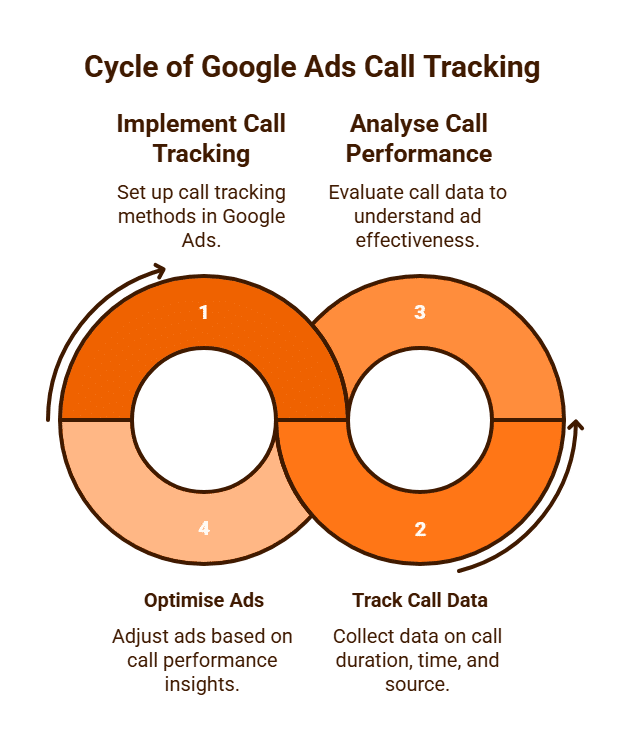
Google Ads provides several robust methods to track phone calls, offering varying levels of detail and implementation complexity.
Types of Phone Call Conversions You Can Track
Google Ads allows you to track calls from different touchpoints within your advertising ecosystem:
Calls from Ads (Call Extensions & Call-Only Ads):
- How it works: When you include a phone number directly in your Google Ads (via call extensions on text ads or through dedicated call-only ads), Google can dynamically replace your business number with a Google Forwarding Number (GFN). When a user calls this GFN, Google tracks the call and routes it to your actual business number.
- Data Captured: Google records details like the call’s start time, duration, and the caller’s area code. You can set a minimum call length (e.g., 30 or 60 seconds) for a call to be counted as a conversion, filtering out accidental or very short calls.
- Benefit: Directly links calls to the ad format that generated them.
Calls to a Phone Number on Your Website:
- How it works: After a user clicks your ad and lands on your website, Google can dynamically display a GFN in place of your regular phone number on your site. This is typically achieved by installing a small JavaScript snippet (phone snippet) on pages where your number appears. When a user calls this displayed GFN, it’s tracked and forwarded to your business.
- Data Captured: Similar to “Calls from Ads,” it captures call duration, time, and area code, but crucially, it links the call back to the specific ad click that brought the user to your website.
- Benefit: Provides insight into calls that happen after a website visit, allowing you to attribute them back to your digital marketing efforts.
Clicks on a Number on Your Mobile Website (Click-to-Call Conversions):
- How it works: This method tracks clicks on a phone number, button, or link on the mobile version of your website after a user has clicked your ad.
- Data Captured: Primarily tracks the click event on the phone number link, not necessarily the actual duration or success of the call itself. It typically doesn’t use a Google Forwarding Number.
- Benefit: Useful for measuring mobile engagement when full call tracking with GFNs isn’t feasible, giving an indication of user intent to call.
Imported Call Conversions:
- How it works: For businesses using third-party call tracking software (e.g., CallRail, WhatConverts, Infinity Tracking) or a Customer Relationship Management (CRM) system, you can integrate these platforms with Google Ads to import more detailed call data. These third-party solutions often provide their own dynamic phone numbers and advanced tracking capabilities (like call recording, transcription, and lead scoring).
- Data Captured: This method offers the most comprehensive insights, allowing you to import data such as lead qualification, sales value, call recordings, and full marketing attribution (which keyword, ad, or campaign led to the specific call). This data is then matched back to the Google Click ID (GCLID).
- Benefit: Provides granular control over which calls are counted as conversions (e.g., only qualified sales calls lasting over X minutes) and allows for value assignment, directly informing automated bidding strategies like Target ROAS.
Why Call Tracking is Indispensable
For any business where phone calls are a significant source of leads or sales, setting up call tracking is not optional; it’s fundamental. It allows you to:
- Optimise Campaign Performance: Identify which keywords, ad copy, and landing pages are driving the most valuable calls, enabling you to allocate budget more effectively.
- Measure True ROAS: Assign monetary value to calls and calculate the actual return on your advertising spend.
- Improve Lead Quality: By setting minimum call durations or integrating with CRM data, you can filter for qualified leads.
- Enable Smart Bidding: Provide essential conversion data for Google’s automated bidding strategies to work efficiently towards your goals.
Google Ads offers robust and flexible options for tracking phone calls, from basic call counts to detailed imported data. By implementing the appropriate call tracking method, businesses can gain invaluable insights into their advertising effectiveness, ensuring that every ring of the phone contributes meaningfully to their bottom line.

What is a Performance Max (PMax) Campaign in Google Ads?
Performance Max (PMax) is Google Ads’ newest fully automated campaign type, introduced to help advertisers maximise conversions or conversion value across all of Google’s advertising channels from a single, unified campaign. Launched in late 2021, PMax leverages Google’s advanced machine learning to automate bidding, budget optimisation, audience targeting, and creative asset delivery.
The core purpose of a PMax campaign is to provide advertisers with a streamlined way to find more converting customers across Google’s entire network, supplementing and extending the reach of existing Search, Display, and Video campaigns.
How a PMax Campaign Works
PMax campaigns operate on a principle of highly automated optimisation, driven by advertiser inputs:
- Advertiser Inputs: You provide Google’s AI with essential ingredients:
- Conversion Goals: Crucially, you define what a conversion means to your business (e.g., purchases, leads, sign-ups) and, ideally, assign conversion values. This tells Google exactly what actions to optimise for.
- Asset Groups: This is where you upload all your creative assets: headlines, descriptions, images, logos, and videos (PMax will even generate basic videos if you don’t provide one). These assets are then automatically assembled into various ad formats that adapt to different channels.
- Audience Signals: While PMax doesn’t allow direct targeting of audiences in the traditional sense, you provide “signals” to Google’s machine learning about who your valuable customers are. This could include your customer lists, custom segments based on website visitors, or custom intent audiences. These signals help Google’s AI find similar users who are likely to convert.
- Final URL Expansion: You can allow Google to send traffic to other relevant landing pages on your website beyond just your initial specified URLs, if its AI determines they are better suited for a conversion.
- Google’s Machine Learning Optimisation: Once these inputs are provided, Google’s AI takes over:
- It automatically generates a vast array of ad combinations using your provided assets.
- It intelligently distributes your budget across all Google Ads channels: Search Network (including text ads and shopping), Display Network, YouTube, Gmail, Discover, and Maps.
- It identifies the best performing ad combinations, channels, and placements in real-time.
- It optimises bids dynamically to achieve your specified conversion goals, finding new conversion opportunities and audiences that manual management might miss.

Key Advantages
- Automated Cross-Channel Reach: Unprecedented reach across Google’s entire advertising ecosystem from a single campaign, simplifying management.
- Simplified Campaign Management: Reduces the complexity of managing multiple campaign types individually, saving time and effort.
- Machine Learning Efficiency: Leverages Google’s powerful AI to find high-performing opportunities and optimise bids more effectively than manual methods.
- New Customer Acquisition: Designed to find new converting customers beyond your existing audiences and keywords, expanding your market reach.
- Improved Performance Potential: Many advertisers report strong results, particularly for e-commerce and lead generation, due to the comprehensive optimisation PMax provides.
Disadvantages and Challenges
- “Black Box” Transparency: PMax offers limited insights into specific placements, keywords (especially search queries), and audience segments that are driving performance. This can make detailed troubleshooting or understanding performance nuances challenging.
- Loss of Granular Control: Advertisers relinquish significant control over targeting, bidding, and ad serving compared to traditional campaign types.
- Reliance on Conversion Tracking: Requires exceptionally robust and accurate conversion tracking, including assigning conversion values, for Google’s AI to optimise effectively.
- Needs High-Quality Assets: The campaign’s success is heavily reliant on the quality, variety, and relevance of the creative assets you provide in your asset groups.
- Potential for Brand Safety Concerns (Limited Visibility): The broad reach can sometimes lead to ads showing on less desirable placements or for brand terms that you might prefer to control via specific Search campaigns. (Note: Account-level negative keywords are the only way to block specific brand terms within PMax).
Performance Max campaigns represent Google’s push towards fully automated, goal-based advertising. While they offer unparalleled reach and powerful optimisation capabilities, they demand trust in Google’s AI and a robust setup of conversion goals and creative assets. For businesses with clear conversion objectives, PMax can be a powerful tool to drive significant growth.

How Do I Calculate ROI in Google Ads?
Calculating Return On Investment (ROI) for your Google Ads campaigns is the ultimate measure of their true profitability. Unlike other metrics that focus solely on advertising efficiency (like ROAS), ROI provides a holistic view, revealing whether your ad spend is genuinely contributing to your business’s bottom line after all associated costs are factored in. This understanding is critical for justifying marketing budgets and making informed strategic decisions.
What is ROI?
ROI is a financial metric that measures the profitability of an investment. For Google Ads, it answers the question: “For every dollar I invest in Google Ads, how much profit do I get back?”
The fundamental formula for ROI is:
ROI = (Net Profit / Total Costs) x 100%
A positive ROI indicates that your campaigns are profitable, while a negative ROI suggests you are spending more than you are earning back.
Key Components for Calculation
To accurately calculate ROI for your Google Ads, you need to account for more than just the money paid directly to Google. You must include all costs associated with generating the revenue attributed to your ads:
- Revenue Generated from Google Ads: This is the total sales value or profit value generated from conversions directly attributed to your Google Ads campaigns. Robust conversion tracking with value assignment (e.g., tracking the exact purchase value for e-commerce, or assigning an average lead value for services) is absolutely essential here.
- Cost of Goods Sold (COGS): For physical products, this includes the direct costs of manufacturing or acquiring the items you sell (e.g., raw materials, production labour, wholesale price). For services, it might include the direct costs of delivering that service.
- Google Ads Spend: The actual amount you paid to Google for clicks, impressions, and other ad services during the measurement period.
- Other Campaign-Related Costs: Don’t overlook these:
- Shipping & Handling Costs: For physical product deliveries.
- Payment Processing Fees: Charges from credit card companies or payment gateways.
- Labour Costs: This could include sales commission for leads generated by ads, customer service time for ad-driven enquiries, or even the wages of staff directly involved in fulfilling ad-generated orders.
- Agency/Management Fees: If you hire an external agency or freelance specialist to manage your Google Ads.
- Landing Page/Website Development Costs: Any specific costs incurred for creating or optimising landing pages directly for your ad campaigns.
- Subscription Costs: For any specific software or tools used exclusively for your ad campaigns.

The Calculation Process
Let’s walk through an example:
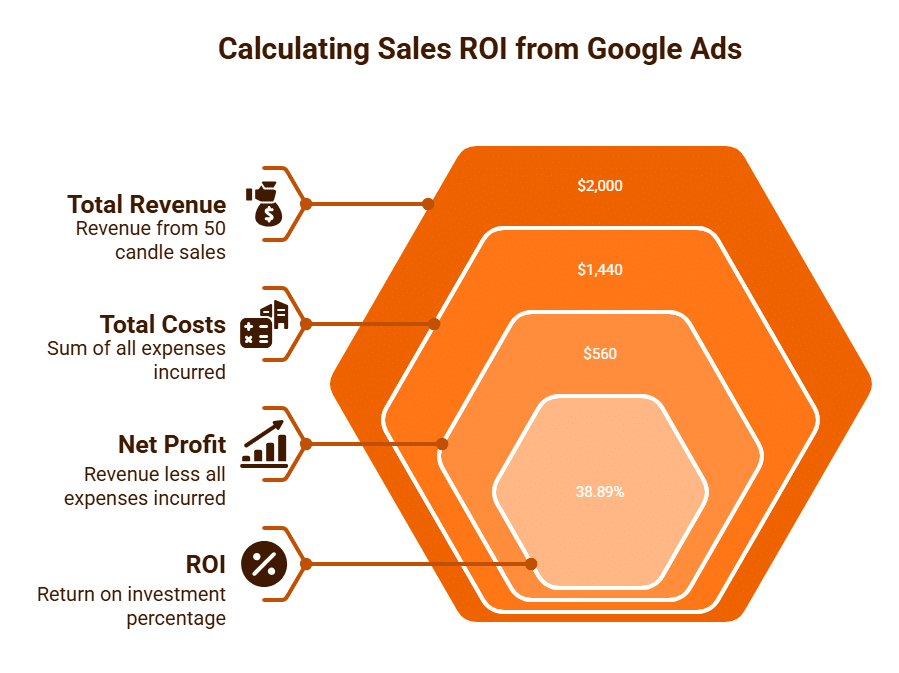
Scenario: You sell custom-made artisanal candles. In one month, your Google Ads campaign for “luxury candles AU” performs as follows:
- Step 1: Calculate Total Revenue from Google Ads
- Number of sales from Google Ads: 50
- Average selling price per candle: $40
- Total Revenue = 50 sales x $40/sale = $2,000
- Step 2: Calculate Total Costs Associated with that Revenue
- Google Ads Spend: $300
- Cost of Goods Sold (COGS) per candle: $15
- Total COGS = 50 sales x $15/candle = $750
- Shipping Costs per order: $5 (assume 50 orders) = $250
- Payment Processing Fees: 2% of revenue = $2,000 x 0.02 = $40
- Your time/labour (or agency fee) attributable to these sales: $100
- Total Costs = $300 (Ads) + $750 (COGS) + $250 (Shipping) + $40 (Processing) + $100 (Labour) = $1,440
- Step 3: Calculate Net Profit
- Net Profit = Total Revenue – Total Costs
- Net Profit = $2,000 – $1,440 = $560
- Step 4: Apply the ROI Formula
- ROI = ($560 / $1,440) x 100% = 38.89%
In this example, your Google Ads campaign delivered a 38.89% ROI, meaning for every $1 invested across all relevant costs, you generated a profit of almost 39 cents.
Why ROI is Crucial
Calculating ROI moves beyond just assessing ad performance to truly evaluating business profitability. It allows you to:
- Justify Marketing Spend: Present clear financial data to stakeholders.
- Optimise for Profit: Focus on campaigns, keywords, and products that genuinely contribute to your bottom line, not just revenue.
- Inform Pricing and Operations: If ROI is low, it might signal issues with product pricing, COGS, or operational inefficiencies, not just ad performance.
By diligently tracking all relevant costs and revenue, you empower yourself to make truly strategic decisions that drive sustainable growth for your business through Google Ads.
What is a Landing Page for Google Ads?
In the context of Google Ads, a landing page is the specific webpage where a user arrives immediately after clicking on one of your ads. It is a standalone web page designed with a singular, focused objective: to convert the visitor into a lead or a customer by prompting a specific action, known as a Call to Action (CTA). The URL of this page is directly specified as the ad’s “Final URL” within your Google Ads account.
Unlike a general website page (like a homepage), which typically has multiple navigation options and encourages exploration, a landing page for Google Ads is intentionally streamlined to minimise distractions and guide the visitor towards one particular goal.
The Crucial Role of Landing Pages in Google Ads
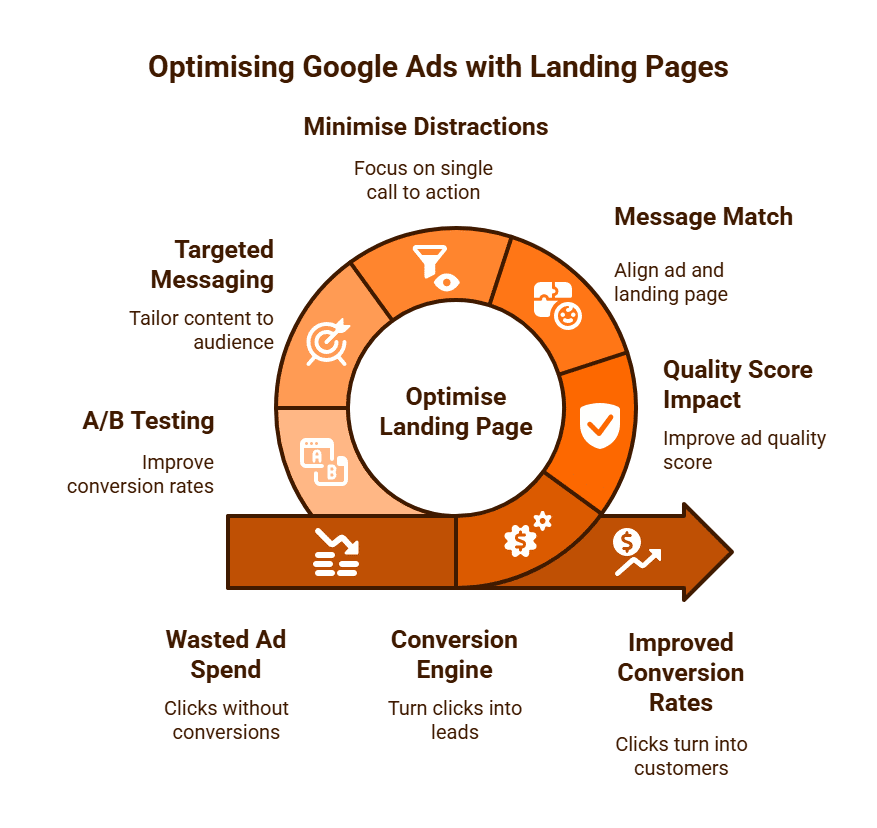
The landing page is arguably as important as the ad itself, if not more so. A brilliant ad can generate clicks, but a poor landing page will cause those clicks (and your ad spend) to go to waste. Here’s why it’s so critical:
- Conversion Engine: This is where the conversion happens. A well-designed landing page is a highly efficient conversion machine, turning interested clicks into valuable leads or sales.
- Quality Score Impact: Google Ads heavily assesses your “Landing Page Experience” as a component of your Quality Score. A highly relevant, fast-loading, and user-friendly landing page will contribute to a better Quality Score, which can lead to:
- Lower Cost-Per-Click (CPC).
- Better ad positions.
- Improved Ad Rank.
- Message Match (Relevance): A great landing page provides a seamless transition from the ad. The content, headline, and offer on the landing page should directly align with the message and promise made in the ad copy and the user’s initial search query. This “message match” reassures the user they’ve landed in the right place and reinforces their intent.
- Minimising Distractions: Unlike a typical website page with extensive navigation menus, internal links, and sidebars, a dedicated landing page strips away these distractions. Every element on the page should serve to guide the user towards the single Call to Action. This high “attention ratio” keeps the visitor focused.
- Targeted Messaging: You can create specific landing pages for different ad groups or even individual keywords. This allows for hyper-targeted messaging that directly addresses the unique needs and intent of each segment of your audience, making the content far more relevant and persuasive.
- A/B Testing and Optimisation: Landing pages are ideal for A/B testing various elements (headlines, CTAs, visuals, form layouts) to continuously improve conversion rates without affecting the rest of your website.
Key Elements of a High-Converting Google Ads Landing Page
A highly effective landing page for Google Ads typically includes:
- A Clear, Compelling Headline: Immediately grabs attention and reinforces the ad’s message and value proposition.
- Concise, Benefit-Oriented Copy: Clearly explains the offer’s benefits and solves the user’s problem in a scannable format (e.g., bullet points).
- High-Quality Visuals: Relevant images or videos that visually support the message and showcase the product or service.
- A Strong, Prominent Call to Action (CTA): A clear, action-oriented button (e.g., “Get a Quote,” “Buy Now,” “Download E-book”) that stands out and tells the user exactly what to do next. It should ideally be “above the fold” (visible without scrolling).
- Optimised Form (if applicable): Short, simple forms that ask only for essential information.
- Social Proof and Trust Signals: Testimonials, customer reviews, trust badges (e.g., secure payment logos, industry certifications), or client logos to build credibility.
- Mobile-Friendly Design and Fast Load Speed: Crucial for user experience and Quality Score. Pages must load quickly and display flawlessly on all devices.
A landing page for Google Ads is a purpose-built digital salesperson. Its sole mission is to convert the qualified traffic generated by your ads into tangible business outcomes, making it an indispensable component for maximising the Return on Ad Spend (ROAS) and ensuring the overall success of your paid advertising efforts.

What are Bottom-of-Funnel Keywords?
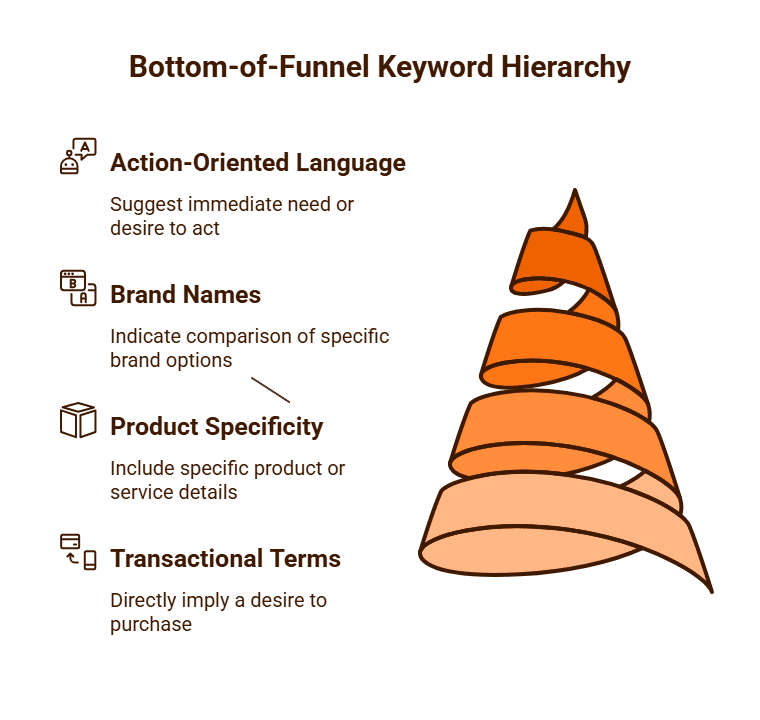
Bottom-of-Funnel (BoF) keywords are search terms used by potential customers who are in the final stages of the buying cycle and are actively looking to make a purchase or complete a specific action. These keywords indicate a high degree of commercial intent and are often a business’s most valuable keywords because they are directly tied to conversions, such as sales, leads, or sign-ups.
Unlike top-of-funnel (ToF) keywords, which are broad and informational, or middle-of-funnel (MoF) keywords, which are for research, BoF keywords are highly specific and action-oriented. A user searching with a BoF keyword has already conducted their initial research, understands their problem, and is now evaluating their final options before committing to a decision.
 Key Characteristics of Bottom-of-Funnel Keywords
BoF keywords are easily identifiable by the language and structure of the search query. They often include terms that signal a strong intent to buy or engage.
- Transactional Terms: These are words that directly imply a desire to purchase. Examples include:
- “buy,” “purchase,” “order”
- “coupon,” “discount,” “deal,” “promo code”
- “price,” “cost,” “pricing”
- “for sale”
- Product/Service Specificity: BoF keywords are rarely broad. They often include specific product names, model numbers, or service types.
- Instead of “laptops,” a BoF search would be “buy Dell XPS 15 laptop” or “Dell XPS 15 price”.
- Instead of “accounting services,” a BoF search might be “hire business accountant Melbourne” or “tax accountant for small business cost”.
- Brand Names: The inclusion of a brand name in a search query is a powerful indicator of a BoF customer. They are past the research stage and are now comparing specific brand options.
- “Nike running shoes reviews”
- “Adidas vs Nike running shoes”
- “Lululemon align leggings sale”
- Action-Oriented Language: Queries often include terms that indicate an immediate need or desire to act.
- “quote,” “estimate,” “consultation”
- “service,” “hire,” “agency,” “provider”
- “near me” (e.g., “plumber near me”)
Why Bottom-of-Funnel Keywords Are So Valuable
BoF keywords are a crucial focus for marketing strategies because they offer a direct path to revenue.
- High Conversion Rates: Traffic from BoF keywords typically converts at a much higher rate than traffic from ToF or MoF keywords. These visitors are not just browsers; they are ready to act.
- Lower Customer Acquisition Cost (CAC): While BoF keywords can be highly competitive and have a higher Cost-Per-Click (CPC) in paid advertising, their strong conversion rate often makes the overall cost of acquiring a customer lower.
- Clear Profitability Metrics: It is much easier to measure the profitability of a BoF keyword, as its performance can be directly tied to a sale or a lead. This allows for clear Return on Investment (ROI) and Return on Ad Spend (ROAS) calculations.
SEO and Google Ads Strategy for BoF Keywords
- For SEO: Optimising for BoF keywords means ensuring that your product pages, service pages, and pricing pages are perfectly tuned to rank for these specific, high-intent terms. The content on these pages should be direct, persuasive, and include a clear call-to-action (CTA).
- For Google Ads: BoF keywords are the foundation of any successful paid search campaign. They are typically placed in Exact Match or Phrase Match ad groups to ensure that your ad is shown to the most qualified, ready-to-buy audience, and not to someone in the early research phase. The ad copy and landing page for these keywords must be hyper-relevant, featuring the brand, product, and offer mentioned in the search query.
While top-of-funnel keywords are for casting a wide net, bottom-of-funnel keywords are for reeling in the catch. A balanced marketing strategy utilises both, but a business’s immediate revenue and growth are most directly influenced by its ability to capture and convert the high-intent traffic from its BoF keywords.

What is Cross-Network Traffic in GA4 Analytics?
Cross-network traffic in Google Analytics 4 (GA4) refers to user interactions and conversions that occur across multiple Google platforms, such as Google Search, YouTube, and the Google Display Network, before a single user converts. Unlike Universal Analytics (UA), which was session-based and could struggle to accurately attribute conversions across different user sessions and devices, GA4’s event-based model is specifically designed to measure this complex user journey.
This feature is a key component of GA4’s user-centric approach, which aims to provide a more holistic and accurate picture of how users engage with your brand across their entire digital lifecycle, regardless of the channel or device they are using. Instead of viewing each interaction in isolation, cross-network traffic reporting helps you see how different Google properties work together to influence a user’s final conversion.

How GA4 Measures Cross-Network Traffic
GA4 measures cross-network traffic by leveraging its unified, event-based data model and a more advanced understanding of the user. It uses machine learning and a proprietary attribution model to connect the dots between various touchpoints.
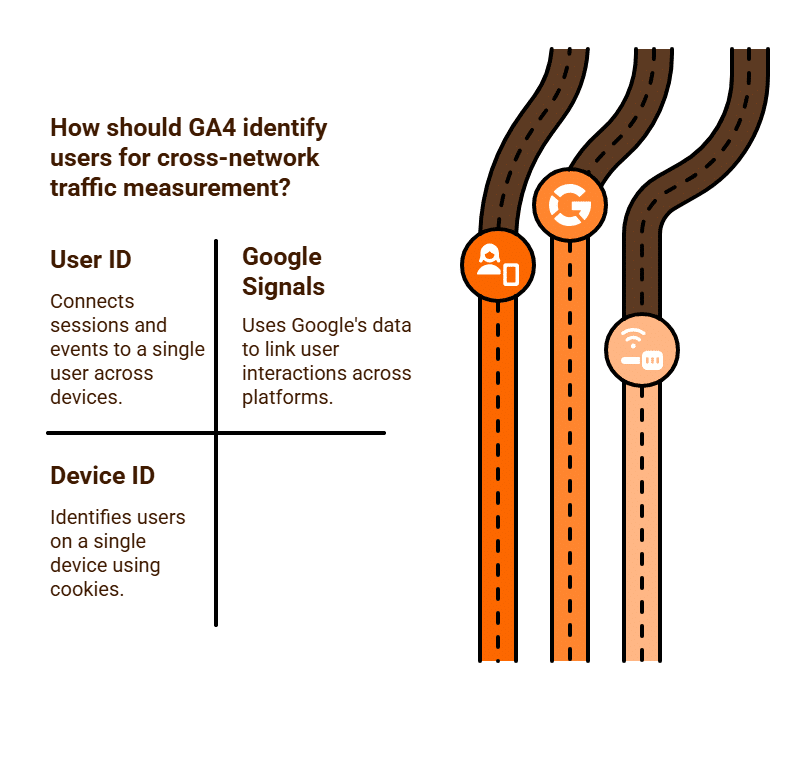
- Unified User Identification: GA4’s user-centric approach is built on its ability to identify a single user across multiple sessions and devices. It uses three primary identity spaces to do this:
- User ID: If you implement a User ID, GA4 can connect all sessions and events to a single user.
- Google Signals: If enabled, this allows GA4 to use Google’s own data from users who have opted in to ad personalisation to link their interactions across different devices and platforms.
- Device ID: In the absence of a User ID or Google Signals, GA4 falls back on a Device ID, using a first-party cookie to identify users on a single device.
- Cross-Network Attribution: This unified user identification allows GA4 to understand the entire sequence of events a user takes before converting. Instead of giving 100% of the credit to the last click, GA4’s default data-driven attribution model uses machine learning to assign credit to multiple touchpoints along the conversion path.
This means if a user first watches one of your ads on YouTube, later searches for your product on Google and clicks on an ad, and then makes a purchase after clicking on a Google Display ad, GA4 will attribute a portion of that conversion to all three touchpoints, providing a more accurate understanding of which networks influenced the sale.
The Importance of Cross-Network Traffic Data
Understanding cross-network traffic is vital for making informed marketing decisions and optimising your ad spend.
- Holistic Customer Journey: It helps you move beyond siloed reporting by showing you the complete customer journey. You can see how a user’s initial awareness on YouTube, for example, contributes to a later search conversion.
- Accurate Attribution: By distributing credit to multiple touchpoints, cross-network traffic reporting provides a more accurate view of which channels are truly driving value. This helps you avoid under-valuing upper-funnel channels like YouTube or Display that play a crucial role in building brand awareness.
- Optimised Ad Spend: With a better understanding of the entire conversion path, you can make more strategic budget allocation decisions. For example, you might choose to invest more in a Display campaign if you see that it consistently serves as the first touchpoint for users who eventually convert through search.
- Improved Performance Max Campaigns: Google’s Performance Max (PMax) campaigns are inherently cross-network. The data from GA4’s cross-network reporting provides invaluable insights for understanding how PMax is performing and for refining the audience signals you provide to the campaign.
Cross-network traffic is a core feature of GA4 that provides a powerful, user-centric view of your digital marketing effectiveness. By accurately measuring and attributing conversions across all Google properties, it enables businesses to build more holistic strategies and make smarter, data-driven decisions that reflect the real-world complexity of the modern customer journey.

What is a Demand Gen Campaign in Google Ads?
A Demand Gen campaign (short for Demand Generation) is a modern, automated campaign type within Google Ads designed to help businesses create and capture consumer interest by influencing purchasing decisions in the upper and mid-funnel of the marketing journey. Its core purpose is to find and engage new, high-value customers who are not yet actively searching for your product or service but are likely to be interested.
Demand Gen campaigns are fundamentally different from traditional search campaigns, which are designed to capture existing demand by showing ads to users who are actively searching for a specific product or service. Instead, Demand Gen is about creating demand and nudging users toward a conversion by proactively placing a brand in front of a relevant audience.
How a Demand Gen Campaign Works
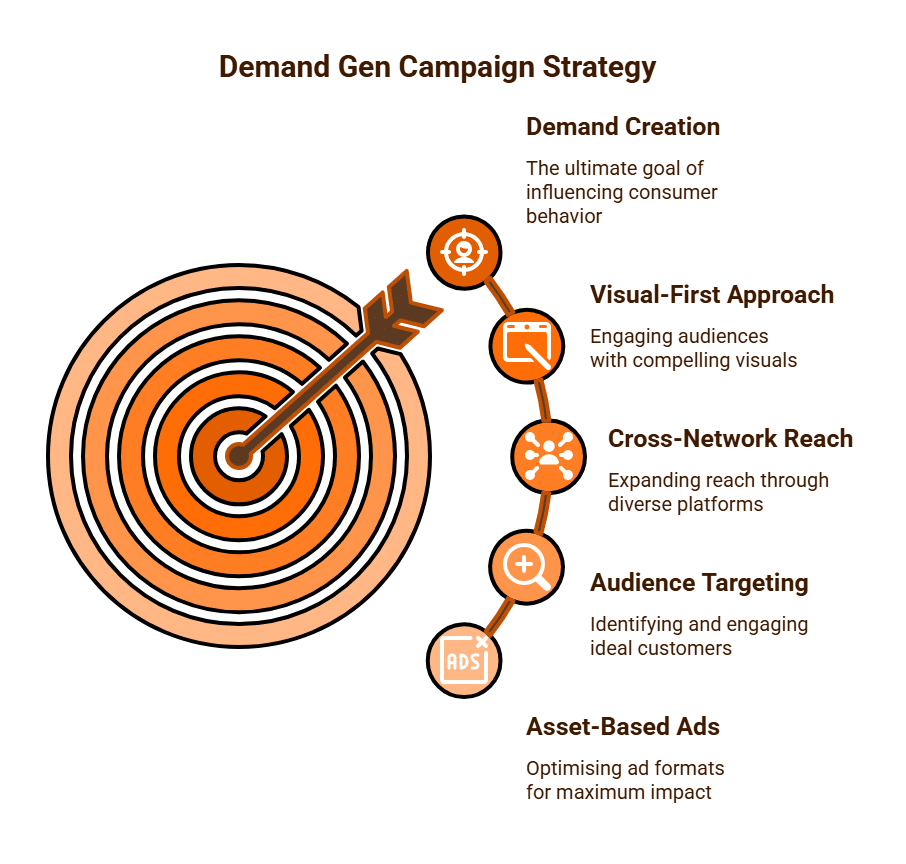
Demand Gen campaigns operate on a visual-first approach, leveraging Google’s powerful machine learning to deliver a rich, engaging experience to potential customers across a wide network of platforms.
- Visual-First Approach: The campaign is built around high-quality creative assets, including eye-catching images and videos. The focus is on visual storytelling to build brand awareness and emotional connection with the audience. This makes it an ideal tool for brands with visually appealing products or services.
- Cross-Network Reach: Demand Gen campaigns serve ads across some of Google’s most engaging and visually driven channels, including:
- YouTube: Ads appear in-stream, in-feed, and as Shorts placements, reaching users who are consuming video content.
- Google Discover: Ads are integrated into the personalised content feed that appears on the Google app and Android devices, reaching users while they are browsing topics of interest.
- Gmail: Ads that appear in the social and promotions tabs of a user’s inbox, engaging them in a less cluttered environment.
- Audience Targeting: The campaign uses Google’s AI to find and target audiences that are most likely to convert. You provide the AI with information about your ideal customer using various targeting methods:
- Custom Audiences: Based on keywords or websites your ideal customer might be interested in.
- Lookalike Segments: Targeting new users who share characteristics with your existing customers.
- Remarketing: Re-engaging users who have previously visited your site.
- Asset-Based Ads: You provide Google’s AI with a variety of creative assets (headlines, descriptions, images, and videos), and the system automatically assembles them into different ad formats to find the combination that performs best for each placement and audience.
Key Benefits of a Demand Gen Campaign
- Creates New Demand: It finds new customers who didn’t know they needed your product, thereby expanding your market and brand reach.
- Highly Visual and Engaging: The focus on high-quality images and video makes it an excellent tool for brands that rely on visual appeal and storytelling to sell their products.
- Automated Optimisation: Google’s AI handles the heavy lifting of bidding and ad placements, optimising in real-time to find the best opportunities to reach your conversion goals.
- Complements Other Campaigns: It works well in conjunction with traditional search campaigns, influencing users earlier in their journey before they are ready to search for a specific product.
So, a Demand Gen campaign is a powerful tool for modern marketers to influence consumer behaviour by placing visually compelling ads in front of the right audience at the right time. It’s a key strategy for creating and nurturing demand, making it an essential component for any comprehensive digital marketing strategy.
How to Optimise for Geo-Targeting My Ad Campaigns?
Geo-targeting is a powerful and essential feature of digital advertising that allows you to show your ads to users in specific geographic locations. For businesses with a physical presence, a regional customer base, or a service that is limited to certain areas, geo-targeting is an easy strategy for ensuring ad spend is directed towards a relevant and high-value audience.
Optimising your geo-targeted campaigns goes beyond simply setting a location; it involves a strategic approach to bidding, ad messaging, and analysis to maximise your return on investment (ROI).
Setting the Foundation for Effective Geo-Targeting
The first step is to establish a clear and logical geo-targeting strategy within your advertising platform, such as Google Ads.
- Define Your Target Area: Start by specifying the geographic locations where you want your ads to appear. This can be as broad as an entire country, state, or city, or as granular as a specific postcode or a custom radius around your business’s physical address. For a local coffee shop, a 5-kilometre radius around its postcode would be an effective starting point.
- Exclude Irrelevant Locations: Just as important as targeting the right locations is excluding the wrong ones. If you are a service provider that operates only in Melbourne, you should exclude all other cities and states in Australia to prevent your ads from being shown to irrelevant audiences, which would lead to wasted ad spend.
- Bidding by Location: You can set bid adjustments to increase or decrease your bids for specific locations. If your data shows that customers in a certain suburb have a higher conversion rate, you can increase your bid for that location to bid more aggressively and capture more of that high-value traffic.
Optimisation Strategies for Your Campaigns
Once your geo-targeting is set, you need to optimise your ads and landing pages to make the most of it.
- Target by User Intent: Google Ads offers different targeting options that are crucial for geo-targeting. You can choose to target users who are physically in or regularly in your targeted location, or you can target people who are interested in your targeted location.
- For a local service like a plumber or an emergency vet, you would choose to target people in your location.
- For a tourism business or a brand selling local products to a national audience, you would choose to target people interested in a location.
- Localised Ad Copy and Messaging: Make your ads as relevant as possible by including location-specific details. Use city names, landmarks, or local references in your ad copy to increase a user’s sense of familiarity and relevance. A search for “plumber” would be far more likely to get a click from a user in Melbourne if the ad headline is “Emergency Plumber Melbourne.”
- Ad Scheduling and Language: Align your ad schedule with your target location’s business hours and time zone. If you are a national brand with a presence in multiple countries, you should ensure your language targeting matches the local language.
- Create Localised Landing Pages: Drive traffic to landing pages that are specific to the geo-targeted location. A landing page for a law firm in Sydney should mention local Sydney-specific details and testimonials, as this will improve the user experience and conversion rates.
Monitoring and Analysis
The final step is to continually monitor and refine your geo-targeting based on performance data.
- Geographic Report: Use the geographic report in Google Ads to see which locations are performing best and which are underperforming. You can then use this data to adjust your bids, refine your targeting, or create new, more specific campaigns for high-performing areas.
- Radius Targeting: For businesses with a physical storefront, use a specific radius around your location. By monitoring the performance of different radii, you can determine your optimal reach and adjust your targeting accordingly.
- Manual Targeting: At Purge Digital, we find that when using the radius method our client’s ads can still show in unwanted areas or suburbs. We actually manually create both targeted and negative geo-locations to help our clients avoid wasted clicks.
By adopting a strategic approach to geo-targeting, you can ensure that your advertising budget is invested as efficiently as possible, driving highly relevant traffic and a strong ROI for your business.
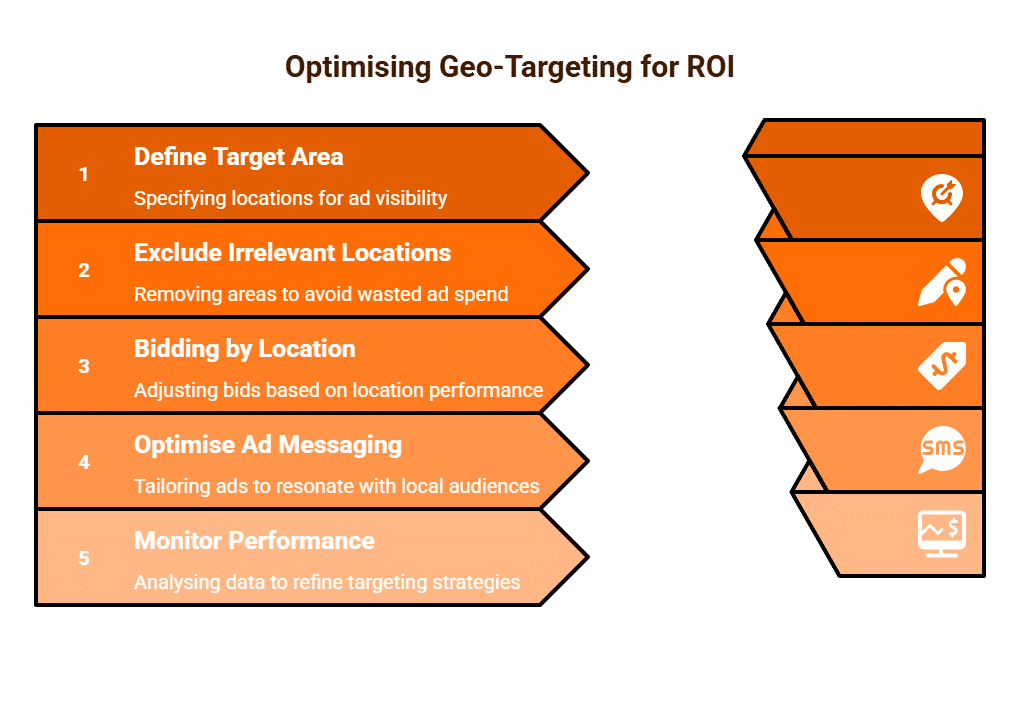
How Many Keywords Should I Use in Google Ads Campaigns?
The question of how many keywords to use in a Google Ads campaign is a frequent one for advertisers. The answer isn’t a fixed number, but rather a strategic approach focused on relevance and organisation. Using too many keywords can dilute your efforts and make campaigns unmanageable, while using too few can limit your reach. A balanced strategy, often known as the “less is more” approach, is typically the most effective.
Prioritise Relevance and Organisation
A common mistake for new advertisers is to add a vast, untargeted list of keywords in an effort to “catch everything.” This often leads to a low Quality Score, which increases your Cost-Per-Click (CPC) and reduces your ad’s visibility. Google’s algorithm rewards relevance. A tight, thematically-organised group of keywords is far more likely to generate a higher Quality Score because it allows you to write highly relevant ad copy and direct users to a specific, relevant landing page.
A good starting point is to create tightly themed ad groups, each containing between 10 and 20 highly relevant keywords. These keywords should share a similar search intent and be closely related to one another. For example, if you sell “running shoes,” you shouldn’t have keywords for “running shoes,” “hiking boots,” and “formal shoes” in the same ad group. Instead, you would create separate ad groups: one for “running shoes,” one for “hiking boots,” and one for “formal shoes.” This allows you to write ad copy and choose a landing page that is perfectly matched to each set of keywords.
The Role of Match Types
The number of keywords you use is also influenced by the match types you select.
- Broad Match: If you use broad match, you can get away with using fewer keywords. For example, a single broad match keyword like running shoes can trigger a wide variety of related searches, including “jogging trainers” or “best footwear for runners.” However, this requires a very diligent negative keyword strategy to filter out irrelevant searches.
- Phrase Match: This match type offers a good balance. A phrase match keyword like “women’s running shoes” is more targeted, so you might use a slightly larger list of phrase match keywords in your ad group to ensure you’re covering all your bases.
- Exact Match: With exact match, you need a much larger list of keywords to achieve the same reach. For example, you might need [buy women’s running shoes], [women’s running shoe sale], and [new women’s running shoes] to cover all the high-intent searches.
A balanced approach is to use a mix of match types, with a core of your most important keywords as exact match and a handful of relevant phrase and broad match terms for discovery.
Use the Search Terms Report for Keyword Discovery
You don’t have to get all your keywords perfect from the start. Google Ads’ Search Terms Report is a goldmine for keyword discovery. By regularly reviewing this report, you can see the actual search queries that triggered your ads. You can then:
- Add high-performing queries as new, targeted keywords.
- Add irrelevant queries as negative keywords to refine your targeting and prevent wasted spend.
This process of continuous refinement is a key to long-term success.
There’s no magic number for keywords in a Google Ads campaign. A strategic and organised approach is far more effective than simply adding as many keywords as you can think of. A good starting point is to create ad groups with 10-20 highly relevant, tightly themed keywords, and then use a combination of match types to balance reach and relevance.
The key is to continually monitor the Search Terms Report to add new, high-value keywords and to filter out irrelevant ones, ensuring that your campaigns are always focused on driving the most profitable traffic to your business.

What is the Quality Score in Google Ads?
Quality Score is a crucial diagnostic tool in Google Ads that measures the relevance and quality of your ads, keywords, and landing pages. It is a score on a scale from 1 to 10 that provides a powerful, albeit opaque, signal of how well your ad is performing. A high Quality Score indicates that Google’s algorithm believes your ads and landing pages are highly relevant and helpful to the users searching for your keywords.
While it doesn’t directly impact your ranking, it’s a key component in determining your Ad Rank, which is the position of your ad on the search results page. A high Quality Score can lead to lower Cost-Per-Click (CPC) and a better ad position, giving you a significant competitive advantage.
The Three Pillars of Quality Score
Your Quality Score is a dynamic metric that is calculated in real-time for each keyword in your account. It is based on three main components:
- Expected Click-Through Rate (eCTR): This is Google’s prediction of how likely a user is to click on your ad when it’s shown for a specific keyword. A higher eCTR means your ad copy is highly relevant and compelling to the user’s search query. This is the most heavily weighted component of Quality Score.
- Ad Relevance: This measures how closely your keyword relates to your ad copy and your ad’s messaging. If a user searches for “red running shoes” and your ad headline is “Red Running Shoes On Sale,” your ad relevance will be high. If your ad headline is “Footwear,” your ad relevance will be low.
- Landing Page Experience: This measures how relevant, transparent, and user-friendly your landing page is. A high-quality landing page should provide the information promised in the ad, be easy to navigate, be mobile-friendly, and load quickly.
Google provides a status for each of these three components (Above Average, Average, or Below Average), which helps you diagnose where your optimisation efforts should be focused.
How Quality Score Impacts Your Campaign
A high Quality Score directly influences two of the most critical aspects of your Google Ads campaigns:
- Ad Rank: Your ad’s position in the search results is determined by its Ad Rank, which is calculated by multiplying your Max Bid by your Quality Score. This means you can have a better ad position than a competitor who is bidding more than you, simply by having a better Quality Score.
Ad Rank = Max Bid x Quality Score
- Cost-Per-Click (CPC): A high Quality Score can lead to a lower CPC. Google rewards advertisers who provide a good user experience by reducing their costs. A high Quality Score acts as a discount, lowering your actual CPC, which in turn improves your Return on Ad Spend (ROAS) and makes your campaigns more profitable.
How to Improve Your Quality Score
Improving your Quality Score is a continuous process that requires a strategic approach.
- Refine Your Keywords: Use highly specific, long-tail keywords that align with your ad copy and landing page. Consider using tighter ad groups with a smaller number of highly relevant keywords.
- Optimise Ad Relevance: Ensure that your ad copy, especially your headlines and descriptions, is directly relevant to the keywords in your ad group. Use dynamic keyword insertion to make your ad copy even more personalised.
- Enhance Your Landing Page Experience:
- Relevance: The landing page should directly address the user’s search query and the promise made in the ad.
- User Experience: The page should be easy to navigate, have a clear call-to-action (CTA), and be mobile-friendly.
- Page Speed: Ensure your landing page loads quickly. A slow page is a direct negative signal to Google and a major cause of user abandonment.
Quality Score is a powerful indicator of your campaign’s health. It’s a holistic metric that rewards advertisers for providing a relevant and seamless experience for their users. By focusing on creating a strong connection between your keywords, ads, and landing pages, you can improve your Quality Score, which will lead to lower costs, better ad positions, and a more profitable Google Ads campaign.
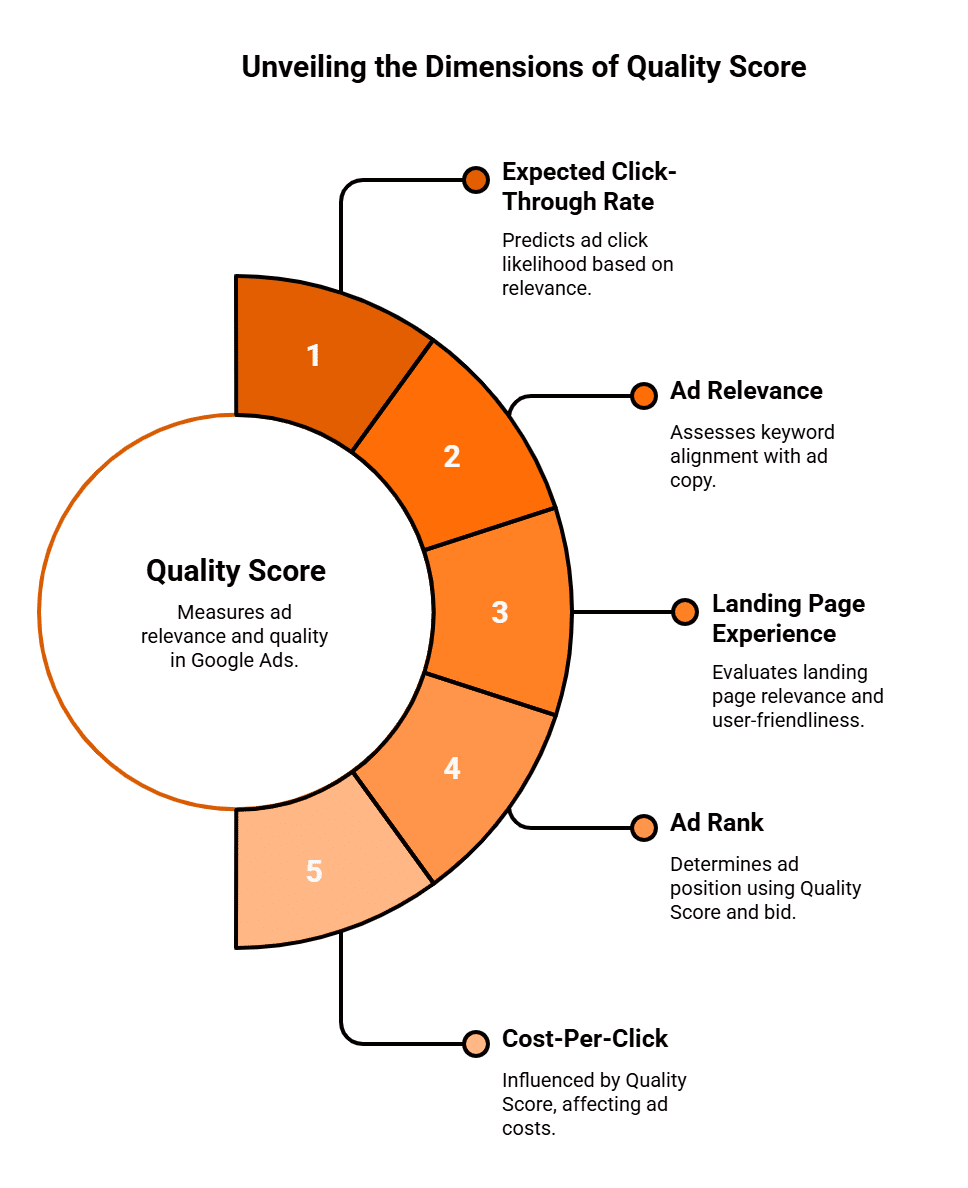
Should We Use Max Clicks or Max Conversions?
When it comes to bidding strategies in Google Ads, two of the most popular automated options are Maximise Clicks and Maximise Conversions. While both aim to get you results, they are fundamentally designed for different campaign goals. Choosing the right strategy is crucial for optimising your ad spend and achieving your business objectives.
Maximise Clicks
Maximise Clicks is a Smart Bidding strategy designed with one primary goal: to get you the most clicks possible within your specified budget. It’s a simple, straightforward strategy that tells Google’s algorithm to automatically set your bids in real-time to drive as much traffic to your website as it can, while staying within your daily budget.
How It Works
Google’s machine learning will analyse various signals, such as device, location, time of day, and audience, to predict which ad auctions are most likely to result in a click. It will then automatically adjust your bids, bidding higher in auctions where a click is more probable and lower where it’s less likely. You have the option to set a “maximum CPC bid limit” to prevent the algorithm from bidding too high on a single click, which gives you some control over your costs.
When to Use Maximise Clicks
Maximise Clicks is the ideal Google Ads bidding strategy when your primary goal is not conversion-focused but rather traffic volume and brand awareness.
- Driving Website Traffic: If your objective is simply to get as many people as possible to your website, whether to read a blog post, view a new collection, or explore your content, this strategy is highly effective.
- Building Brand Awareness: For a new business or a new product launch, Maximise Clicks can be a cost-effective way to get your brand in front of a large audience and generate initial interest.
- Initial Data Gathering: When a campaign is new and you don’t have enough conversion data yet, Maximise Clicks is a good starting point. It helps you quickly gather data on which keywords, ad copy, and landing pages generate the most traffic, which can then inform a more conversion-focused strategy later.
Maximise Conversions
Maximise Conversions is a more advanced Smart Bidding strategy designed to get you the most conversions possible within your daily budget. This strategy is centred on business outcomes, such as sales, leads, or sign-ups, and is far more sophisticated in its approach.
How It Works
Google’s machine learning will analyse a vast array of signals to predict which users are most likely to convert. It will then automatically adjust your bids in real-time, bidding aggressively in auctions where a conversion is highly probable and pulling back in auctions where a conversion is less likely. This strategy is also aware of your Conversion Value if you have set it up (e.g., tracking the revenue of an e-commerce sale), and it will automatically adjust bids to drive the most valuable conversions.
When to Use Maximise Conversions
Maximise Conversions is the go-to strategy for businesses with clear, measurable conversion goals.
- Generating Leads and Sales: This is the ideal strategy for e-commerce stores, service-based businesses, and any company that has defined a specific action as a conversion. It’s built to directly drive your business’s bottom line.
- Established Campaigns with Conversion Data: For this strategy to work effectively, you need a healthy amount of conversion data (typically 15-30 conversions in the last 30 days) for the algorithm to learn from. This data allows the AI to accurately predict which auctions are most likely to result in a conversion.
- Maximising Profitability: When paired with conversion value tracking, Maximise Conversions can optimise for the highest-value conversions, ensuring that your ad spend is directed towards the most profitable outcomes.
Making the Right Choice
The choice between Maximise Clicks and Maximise Conversions depends entirely on your Google Ad campaign’s objectives and its stage in the lifecycle.
- Use Maximise Clicks when: Your primary goal is to drive traffic and brand awareness. You are a new campaign with no conversion data. You want to gather a large volume of data to inform a future, more conversion-focused strategy.
- Use Maximise Conversions when: Your primary goal is to generate sales, leads, or other conversions. You have an established campaign with enough conversion data for the algorithm to learn from. Your focus is on profitability and business growth.
A Hybrid Approach: A Path to Success
A successful Google Ads strategy often involves a hybrid approach that uses both bidding strategies at different stages of a campaign. You might start a new campaign with Maximise Clicks to quickly gather traffic and data. Once you have accumulated enough conversion data, you can then transition to Maximise Conversions to optimise for business outcomes. This two-step process allows you to efficiently build an audience and then convert that audience into a profitable revenue stream.
Both bidding strategies are powerful tools in their own right. However, using them without a clear understanding of their purpose can lead to inefficient spending. By aligning the right strategy with your campaign’s goals, you can ensure that your Google Ads budget is working as effectively as possible to deliver the results you need.

Can We Manage When Ads Are Shown & Suggestions for Best Results?
Managing Ad Delivery: Controlling When Google Ads are Shown
One of the most potent features within the Google Ads platform is the ability to precisely control when your advertisements appear, a feature known as ad scheduling.
This is far more than a simple on off switch; it is a sophisticated, data driven tool that allows advertisers to align ad spend directly with periods of peak customer activity and conversion probability.
Instead of spreading budget thinly across all hours of the day, seven days a week, strategic ad scheduling ensures that your ads are visible when your target audience is most likely to engage and convert, significantly improving overall return on investment (ROI).
The Mechanics of Ad Scheduling Control
Google Ads provides advertisers with granular control over ad delivery through the Ad Schedule feature, found within the settings of any campaign. By default, campaigns are set to run “All day,” but this is rarely the most effective approach.
- Specifying Days and Hours: The primary function allows you to define specific days of the week and hours of the day during which your ads will be eligible to show. This can be as precise as blocking out the overnight hours or segmenting the day into four hour blocks for detailed analysis.
- Time Zone Alignment: A crucial technical detail is understanding that ad schedules are based on your Google Ads account’s time zone. If your customer base is global, you must create separate campaigns or use bid adjustments to ensure your ads appear at the optimal local time for each target region.
- Ad Schedule Bid Adjustments: This is the feature that elevates ad scheduling from a simple timing mechanism to a powerful optimisation strategy. Within the schedule, you can set bid adjustments to increase or decrease your bids for specific time slots. For instance, if data shows conversions are 30 per cent higher between 7 PM and 10 PM on weekdays, you can apply a +20 per cent bid adjustment to those hours to aggressively compete for top ad positions when customer intent is highest. Conversely, you can decrease bids or entirely pause ads during low performing hours to conserve budget.
Suggestions for Best Results: A Data Driven Approach
Effective ad scheduling is not based on guesswork; it is a continuous, data driven cycle of analysis and adjustment.
1. Analyse Historical Performance Data
The single most important step is to leverage your own historical data. Use the Day and Hour report within Google Ads and custom reports in Google Analytics (GA4) to identify performance patterns.
- Pinpoint Conversion Windows: Look beyond simple clicks. Segment your data by day of the week and hour of the day to discover exactly when your cost per acquisition (CPA) is lowest and your conversion rate is highest. You might find that evening traffic, though smaller in volume, brings higher value conversions than the high volume clicks received during morning hours.
- Map Time to Intent: Analyse the conversion path. For a business selling professional services, conversions might spike during weekday working hours (9 AM to 5 PM) when professionals are at their desks. For an online retailer, peak purchasing hours might be in the evenings (7 PM to 10 PM) or on Sunday afternoons when people are browsing leisurely.
2. Align Scheduling with Business Operations
For many businesses, the schedule should align with the availability of personnel and resources.
- Customer Service Availability: If your business relies on immediate phone calls or live chat to capture leads, you should pause ads outside of business hours. Wasting ad spend by delivering calls when no one is available to answer damages customer experience and wastes budget.
- Physical Store Hours: For businesses using local search ads or call extensions, scheduling must match the physical operating hours of the shop or office to ensure immediate service delivery.
3. Test and Refine Incrementally
Ad scheduling should be treated as a flexible experiment. Avoid making drastic changes immediately.
- Start with Bid Adjustments: When first testing a theory, begin by applying small bid adjustments (e.g., +10 per cent or 15 per cent) rather than completely pausing ad delivery during certain hours. This allows you to collect more data at a controlled cost.
- Segment by Campaign: For optimal control, duplicate high performing campaigns and apply different ad schedules to each. For example, run one campaign exclusively on weekdays with a high budget and a separate, lower budget campaign on weekends to precisely control spend during different demand periods.
By meticulously using ad scheduling and continually auditing the performance data, advertisers can move away from wasteful “always on” spending. This strategic control ensures that valuable budget is directed towards the golden hours when the audience is most engaged, leading directly to higher conversion efficiency and greater profitability.
What Are Google Ads Paid Shopping Campaigns?
For any e-commerce site owner, capturing the attention of consumers actively searching to purchase is paramount. While traditional text-based advertising has its merits, Google Ads Paid Shopping Campaigns historically known as Product Listing Ads (PLAs) have emerged as a critical, high-impact channel for e-commerce businesses to drive visibility, traffic, and sales. Unlike standard Search Ads, Shopping Campaigns offer a visually rich, retail-centric experience, positioning a brand’s products directly in front of buyers at the precise moment of intent.
What Defines a Shopping Campaign?
The fundamental distinction of a Shopping Campaign lies in the ad format and the mechanism that triggers it.
A standard Google Search Ad consists purely of text. Conversely, a Shopping Ad is visually dominant, featuring:
- A high-quality product image.
- The product title.
- The current price.
- The store name (merchant).
- Additional information such as product ratings and special offer annotations.6
These ads appear prominently at the very top of Google Search Result Pages (SERPs) or within the dedicated Google Shopping tab. By showcasing the product visually, along with key purchasing information, shoppers gain a strong sense of the item and its cost before they even click. This process is crucial to the campaign’s success.
The key operational difference is that Shopping Ads do not rely on traditional keywords for targeting. Instead, Google determines when and where to display the ad by intelligently matching the user’s search query to the product data provided by the retailer.
How Shopping Campaigns Operate: The Two-Platform Synergy
Setting up and running a Paid Shopping Campaign requires the integration of two distinct, yet interconnected, Google platforms:
1. Google Merchant Center (GMC)
The GMC is the retailer’s central hub for product data. It is where a merchant submits their entire product catalogue known as the product feed in a Google friendly format. This feed is the lifeblood of the campaign, as it contains all the attributes Google needs to create the ad and match it to relevant searches. Mandatory attributes for the feed typically include:
- ID (Unique SKU)
- Title (Optimised for search terms)
- Description
- Link (Product URL)
- Image link
- Price
- Availability (e.g., in stock, out of stock)
The quality and optimisation of this feed are paramount; inaccuracies in pricing or availability can lead to product disapproval, halting advertising efforts.
2. Google Ads
This is the platform used to manage the campaign’s structure, budget, bidding, and reporting. Once the GMC is linked to the Google Ads account, retailers can choose between campaign types:
- Standard Shopping Campaigns: Offer more granular control over bids at the product group level and allow for the addition of negative keywords to filter out irrelevant search queries.
- Performance Max (PMax) Campaigns: The newer, AI-driven campaign type that uses the Merchant Center feed (plus other assets) to target customers across all of Google’s inventory Search, Display, YouTube, Gmail, and Discover from a single campaign. PMax is highly automated, leveraging Google’s machine learning for bidding and optimisation.
In both cases, retailers pay using the Cost-Per-Click (CPC) model, meaning a charge is incurred only when a user clicks the ad, leading them to the retailer’s website or a local inventory landing page.
Compelling Benefits for the AU Retailer
For businesses operating in the competitive AU e-commerce space, integrating Shopping Campaigns offers several compelling advantages over relying solely on text ads:
1. Better Qualified Leads and Higher Conversion Rates
Because the ad displays the product image and price upfront, users who click have already qualified the product as visually appealing and within their budget. This transparency leads to a much higher purchase intent upon landing on the site, translating into superior conversion rates.
2. Increased Visibility and Brand Reach
A retailer can have multiple Shopping Ads appear in a single search result for the same user, and critically, a Shopping Ad can appear simultaneously with a text ad from the same advertiser. This significantly increases brand real estate on the SERP, pushing competitors further down the page.
3. Retail-Centric Management
The campaign management structure is intuitively built around product inventory rather than keyword lists. Retailers can group products by attributes such as brand, product type, price margin, or even seasonal best-sellers, allowing for highly targeted bidding strategies that align precisely with commercial goals.
4. Powerful Competitive Insight
The Google Ads platform provides detailed, product-level performance data. Furthermore, merchants can gain anonymous insights into their competitive landscape, understanding where they are losing impression share to rivals. This intelligence allows for precise bid adjustments and strategic planning.
Paid Shopping Campaigns serve as an essential visual storefront on the world’s largest search engine. By transforming the search experience from a text-based inquiry into a rich visual shopping aisle, they allow retailers to connect with high-intent consumers efficiently, delivering one of the highest returns on investment available in modern digital advertising.
What Types of Reports are Available in Google Ads?
For any business investing in paid search, understanding the performance of campaigns is an absolute requirement. The Google Ads platform, while complex, offers an incredibly robust suite of reporting tools designed to provide granular insights into every facet of your advertising efforts.
These reports are not just historical data; they are the strategic compass that guides optimisation, budget allocation, and ultimately, return on investment (ROI). Mastering the various types of reports available is crucial for making informed decisions and achieving advertising objectives in the competitive Australian market.
The Foundation: The Overview Page and Custom Reports
Upon logging into Google Ads, the Overview page provides a high-level snapshot of key metrics, trends, and actionable insights. It’s a great starting point for a quick check-up. However, for deeper analysis, the true power lies within the “Reports” section (often found under “Tools and Settings” or directly in the left-hand navigation). Here, you can access a library of predefined reports and, more importantly, create highly customised reports tailored to your specific business questions.
The Report Editor is a powerful drag-and-drop tool that allows you to select dimensions (e.g., campaign, keyword, device) and metrics (e.g., clicks, conversions, cost) to build bespoke reports. These custom reports can then be saved, scheduled for email delivery, or downloaded for further analysis in spreadsheets.
Key Report Categories & Their Strategic Value
Google Ads reports can generally be categorised by the area of focus they provide insights into:
1. Performance Reports (The “What Happened”)
These are the most frequently used reports, detailing how your campaigns, ad groups, ads, and keywords are performing against your chosen metrics.
- Campaigns Report: A top-level view showing the performance of each campaign. Ideal for identifying which campaigns are meeting objectives and where budget should be allocated.
- Ad Groups Report: Breaks down performance by ad group within a campaign, allowing you to see which groups of keywords or targeting methods are most effective.
- Ads Report: Shows the individual performance of each ad creative (text, responsive search ads, display ads). Critical for A/B testing and optimising ad copy and imagery.
- Keywords Report: Arguably one of the most vital reports. It reveals the clicks, impressions, conversions, and costs associated with each individual keyword. This helps in:
- Optimising Bids: Adjusting bids for high performing keywords.
- Identifying Underperformers: Pausing or lowering bids on keywords that waste budget.
- Finding New Opportunities: Discovering valuable long-tail keywords.
- Search Terms Report: This is distinct from the Keywords Report and incredibly powerful. It shows the actual search queries users typed into Google that triggered your ads. This is crucial for:
- Negative Keywords: Identifying irrelevant search terms to add as negative keywords, preventing wasted spend.
- New Keyword Discovery: Finding highly relevant search terms to add to your campaigns.
- Understanding User Intent: Gaining insights into how users phrase their queries.
2. Audience Reports (The “Who Saw/Clicked”)
Understanding your audience helps refine targeting and messaging.
- Demographics Report: Provides insights into performance by age, gender, household income (in some regions), and parental status. Helps tailor messaging to specific demographic segments.
- Audiences Report: For campaigns using audience targeting (e.g., affinity, in-market, custom audiences), this report shows the performance of each audience segment. Critical for optimising Display and Video campaigns.
- Geographic Report: Breaks down performance by location, down to country, region, city, or even postcode. Essential for businesses with a local focus or those looking to expand into new areas within Australia.
- Device Report: Shows how your ads perform on mobile phones, tablets, and desktop computers. Useful for adjusting bid modifiers based on device performance, particularly for mobile-first user journeys.
3. Asset & Placement Reports (The “Where They Saw It”)
Relevant for visual campaigns or those using specific placements.
- Extensions Report: Details the performance of your ad extensions (e.g., sitelinks, callouts, structured snippets). Reveals which extensions are driving clicks and improving ad relevance.
- Placements Report: For Display Network and YouTube campaigns, this shows the specific websites, apps, or YouTube channels where your ads appeared. Essential for:
- Excluding Underperforming Placements: Preventing ads from showing on irrelevant or low-converting sites/apps.
- Identifying Top Placements: Doubling down on placements that drive strong results.
- Video Reports (for YouTube campaigns): Offer granular data on video views, watch time, impressions, and conversions for specific video creatives and channels.
4. Diagnostic & Account Health Reports
Less about performance, more about the operational health of your account.
- Auction Insights Report: Provides a competitive landscape view. It shows which other advertisers are bidding on the same keywords as you, their average position, impression share, and overlap rate. Invaluable for understanding your competitive position.
- Change History Report: A forensic audit tool showing every change made to your account (e.g., bid adjustments, pausing campaigns, adding keywords), who made it, and when. Essential for troubleshooting performance dips or understanding the impact of recent changes.
- Budget Report: Monitors budget spend against forecasts and provides insights into where budget is being consumed.
Maximising Reporting Value
- Schedule Reports: Automate the delivery of your most important reports directly to your inbox or a shared drive.
- Segment Data: Always segment your reports by device, network, or time for deeper insights.
- Use Custom Columns: Tailor your report views to include the metrics most relevant to your KPIs (Key Performance Indicators).
- Integrate with Google Analytics: While Google Ads tracks campaign performance, Google Analytics provides deeper on-site behaviour data (e.g., bounce rate, time on site, conversion paths after the click). Combining these datasets offers a holistic view.
Google Ads offers a rich tapestry of reporting options, moving far beyond basic click and impression counts. For Australian businesses, leveraging these reports to understand not just what happened, but why it happened, who it happened to, and where it happened, is the cornerstone of effective campaign management. By continually analysing these insights, advertisers can refine their strategies, optimise their spend, and drive superior results in an increasingly complex digital advertising ecosystem.
How Should We Update Our Images in Google Ads Campaigns?
When investing in paid advertising, the adage “a picture is worth a thousand words” holds more truth than ever. While compelling ad copy and precise keyword targeting remain crucial, the images used in Google Ads campaigns particularly for Display, Discovery, Performance Max, and even some Search ad formats (Responsive Search Ads often include image assets) play a pivotal role in capturing attention, conveying brand identity, and driving conversions.
Simply setting and forgetting your visual assets is a missed opportunity. A proactive and data-driven approach to updating images is essential for maintaining campaign freshness, combating ad fatigue, and optimising performance in the competitive Australian market.
Why Ad Image Updates Are Not Optional
- Combating Ad Fatigue: Audiences quickly become accustomed to seeing the same visuals. Repeated exposure to the identical image leads to diminished engagement, lower click-through rates (CTR), and increased cost-per-click (CPC). Regular updates keep your ads feeling fresh and relevant.
- Reflecting Seasonality & Promotions: Your visuals should align with current promotions, seasonal events (e.g., Christmas, Black Friday, summer sales), or cultural moments. An outdated image during a peak sales period is a missed opportunity.
- Improving Relevance: As your products, services, or brand messaging evolve, your images must follow suit. Newer product lines, updated branding, or different target audiences necessitate fresh visual communication.
- Optimising Performance: Data from A/B testing and performance reports will consistently show that some images outperform others. Updating to high-performing visuals is a direct path to better campaign results.
- Meeting Evolving Platform Requirements: Google frequently updates its ad policies and best practices for image assets. Staying current ensures your ads remain compliant and perform optimally across various placements.
A Strategic Action Plan for Image Updates
Implementing an effective image update strategy requires a systematic approach:
1. Regular Auditing and Performance Review
- Schedule Audits: Set a recurring schedule (e.g., monthly, quarterly, or bi-weekly for high-spend campaigns) to review image performance.
- Key Metrics for Images: Focus on CTR, Conversion Rate, and Cost Per Acquisition (CPA) at the image asset level. Google Ads provides detailed asset reports for Responsive Display Ads and Performance Max campaigns, showing individual image performance.
- Identify Underperformers: Pinpoint images with low CTR, high CPA, or those showing signs of fatigue (e.g., declining performance over time).
- Identify Top Performers: Understand what works. What visual elements, colours, product angles, or lifestyle contexts generate the best results?
2. Preparing New Creative Assets
- Diversity is Key: Don’t just create one new image. Develop a range of visuals covering different angles, contexts, and styles.
- Product-Focused: Clean, high-quality images of the product itself.
- Lifestyle/In-Use: Show people interacting with your product/service in a relevant context. This helps potential customers visualise themselves using it.
- Brand-Focused: Images that evoke your brand’s essence, values, or unique selling proposition (USP).
- Text Overlays (Used Sparingly): For specific promotions or calls to action, text overlays can be effective, but keep them concise and readable.
- Adhere to Specifications: Ensure all images meet Google’s technical requirements for aspect ratios (e.g., 1.91:1 landscape, 1:1 square), file size, and safe zones. Crop and resize meticulously for various placements.
- High Quality & Professionalism: Pixelated, blurry, or unprofessional images reflect poorly on your brand. Invest in good photography or graphic design.
- Mobile-First Mindset: A significant portion of ad impressions are on mobile devices. Design images that are clear and impactful even on small screens.
3. Strategic Implementation and Testing
- Phased Rollout: Don’t swap all images simultaneously, especially in active campaigns. Introduce new images gradually.
- A/B Testing New Assets: Google Ads’ Responsive Display Ads and Performance Max Campaigns natively test multiple image assets. Allow the platform’s machine learning time to gather data on new images. For older ad formats, create entirely new ads with the updated images to run alongside existing ones for a direct comparison.
- Segment by Audience/Placement: Consider if certain images resonate better with specific audience segments or on particular placements. A detailed product shot might work well on the Google Display Network, while a vibrant lifestyle image might excel on Discovery campaigns.
- Align with Landing Pages: Ensure consistency between your ad images and the landing page experience. A click generated by a compelling image should lead to a visually similar and relevant destination.
4. Seasonal and Promotional Refresh
- Calendar Planning: Integrate image updates into your annual marketing calendar. Plan visuals specifically for:
- Major holidays (Christmas, Easter, Halloween).
- Sales events (Black Friday, Cyber Monday, January sales).
- Seasonal changes (Summer, Autumn collections).
- Company milestones or product launches.
- Pre-emptive Creation: Create and stage seasonal creatives well in advance to avoid last-minute rushes.
- Post-Promotion Purge: Once a promotion ends, remove or pause all associated images to avoid confusing users or promoting expired offers.
5. Leveraging Google’s AI Tools
- Responsive Display Ads (RDAs): Utilise RDAs fully. They allow you to upload multiple headlines, descriptions, and images. Google’s AI then combines these assets to create optimal ad variations, learning which images perform best in different contexts. This automates a significant part of the A/B testing process.
- Performance Max Campaigns: These campaigns heavily rely on the quality and diversity of the image assets you provide. The more high-quality, relevant images (in various aspect ratios) you feed into PMax, the better its AI can perform across all Google channels.
By adopting a disciplined approach to image updates rooted in data analysis, creative diversity, and strategic planning businesses can ensure their Google Ads campaigns remain fresh, engaging, and highly effective. In an increasingly visual digital world, impactful imagery is not just about aesthetics; it’s a critical driver of clicks, conversions, and ultimately, sustained campaign success.
What are Responsive Search Ads?
When using Google Paid Ads, the pressure to deliver highly relevant and effective advertisements is constant. Google’s transition away from traditional Expanded Text Ads (ETAs) towards Responsive Search Ads (RSAs) marked a fundamental shift, demanding a more agile, machine learning driven approach to ad creation. RSAs are not simply a new ad format; they represent the preferred method for modern search advertising, leveraging automation to maximise message relevance and, crucially, advertiser ROI.
For Australian businesses navigating competitive landscapes like insurance, finance, or retail, understanding and correctly implementing RSAs is paramount to maintaining performance and efficiency within Google Ads.
Defining the Responsive Search Ad
A Responsive Search Ad is an ad format that allows advertisers to provide up to 15 different headlines and four different descriptions. Crucially, Google’s machine learning model then takes these assets and automatically tests various combinations, mixing and matching the headlines and descriptions in real time to create a tailored ad.
When a user initiates a search, the system determines the most effective combination of headlines and descriptions based on several factors, including:
- The user’s specific search query.
- The device they are using.
- Their historical location and context.
- The predicted performance of the ad combination.
The goal is to deliver the most potent and relevant message possible, thereby improving the ad’s Quality Score and increasing the Click-Through Rate (CTR).
In a typical search result, a Responsive Search Ad displays up to three headlines and two descriptions, automatically selecting the most impactful assets for that particular search instance.
The Mechanics of RSA Creation
Creating an effective RSA requires a shift in mindset from crafting one perfect message (as with ETAs) to providing a comprehensive library of compelling selling points.
The Asset Library
Advertisers must supply the following assets:
- Headlines (Up to 15): Each headline can be up to 30 characters long. It is crucial to use a variety of headlines that cover different bases:
- Keyword Incorporation: At least one headline must include a core keyword relevant to the ad group.
- Unique Selling Propositions (USPs): Include benefits like “Free Delivery Over $50,” “24/7 AU Customer Support,” or “Guaranteed 4-Hour Service.”
- Call-to-Action (CTA): Use action phrases like “Shop Our New Range” or “Book a Free Consultation.”
- Descriptions (Up to 4): Each description can be up to 90 characters long. These provide more detail and context, expanding on the offer. They should focus on features, benefits, and trust signals (e.g., “Rated 5 Stars by Trustpilot”).
Pinning: Exercising Control
While the goal of RSAs is automation, advertisers retain some degree of control through pinning. Pinning an asset means restricting it to a specific position (Headline 1, Headline 2, Headline 3, or a specific description slot).
- Mandatory Pinning (Recommended): It is best practice to Pin a headline that includes a core keyword to Position 1 or 2. This ensures ad relevance and maintains a high Quality Score, which is vital for efficient bidding.
- Strategic Pinning (Optional): If a specific regulatory or brand message must appear (e.g., “FCA Registered Broker”), it can be pinned to a designated position.
Caution: Over-pinning (pinning too many assets to too many slots) limits Google’s testing capability, effectively turning the RSA back into a static ETA and negating its primary advantage.
The Performance and Efficiency Advantage
RSAs are considered the preferred ad type for two main reasons: relevance and data driven optimisation.
1. Enhanced Relevance and Quality Score
By continually testing and adapting the ad copy to the user’s search query, RSAs increase the likelihood that the final displayed ad text is an extremely close match to what the user searched for. This heightened relevance leads to:
- Higher CTRs: Users are more likely to click ads that directly address their needs.
- Improved Quality Score: Relevance is a key component of Quality Score. A higher Quality Score means the advertiser pays less for the same ad position, dramatically improving cost efficiency.
2. Machine Learning Optimisation
The core value of the RSA lies in its test and learn cycle. The system tracks the performance of every combination, prioritising the high performing permutations and discontinuing the poor ones. This continuous, automated optimisation saves advertisers significant time that would otherwise be spent manually A/B testing two or three versions of a traditional ETA.
Google provides an Ad Strength score (ranging from Poor to Excellent) to guide advertisers. An ‘Excellent’ score is achieved by providing a high quantity of unique and varied assets, which gives the machine learning model the necessary material to succeed.
3. Future Proofing
Google has made it clear that RSAs are the future of search advertising. By focusing development and feature releases on this format, advertisers who embrace RSAs ensure their accounts are positioned to benefit from future automation and platform enhancements.
Google’s Responsive Search Ads demand a more granular, asset based approach to copy creation, but they deliver unparalleled performance through automated relevance. For any Australian business aiming to maximise their budget and secure the best possible position in search results, mastering the art of providing a diverse and high-quality asset library is no longer optional; it is the definition of best practice in modern PPC campaigns.