

What Are Conversions in E-commerce Stores?
In the context of e-commerce, a conversion refers to any desired action a visitor takes on an online store that moves them closer to, or directly results in, a business objective.
While a website might attract thousands of visitors, it’s the number of conversions that truly indicates its success and profitability. Without conversions, an e-commerce store is merely a digital brochure; with them, it’s a revenue-generating machine.
The Primary E-commerce Conversion: The Sale
The ultimate and most valuable conversion in any e-commerce store is, unequivocally, a purchase or a sale. This occurs when a visitor successfully completes a transaction, adding an item to their cart, navigating through the checkout process, and confirming payment. This action directly translates into revenue for the business and is the primary goal of most online retail operations.
Micro-Conversions: Building Blocks to a Sale
While the final purchase is the star, there are numerous smaller, valuable actions that customers take along their journey that are known as micro-conversions. These indicate increasing levels of engagement and intent, serving as crucial stepping stones towards the ultimate sale.
Tracking these micro-conversions provides invaluable insights into customer behaviour and potential areas for optimisation.
Common e-commerce micro-conversions include:
- Adding Products to the Cart: This is a strong signal of purchase intent. Even if the sale isn’t completed immediately, it shows the customer has found something they like.
- Initiating Checkout: A customer proceeding from the cart to the first step of the checkout process indicates a very high intent to buy. Dropping off at this stage often highlights issues within the checkout flow itself.
- Product Page Views: While not a direct buying action, a visitor spending time on a specific product page, especially viewing multiple images or reading reviews, suggests serious interest compared to just Browse category pages.
- Account Registration or Login: A user creating an account or logging into an existing one indicates a commitment to the store and facilitates future repeat purchases.
- Newsletter Sign-ups: Capturing an email address means the business can continue to nurture the lead through email marketing, even if a purchase doesn’t happen immediately.
- Adding Items to a Wishlist: This signals a strong interest in a product for a future purchase, especially for higher-value items or gift ideas.
- Using Internal Search: When a customer uses the search bar, it indicates they have a specific need. Tracking these queries helps identify product gaps or popular items.
- Engagement with Interactive Features: This could include using a product customiser, watching a product video, engaging with a live chat, or comparing products.

Why Conversions are Critical for E-commerce Success
- Direct Revenue Generation: The most obvious reason – conversions are directly tied to an e-commerce store’s profitability and ability to sustain itself.
- Performance Measurement: Conversions allow businesses to quantify the effectiveness of all their marketing efforts (SEO, paid ads, social media), website design, user experience (UX), and even product range. Without tracking conversions, you don’t truly know what’s working.
- Optimisation Opportunities: By identifying where users convert and, crucially, where they abandon their journey (e.g., high “add to cart” but low “checkout completion”), businesses can pinpoint friction points and implement optimisations (e.g., A/B testing, UX improvements).
- Customer Journey Insights: Tracking the sequence of micro-conversions helps map out the typical customer journey, allowing businesses to tailor content and calls to action more effectively at each stage.
- Scalability and Forecasting: Understanding conversion rates allows businesses to predict sales based on traffic levels and confidently scale marketing efforts, knowing the potential return.
To accurately measure these actions, e-commerce stores rely heavily on analytics platforms like Google Analytics 4 (GA4) and Google Ads Conversion Tracking, which allow them to define, track, and report on every valuable interaction from initial visit to final purchase. Conversions are the lifeblood of e-commerce, transforming website visitors into loyal, revenue-generating customers.

What is the Worldwide Average Conversion Rate?
The question of the “worldwide average conversion rate” is one that many businesses ponder, seeking a benchmark against which to measure their own performance.
However, it’s crucial to understand that there isn’t a single, universally applicable average conversion rate that defines success across all industries, business models, or geographical regions. Conversion rates are highly contextual and vary significantly based on numerous factors.
Despite this variability, aggregated industry data from various analytics providers and marketing platforms offers some general benchmarks for e-commerce and digital marketing conversions.
General E-commerce Conversion Rate
For standard e-commerce websites (B2C retail), the global average conversion rate typically hovers around 2% to 4%. This means that for every 100 visitors to an online store, roughly 2 to 4 of them will make a purchase. Some reports as of 2024-2025 indicate a global average often cited in the range of 1.8% to 2.5%.
However, this is just a very broad average. Factors that cause significant variations include:
-
Industry and Product Type:
-
- Higher Conversion Rates: Industries with lower-cost, frequently purchased, or emotionally driven products often see higher conversion rates. Examples include:
- Beauty and Personal Care: Often 4.5% – 6.8%
- Food & Beverage: Can be as high as 4.9% – 6.64%
- Arts & Crafts: Reported around 4.6% – 5.2%
- Lower Conversion Rates: Industries selling high-ticket items, products requiring extensive research, or those with longer decision-making cycles tend to have lower conversion rates. Examples include:
- Luxury Goods and Jewellery: Around 1.3% – 1.5%
- Home Furnishings/Decor: Can range from 1.4% – 2.5%
- Travel and Hospitality: Often very low, around 0.2% – 0.7% due to complex booking processes and extensive comparison shopping.
- Higher Conversion Rates: Industries with lower-cost, frequently purchased, or emotionally driven products often see higher conversion rates. Examples include:
- Traffic Source: The channel through which users arrive at your site significantly impacts conversion rates because it reflects user intent.
- Email Marketing: Often boasts the highest conversion rates (e.g., 7% to over 10%) due to its highly segmented, personalised, and permission-based nature.
- Direct Traffic: Users who type your URL directly or use bookmarks tend to convert highly (e.g., 3.5%+) as they have strong intent.
- Referral Traffic: Traffic from other websites often performs well (e.g., 5%+).
- Organic Search: Typically converts around 2% to 4%.
- Paid Search (Google Ads): Averages around 2% to 4.5% on the Search Network, but significantly lower on the Display Network (e.g., 0.5% – 1%).
- Social Media: Generally lower conversion rates (e.g., 0.7% – 2%), as users are often in a Browse or socialising mindset rather than a buying one, though certain platforms and ad formats can outperform.
- Device: Desktop users consistently show higher conversion rates (e.g., 3% – 4%) compared to mobile users (e.g., 1.8% – 2.9%). While mobile Browse is dominant, users often prefer to complete purchases on a larger screen or in a less distracted environment. Tablets sometimes sit in between or even higher than desktop in certain reports.
- Region and Culture: Conversion rates can vary by geographic region due to different online shopping habits, payment preferences, and economic factors. For example, North America and Europe often show higher rates than some parts of Asia-Pacific.

What is a “Good” Conversion Rate?
Given the vast differences, a “good” conversion rate is less about a global average and more about:
- Your Industry Benchmark: How do you compare to competitors in your specific niche?
- Your Goals: Are you achieving your target Cost Per Acquisition (CPA) or Return On Ad Spend (ROAS)?
- Continuous Improvement: The best conversion rate is always one that is better than your last one. Focus on ongoing Conversion Rate Optimisation (CRO) efforts to continuously test and improve.
While a global e-commerce conversion rate of 2% to 4% serves as a rough guide, it’s a dynamic figure heavily influenced by context. Businesses should benchmark against their specific industry, analyse their own data diligently, and continually optimise their website and marketing efforts to improve their unique conversion rates.
How Do We Measure the Conversion Rate?
Measuring the conversion rate is fundamental to understanding the effectiveness of your website, marketing campaigns, and overall business strategy.
It quantifies how efficiently your efforts are turning visitors into valuable customers or leads. The calculation itself is straightforward, but its interpretation requires careful consideration of the context and the tools used for tracking.
The basic formula for calculating conversion rate is:
Conversion Rate = (Number of Conversions / Total Number of Visitors or Sessions) x 100%
This formula yields a percentage representing the proportion of your audience that completed a defined desired action.
Defining “Conversions” and “Visitors/Sessions”
Before you can measure, you must clearly define what constitutes a “conversion” and how you’re counting your “visitors” or “sessions.”
- Defining “Conversions”:
As previously discussed, a conversion is any action valuable to your business. This could be a macro-conversion (like a purchase in an e-commerce store) or a micro-conversion (like a newsletter signup, a form submission, a phone call, or a download). You need to explicitly set up these actions as “conversions” or “key events” within your analytics platform. - Defining “Visitors” or “Sessions”:
The denominator in your calculation can vary:- Total Visitors (Users): This counts unique individuals who visited your site within a given period. If a user visits your site multiple times in a day, they are still counted as one user. This metric is useful for understanding the percentage of people who converted.
- Total Sessions (Visits): This counts each individual visit to your website. If a user visits your site three times in a day, that’s three sessions. Many analytics platforms, particularly older versions of Google Analytics (Universal Analytics), historically used sessions as the primary denominator for conversion rate. This metric is good for understanding the effectiveness per visit.

Measuring Tools and GA4’s Approach
Modern web analytics platforms are essential for accurately measuring conversion rates:
- Google Analytics 4 (GA4):
GA4, with its event-based data model, has evolved how conversion rate is measured compared to Universal Analytics. In GA4, every interaction is an event, and you mark specific events as “conversions” (previously called “goals”). GA4 provides two distinct conversion rates:- Session Conversion Rate: This is the percentage of sessions that included at least one conversion event. It’s calculated as (Number of sessions with at least one conversion / Total number of sessions) x 100%. This provides insight into the immediate effectiveness of individual visits.
- User Conversion Rate: This is the percentage of unique users who triggered at least one conversion event during their visit(s) to the site. It’s calculated as (Number of users who triggered a conversion / Total number of users) x 100%. This offers a broader perspective on how effectively your website converts individual people, regardless of how many sessions they had.
- You set up conversion events in GA4 by navigating to Admin > Events and toggling the “Mark as conversion” option for the events you wish to track (e.g., purchase, generate_lead, form_submit). GA4 automatically reports these conversion rates in various reports, or you can customise reports to include them.
- Google Ads Conversion Tracking:
For paid advertising campaigns, Google Ads has its own dedicated conversion tracking. You implement a Google Ads conversion tag (or use Google Tag Manager) on your website. This directly measures specific actions (e.g., ad clicks leading to purchases, phone calls from ads) and attributes them back to the specific campaign, ad group, and keyword. Google Ads then calculates its own conversion rate (Conversions ÷ Ad Interactions) for the purposes of campaign optimisation and automated bidding. - E-commerce Platforms (e.g., Shopify, Magento):
Most e-commerce platforms have built-in analytics dashboards that automatically calculate e-commerce conversion rates (typically based on completed sales per session/visit). They usually integrate seamlessly with Google Analytics for more detailed reporting.
Interpreting Your Conversion Rate
Once measured, context is key. A “good” conversion rate varies significantly by industry, traffic source, device, and the type of conversion. The most valuable approach is to:
- Benchmark Against Yourself: Track your conversion rate over time and strive for continuous improvement through Conversion Rate Optimisation (CRO) efforts.
- Segment Your Data: Look at conversion rates by device (mobile vs. desktop), traffic source (organic, paid, social), geographic location, and audience segment to identify specific areas of strength or weakness.
By diligently measuring and analysing your conversion rates, businesses can gain actionable insights, optimise their digital strategies, and ultimately drive greater profitability.

How Do We Optimise E-commerce Site or Collection Pages?
Optimising e-commerce sites or collection pages is a pivotal strategy for online retailers. These pages serve as critical gateways for users navigating your product catalogue, often ranking for broader, high-volume keywords.
Unlike individual product pages, which focus on specific items, collection pages (also known as category pages) are designed to showcase a range of related products, guiding users towards their desired selection. Effective optimisation here combines robust SEO practices with a focus on user experience (UX) and conversion rate optimisation (CRO).
1. Strategic Keyword Research and Intent Alignment
The journey begins with meticulous keyword research tailored to collections. Focus on:
- Broad Category Keywords: These are the primary terms users employ to search for a group of products (e.g., “women’s running shoes,” “organic facial cleansers,” “digital cameras”).
- Commercial Investigation Intent: Users landing on these pages are often in a research or comparison phase. Your content should answer common questions related to the category and highlight key differentiators.
Ensure the content and functionality of the collection page perfectly align with this broader search intent.
2. On-Page SEO Elements for Collection Pages
- Unique and Compelling Title Tags: Craft concise (ideally under 60 characters) and keyword-rich title tags that accurately describe the collection (e.g., “Men’s Waterproof Hiking Boots | Your Brand UK”).
- Engaging Meta Descriptions: Write a persuasive summary (around 150-160 characters) for each collection, incorporating keywords naturally and enticing users to click from the search results.
- Strategic Heading Structure (H1, H2): Implement a single, clear H1 tag for the main category name. Use H2 tags for logical sub-sections within the page, such as “Popular Sub-Categories,” “New Arrivals,” or “Top Features,” incorporating relevant keywords where natural.
- Unique, Value-Driven Content: Provide a unique descriptive text for each collection page. This introductory content (e.g., 150-300 words at the top or bottom) should explain what the collection offers, its benefits, and the types of products users can expect to find. This text provides crucial context for search engines and enhances the user’s understanding, avoiding “thin content” issues.
- Internal Linking: Strategically link from your collection pages to relevant sub-categories within that collection, and to related blog posts or buying guides that provide additional value.
3. Technical and User Experience (UX) for Collection Pages
- Site Architecture: Ensure collection pages are easily discoverable through a clear, shallow site hierarchy. They should be accessible from your homepage and main navigation with minimal clicks.
- Clean URL Structure: Implement short, descriptive, and keyword-rich URLs (e.g., yourstore.com/footwear/womens-running-shoes).
- Page Load Speed: Collection pages often feature many product images. Optimise all visuals (compression, next-gen formats like WebP/AVIF) and code to ensure rapid loading, which is vital for user retention and SEO ranking.
- Mobile Responsiveness: A seamless Browse and filtering experience on all mobile devices is non-negotiable. Ensure product grids, filters, and navigation are intuitive on smaller screens.
- Faceted Navigation Optimisation: E-commerce sites extensively use filters (facets) for sorting products (e.g., by size, colour, brand). Without proper handling, these can create thousands of duplicate or low-value pages. Use canonical tags to point filter results back to the main category page, or implement noindex, follow directives for specific filter combinations that offer little SEO value but help users.
- Intuitive User Experience: Provide clear filtering and sorting options, high-quality product listing images, and easy navigation within the collection to help users find what they need efficiently.
4. Schema Markup
Implement relevant Schema Markup for your collection pages. While Product schema is for individual product pages, CollectionPage or WebPage schema, potentially with ItemList schema (describing the list of products on the page), can provide search engines with explicit information about your collection, potentially leading to enhanced search result displays.
By meticulously optimising these aspects, e-commerce businesses can significantly improve the visibility of their collection pages, attract qualified traffic, and efficiently guide users towards successful purchases.

How Do We Optimise E-commerce Site Pages?
Optimising e-commerce site pages is a specialised discipline that merges the principles of SEO, User Experience (UX), and Conversion Rate Optimisation (CRO) to attract relevant organic traffic and, crucially, convert that traffic into sales.
Unlike general content pages, e-commerce pages have direct commercial intent, making their optimisation directly tied to revenue generation.
1. Product Page Optimisation: The Conversion Hub
Product pages are the most vital assets for an e-commerce store, as they are where purchasing decisions are made.
- Unique, Detailed Product Descriptions: Avoid generic manufacturer copy. Write compelling, unique descriptions (aim for 300-500 words or more for complex products) that highlight benefits, solve customer problems, and answer potential questions. Naturally integrate your primary product keywords, synonyms, and related long-tail phrases. This content boosts relevance for search engines and provides the information customers need.
- High-Quality Visuals: Include multiple high-resolution images from various angles, showing the product in use. Incorporate videos, 360-degree views, or augmented reality features where possible. Ensure all images are compressed for fast loading, use descriptive filenames (e.g., womens-running-shoes-blue.jpg), and fill in accurate Alt Text for accessibility and SEO.
- Compelling Product Titles: Craft clear, concise titles that include the main product keyword, brand name, and essential features (e.g., “Nike Air Zoom Pegasus 40 Women’s Running Shoes – Blue”).
- Robust Customer Reviews & Ratings: User-generated content (UGC) like reviews and star ratings are powerful trust signals for both customers and search engines. Encourage reviews and implement Schema Markup for reviews to enable rich snippets in search results, increasing visibility and click-through rates (CTRs).
- Clear Call-to-Action (CTA): Ensure your “Add to Cart” or “Buy Now” button is prominent, easy to find, and visually distinct.
- Transparent Pricing & Availability: Clearly display prices, any discount information, stock levels, and estimated delivery times or costs to avoid surprises later.
- Technical Product Schema: Implement Product Schema markup (e.g., price, availability, aggregate rating, brand) to help search engines understand your product data explicitly and display rich snippets in SERPs.

2. Category Page Optimisation: The Browse Gateway
Category pages guide users through your product range and often rank for broader, higher-volume keywords.
- Unique Category Descriptions: Write 150-300 words of unique, keyword-rich content at the top or bottom of each category page. This clarifies what products the category contains and provides context for search engines.
- Strategic Internal Linking: Link from category descriptions to key subcategories, popular products, or relevant blog posts.
- Filter and Faceted Navigation Optimisation: E-commerce sites often use filters (e.g., by size, colour, brand). Ensure these don’t create thousands of duplicate or “thin content” pages. Implement canonical tags to point to the main category page, or use noindex directives for filter combinations you don’t want indexed.
3. Homepage Optimisation: The First Impression
- Clear Value Proposition: Your homepage should immediately communicate what your store offers and why customers should buy from you.
- Prominent Navigation: Ensure easy access to key product categories, popular items, and essential information like contact and returns policies.
- Fast Load Speed: As the entry point for many visitors, a rapid loading homepage is critical for retaining users and positively impacting SEO.
4. Technical and User Experience (UX) Considerations
These site-wide elements are particularly vital for e-commerce:
- Site Speed: Every millisecond of delay can reduce conversions. Optimise images, leverage caching, minimise code, and use a Content Delivery Network (CDN).
- Mobile Responsiveness: A flawless shopping experience on mobile devices is non-negotiable. Ensure easy navigation, clickable elements, and a smooth checkout on smaller screens.
- Streamlined Checkout Process: Simplify your checkout funnel. Offer guest checkout, minimise form fields, and ensure transparent pricing (including shipping and taxes) from the outset.
- Secure Site (HTTPS): An SSL certificate (HTTPS) is fundamental for e-commerce, ensuring data encryption for transactions, building customer trust, and acting as a minor Google ranking factor.
- Internal Search Optimisation: Ensure your site’s internal search delivers accurate, relevant results. Analyse internal search queries for keyword ideas and to identify product gaps.
- XML Sitemaps and Robots.txt: Maintain an accurate XML sitemap submitted to Google Search Console to ensure all your product and category pages are discoverable and indexed. Correctly configure robots.txt to guide crawlers.
By adopting a holistic approach that integrates meticulous on-page SEO with technical excellence and a seamless user experience, e-commerce stores can significantly boost their search visibility and convert more visitors into valuable customers.

How Do We Optimise E-commerce Site Product Pages?
Optimising e-commerce product pages is arguably the most critical task for any online retailer. These individual pages are where potential customers make their final purchasing decisions, making them direct drivers of revenue.
Effective optimisation of product pages combines meticulous on-page SEO with a highly persuasive user experience (UX) and conversion rate optimisation (CRO) focus, designed to inform, reassure, and prompt immediate action.
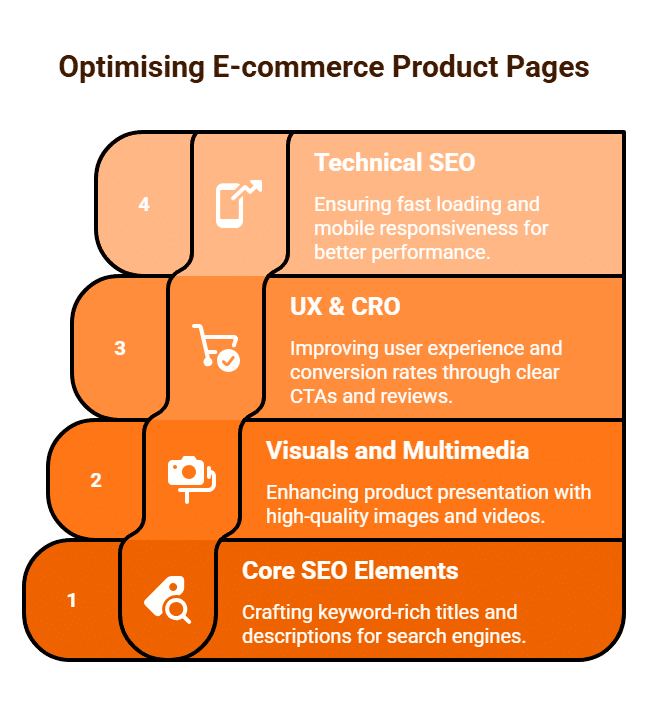
1. Core On-Page SEO Elements
- Unique, Keyword-Rich Product Titles: Craft titles that are not only appealing to customers but also informative for search engines. Include the primary product keyword (e.g., product name, model number), brand, and perhaps a key feature. For example, “Samsung Galaxy S24 Ultra 256GB – Titanium Grey.”
- Compelling Meta Descriptions: While not a direct ranking factor, a well-written meta description (around 150-160 characters) is crucial for attracting clicks from the search results. It should reinforce the product’s value, include price or an offer, and feature a strong call to action (e.g., “Shop the Samsung Galaxy S24 Ultra now – Free UK Delivery!”).
- Strategic Heading Usage: Use a single <h1> tag for the main product name. Utilise <h2> and <h3> tags for key sections like “Features,” “Specifications,” “Customer Reviews,” or “How to Use.” This improves readability and provides structure for search engine crawlers.
- In-depth, Unique Product Descriptions: This is paramount. Avoid using generic manufacturer descriptions. Write unique, detailed, and engaging copy (aim for 200-500+ words for complex products). Focus on benefits and solutions for the customer, rather than just features. Naturally integrate long-tail keywords, synonyms, and related terms. Use bullet points, bold text, and short paragraphs to enhance readability.
2. Visuals and Multimedia
- High-Resolution Product Images: Provide multiple, high-quality images from various angles. Include lifestyle shots showing the product in use, images highlighting key features, and classic white-background shots. Ensure images are compressed (using formats like WebP or AVIF) for fast loading.
- Descriptive Filenames and Alt Text: Name your image files descriptively (e.g., samsung-s24-ultra-titanium-front.jpg). Crucially, fill in accurate and keyword-rich Alt Text for every image. This is vital for both search engine understanding and accessibility for visually impaired users.
- Product Videos and 360-Degree Views: Videos demonstrating the product’s features, an unboxing experience, or testimonials can significantly boost engagement and conversions. 360-degree views or Augmented Reality (AR) features allow customers to inspect the product thoroughly, reducing uncertainty and returns.
3. User Experience (UX) & Conversion Rate Optimisation (CRO)
- Clear Call-to-Action (CTA): The “Add to Cart” or “Buy Now” button must be prominent, easily visible above the fold, and compelling. Consider testing different colours, sizes, and microcopy.
- Transparent Pricing & Availability: Clearly display the product price, any discounts, stock levels (“In Stock,” “Low Stock”), and estimated delivery times or costs upfront. Hidden costs are a major conversion killer.
- Robust Customer Reviews & Ratings: Implement a system for customers to leave reviews. Display these reviews prominently on the page. User-generated content (UGC) is powerful social proof and provides fresh, keyword-rich content.
- Q&A Section: A dedicated section where customers can ask questions and receive answers (from you or other customers) helps address concerns directly on the page, reducing the need for customer service contact.
- Internal Linking: Link to related products, relevant categories, size guides, or blog posts that offer complementary information.
- Customer Support Accessibility: Make it easy for customers to contact support (e.g., live chat, phone number) if they have pre-purchase questions.
4. Technical SEO for Product Pages
- Product Schema Markup: This is vital. Implement Product Schema (e.g., price, availability, aggregate rating, brand, image, description) to allow search engines to display rich snippets in SERPs, significantly enhancing visibility and CTR.
- Canonical Tags: For products with multiple colour, size, or variation options that have distinct URLs but largely similar content, use canonical tags to point to a preferred version. This prevents duplicate content issues.
- Fast Page Load Speed: Product pages often contain many images and scripts. Ensure they load quickly on all devices, as slow loading directly correlates with higher bounce rates and lower conversions.
- Mobile Responsiveness: A flawless and intuitive experience on mobile devices is paramount, covering everything from image display to the “Add to Cart” button functionality.
By meticulously optimising these elements, e-commerce businesses can transform their product pages into high-performing assets that not only rank well but also convert visitors into loyal customers.
How Do You Manage Seasonal Products?
Managing seasonal products in an e-commerce store requires a proactive and integrated strategy that spans inventory, website optimisation, and marketing.
Products tied to specific times of the year – be it Christmas decorations, summer swimwear, or back-to-school supplies – present unique challenges and opportunities due to fluctuating demand.
1. Understanding and Forecasting Seasonality
The first step is to deeply understand your product’s seasonal demand patterns.
- Historical Data Analysis: Review past sales data (over several years if possible) for each seasonal product. Look for peaks, troughs, and the duration of high-demand periods. This data is your most reliable guide for predicting future sales.
- Market Trends (Google Trends): Utilise tools like Google Trends to observe search interest fluctuations for your seasonal keywords. This helps anticipate demand surges and identify emerging trends. For instance, searches for “garden furniture” peak in spring, while “winter coats” surge in autumn.
- Key Dates and Events: Map out a calendar of relevant holidays (Christmas, Easter, Valentine’s Day), seasonal events (summer holidays, Black Friday, Cyber Monday), and industry-specific occasions.
2. Inventory Management: Balancing Stock and Demand
Effective inventory management is crucial to avoid costly overstocking or disappointing stockouts.
- Accurate Demand Forecasting: Combine historical sales data with market trends to forecast demand for each seasonal item. This helps determine optimal stock levels.
- Supplier Collaboration: Work closely with your suppliers. Communicate your anticipated demand well in advance to ensure timely deliveries and sufficient stock. Understand their lead times.
- Flexible Inventory Models:
- Pre-orders: For highly anticipated items, consider offering pre-orders to gauge actual demand before committing to large stock quantities. This also secures early sales.
- Backorders: If an item temporarily sells out, allow backorders with clear delivery timelines to capture sales rather than losing them.
- Just-in-Time (JIT) or Dropshipping: For certain seasonal products, these models can minimise inventory holding costs by only ordering/producing goods as needed.
- Clearance Strategies: Plan for end-of-season clearance sales or promotions to move unsold seasonal stock. Holding onto out-of-season inventory incurs storage costs and ties up capital.
3. Website and SEO Strategies for Seasonal Products
Your website needs to adapt to seasonal shifts to remain relevant in search results.
- Early Keyword Research: Identify seasonal keywords well in advance (3-6 months before the peak). This includes broad terms, long-tail phrases, and question-based queries related to the season or event (e.g., “Christmas gift ideas for him,” “best waterproof jackets for winter walks”).
- Seasonal Content Creation: Develop fresh, relevant content around these keywords. This can include:
- Blog Posts: “Top 10 Summer Essentials,” “Your Guide to Festive Home Decor.”
- Buying Guides: “How to Choose the Perfect BBQ Grill.”
- Gift Guides: Themed gift suggestions for holidays.
- Landing Pages: Dedicated, optimised landing pages for major seasonal campaigns (e.g., “Black Friday Deals”).
- Evergreen URLs: For recurring seasonal pages (e.g., “Christmas Decorations”), use evergreen URLs (e.g., yourstore.com/christmas-decorations) rather than including the year (e.g., christmas-decorations-2024). This preserves SEO authority year after year.
- Don’t Delete, Refresh: Avoid deleting seasonal product pages or categories once the season ends. Instead, de-optimise them slightly, and then refresh and re-optimise them with new content and updated keywords for the following year. Deleting pages loses any accumulated link equity and ranking history.
- Image Optimisation: Use high-quality, seasonally themed images. Ensure they are compressed and have descriptive alt text to rank in image search.
4. Marketing and Promotional Activities
- Flexible Content Calendar: Plan your content and marketing campaigns well in advance, aligning them with your seasonal calendar.
- Targeted Marketing Campaigns: Launch specific campaigns (email, social media, paid ads) that highlight your seasonal offerings. Tailor messaging and visuals to the season’s theme.
- Seasonal Promotions: Offer discounts, bundled deals, or limited-time offers to incentivise purchases during peak periods or to clear end-of-season stock.
- Email Marketing: Segment your email list and send personalised campaigns showcasing new seasonal arrivals, exclusive offers, or gift guides.
- Social Media Engagement: Share captivating, seasonally relevant content with appropriate hashtags. Engage with your audience to build excitement.
- Paid Advertising (Google Ads, Social Ads): Adjust your ad spend and bidding strategies to align with seasonal demand. Increase budgets during peak periods for high-converting keywords and scale back during off-peak times.
By adopting a comprehensive and agile approach to managing seasonal products, e-commerce businesses can effectively capitalise on demand fluctuations, minimise risks, and drive consistent sales throughout the year.

How Do We Optimise Product Images?
Optimising product images is a crucial, yet often overlooked, aspect of e-commerce success.
High-quality, well-optimised images are vital for attracting customers, enhancing their shopping experience, building trust, and improving your website’s search engine optimisation (SEO).
Effectively optimising product images involves a balance of visual appeal, technical performance, and SEO best practices.
1. Visual Quality: Attracting and Informing Customers
Your images are often the first, and sometimes only, interaction a customer has with your product before purchase. Therefore, visual quality is paramount.
- High Resolution: Use high-resolution images that showcase product details clearly. This builds trust and allows customers to inspect the item closely.
- Multiple Angles & Views: Provide images from various angles (front, side, back, top, bottom). Include close-up shots of key features, textures, and details.
- Lifestyle Shots: Show the product in use or in a relevant setting. This helps customers visualise themselves using the product and understand its benefits. For example, clothing on a model, furniture in a room.
- Contextual Shots: Include images that demonstrate the product’s scale (e.g., a phone next to a hand) or different variations (e.g., all available colours).
- Consistent Styling: Maintain a consistent aesthetic across all your product images (e.g., lighting, background, colour temperature). This reinforces brand identity and provides a professional look.
- Video and 360-Degree Views: Consider adding short product videos (e.g., demonstrations, unboxing) or interactive 360-degree spins. These significantly enhance user engagement and can reduce returns.
2. Technical Optimisation: Speed and Performance
Large image files are a major culprit for slow website loading times, which negatively impact user experience, conversion rates, and SEO rankings.
- File Format Selection:
- WebP or AVIF: These are “next-gen” image formats (like WebP and the newer AVIF) that offer superior compression and smaller file sizes compared to traditional JPEGs and PNGs, often without noticeable quality loss. Many modern e-commerce platforms and browsers support them.
- JPEG: Excellent for photographs and complex images, offering good compression for smaller file sizes.
- PNG: Best for images with transparency or sharp lines (like logos, graphics, screenshots), as it uses lossless compression.
- Image Compression: Use image optimisation tools (e.g., TinyPNG, ImageOptim, or built-in features of your e-commerce platform) to compress images before uploading. This drastically reduces file size while maintaining acceptable visual quality.
- Resizing and Cropping: Resize images to the maximum dimensions they will actually be displayed on your website. Avoid uploading unnecessarily large images that are then scaled down by your site. Crop images to focus on the product, eliminating unnecessary background space.
- Lazy Loading: Implement lazy loading, where images “below the fold” (not immediately visible on screen) only load as the user scrolls down. This speeds up initial page load time, improving perceived performance.
3. SEO Optimisation: Visibility in Search
Optimising images for search engines helps your products appear in both web search results and Google Images.
- Descriptive Filenames: Use clear, keyword-rich filenames that describe the image content. Avoid generic names like IMG_001.jpg. Instead, use womens-red-leather-wallet.jpg or nike-air-max-running-shoe-side-view.webp.
- Compelling Alt Text (Alternative Text): This is paramount for image SEO and accessibility. Alt text is a brief, descriptive phrase that explains the image content for visually impaired users (via screen readers) and for search engines (which cannot “see” images). Include relevant keywords naturally. For example, <img src=”red-leather-wallet.jpg” alt=”High-quality red leather wallet with multiple card slots”>.
- Image Sitemaps: For large e-commerce sites, submit an image sitemap to Google Search Console to help Google discover and index all your product images.
- Contextual Placement: Ensure product images are placed near relevant text content on the product page, reinforcing their meaning for search engines.
By meticulously optimising product images across these three pillars—visual quality, technical performance, and SEO—e-commerce businesses can significantly enhance user experience, boost conversion rates, and improve their organic search visibility, ultimately driving more sales.

How Do We Sell Products Overseas?
Expanding an e-commerce business to international markets presents significant opportunities for growth, but it also introduces a unique set of complexities.
Successfully selling products overseas requires meticulous planning, a deep understanding of new markets, and adaptation of your operations to meet global demands.
1. Market Research and Strategic Selection
Don’t simply open your store to the world. A strategic approach is vital:
- Identify Target Markets: Research countries with a high potential demand for your products, favourable economic conditions, and a relatively manageable competitive landscape. Utilise tools like Google Market Finder to gauge search interest and export trends.
- Understand Local Demand and Preferences: What are the cultural nuances? Are there specific product features, sizes, or colours preferred in that market? Are there local equivalents or substitutes that consumers are already familiar with?
- Assess Competition: Who are your existing and potential competitors in the target country? Analyse their pricing, marketing, and fulfilment strategies.
- Regulatory Landscape: Investigate import duties, taxes (such as VAT/GST), product certifications (e.g., CE marking for the EU, FCC for the US), and specific labelling requirements.
2. Logistics and Fulfilment
This is often the most challenging aspect of international expansion.
- International Shipping Carriers: Choose reliable partners like DHL, FedEx, UPS, or national postal services (e.g., Royal Mail, Australia Post International). Evaluate their services based on speed, cost, tracking capabilities, and reliability for your product type.
- Customs and Duties: Understand the complexities of tariffs and import taxes. Decide whether you will handle duties and taxes upfront (Delivered Duty Paid – DDP) or if the customer will be responsible upon delivery (Delivered At Place – DAP). DDP generally leads to a better customer experience, avoiding unexpected charges.
- Warehousing and 3PLs (Third-Party Logistics): For significant volumes in a target market, consider partnering with a 3PL provider. This can reduce shipping costs, speed up delivery times, and simplify local returns.
- International Returns Policy: Establish a clear, fair, and easy-to-understand returns process for international customers. A straightforward returns policy is crucial for building trust and encouraging purchases.
3. Legal and Financial Considerations
Navigating international legal and financial frameworks is critical for compliance and profitability.
- Taxation: Beyond import duties, understand your obligations regarding sales tax, VAT, or GST in the destination country. You may need to register for VAT if selling to consumers in certain regions (e.g., the EU’s VAT e-commerce rules).
- Product Compliance: Ensure your products meet all safety, environmental, and technical standards of the target country. This might involve obtaining specific certifications or adhering to local regulations.
- Payment Gateways and Currencies: Offer popular local payment methods and display prices in the local currency. Multi-currency checkout functionality on your e-commerce platform is highly recommended to improve conversion rates.
- Intellectual Property: Consider protecting your brand name, trademarks, and unique product designs in your key target markets to prevent infringement.
4. Website Localisation and User Experience
Your online store needs to feel local to your international customers.
- Language Translation: Provide accurate, high-quality translations of your website content. Avoid automated translation tools for key content, as nuances can be lost. Consider regional dialects if relevant.
- Localised Content: Adapt imagery, testimonials, cultural references, and marketing messages to resonate with the local culture. What works in one country may not work in another.
- Customer Support: Offer customer support in the local language, or at least in a common international language, and be mindful of time zone differences.
- Shipping Options and Costs: Clearly display all international shipping options, estimated delivery times, and associated costs from the outset to avoid customer abandonment.
5. Marketing and Promotion
Tailor your marketing efforts to each specific international market.
- International SEO: Optimise your website content for relevant keywords in the target language. Implement hreflang tags to inform search engines about language and regional versions of your pages.
- International Paid Ads: Run targeted Google Ads and social media campaigns in the new market, using local language and currency.
- Localised Social Media: Engage on social media platforms popular in the target country and adapt your content to suit local trends.
- Influencer Marketing: Collaborate with local influencers who can authentically promote your products to their audience.
By meticulously addressing these facets, businesses can navigate the complexities of international trade, effectively reach new customers, and unlock substantial growth opportunities by selling their products overseas.

Compare Shopify vs Woo Commerce for Selling Products Online?
Choosing the right e-commerce platform is a foundational decision for any online business, significantly impacting everything from ease of setup and daily management to scalability and long-term costs.
In Australia and globally, Shopify and WooCommerce stand out as two of the most popular and robust options for selling products online. While both enable successful online retail, they fundamentally differ in their architecture, features, and the level of technical expertise they demand.
Shopify: The All-in-One Hosted Solution
Shopify is a Software-as-a-Service (SaaS) platform, meaning it’s a fully hosted, all-in-one solution designed specifically for e-commerce. It manages all the technical infrastructure – hosting, security, updates, and maintenance – allowing merchants to focus primarily on selling and marketing their products.
Advantages of Shopify:
- Ease of Use: Shopify is renowned for its user-friendly interface and intuitive drag-and-drop builder. Setting up a store requires minimal technical knowledge, making it ideal for beginners or businesses prioritising a quick launch. Adding products, managing inventory, and processing orders are straightforward tasks.
- Predictable Costs: Shopify operates on a clear monthly subscription model (e.g., Basic from $42/month, Grow from $114/month, Advanced from $431/month for annual billing in Australia). These plans include hosting, SSL certificates, and essential features. While transaction fees apply if not using Shopify Payments, the overall cost structure is transparent and predictable.
- Built-in Features & Apps: Shopify offers a comprehensive suite of built-in e-commerce features, including inventory management, payment processing (Shopify Payments), shipping tools, and basic analytics. Its extensive App Store provides thousands of third-party integrations (both free and paid) to extend functionality, from email marketing to advanced SEO.
- Security & Reliability: As a hosted platform, Shopify handles all security updates, PCI DSS compliance (for secure credit card transactions), and server maintenance. This offers peace of mind regarding uptime and data protection.
- Dedicated Support: Shopify provides 24/7 customer support via live chat, email, and phone, which is invaluable for troubleshooting issues quickly.
- Scalability: Shopify is designed to scale effortlessly, handling sudden traffic spikes and growing product catalogues without requiring manual server management or complex upgrades from the merchant.
Disadvantages of Shopify:
- Less Customisation Flexibility: While themes are highly customisable, deep customisation often requires knowledge of Liquid, Shopify’s proprietary templating language, or reliance on apps. Full control over certain aspects like the checkout process is typically restricted to higher-tier plans like Shopify Plus (USD$2300 per Month).
- Transaction Fees: If you choose to use third-party payment gateways instead of Shopify Payments, additional transaction fees (e.g., 2% on Basic plan) apply on top of the gateway’s own fees.
- Content Marketing Limitations: While it has a built-in blogging feature, Shopify’s content management system (CMS) is generally less robust and flexible than WordPress for advanced content marketing strategies.

WooCommerce: The Flexible WordPress Plugin
WooCommerce is a free, open-source e-commerce plugin built for WordPress, the world’s most popular Content Management System (CMS). This means to use WooCommerce, you first need a self-hosted WordPress website. WooCommerce transforms a standard WordPress site into a fully functional online store, offering immense customisation and control.
Advantages of WooCommerce:
- Unparalleled Customisation & Control: Being open-source and built on WordPress, WooCommerce offers virtually limitless customisation possibilities. You have full control over your website’s code, design, features, and integrations. This is ideal for businesses with unique requirements or developers who want to build highly bespoke solutions.
- Cost-Effectiveness (Initial): The WooCommerce plugin itself is free. This makes it an attractive option for businesses looking to minimise initial platform fees.
- WordPress Ecosystem & SEO: WooCommerce benefits from WordPress’s robust CMS capabilities, including its powerful blogging system and extensive SEO plugins (e.g., Yoast SEO, Rank Math). WordPress is inherently SEO-friendly, allowing for granular control over meta data, URLs, and site architecture.
- No Transaction Fees (from WooCommerce): WooCommerce itself does not charge additional transaction fees for using third-party payment gateways; you only pay the standard fees imposed by your chosen payment processor.
- Ownership of Data: You fully own your website, code, and data, offering complete control over your online assets.
Disadvantages of WooCommerce:
- Requires Technical Expertise: WooCommerce is a self-hosted solution. This means you are responsible for choosing and managing your own web hosting, domain, SSL certificate, security, and updates. While there are managed WooCommerce hosting providers, a degree of technical comfort is often required.
- Variable Costs: While the plugin is free, costs can become less predictable. You’ll pay for hosting (e.g., from $15/month up to hundreds for high-traffic sites), premium themes, and potentially numerous paid extensions/plugins for advanced features (e.g., subscriptions, advanced shipping).
- Security & Maintenance Responsibility: You are primarily responsible for your site’s security (e.g., installing plugins, regular backups, monitoring for threats).
- Customer Support: Official support for WooCommerce is more limited compared to Shopify. You typically rely on community forums, documentation, or your hosting provider for help. For complex issues, hiring a developer is often necessary.

Conclusion
The choice between Shopify and WooCommerce ultimately depends on your business’s specific needs, technical comfort level, and budget.
- Choose Shopify if: You prioritise ease of use, a quick launch, minimal technical hassle, predictable monthly costs, and robust built-in support. It’s ideal for beginners and businesses focused on rapid scaling without developer dependence.
- Choose WooCommerce if: You require ultimate control, extensive customisation, want to leverage the WordPress ecosystem for content marketing, or have specific technical requirements and are comfortable managing the underlying infrastructure. It’s often favoured by developers, technically savvy entrepreneurs, or businesses on a tighter budget willing to invest time in management.
Both platforms are highly capable of powering successful online stores, but their differing philosophies cater to distinct business profiles.
How Do We Market with Google Merchant Center?
Google Merchant Center (GMC) is an indispensable platform for any e-commerce business looking to effectively advertise and promote its products across Google’s vast network. While not an advertising platform itself, GMC serves as the crucial bridge that connects your online store’s product data with various Google shopping experiences, primarily enabling the creation of highly visual and effective Google Shopping Ads.
What is Google Merchant Center?
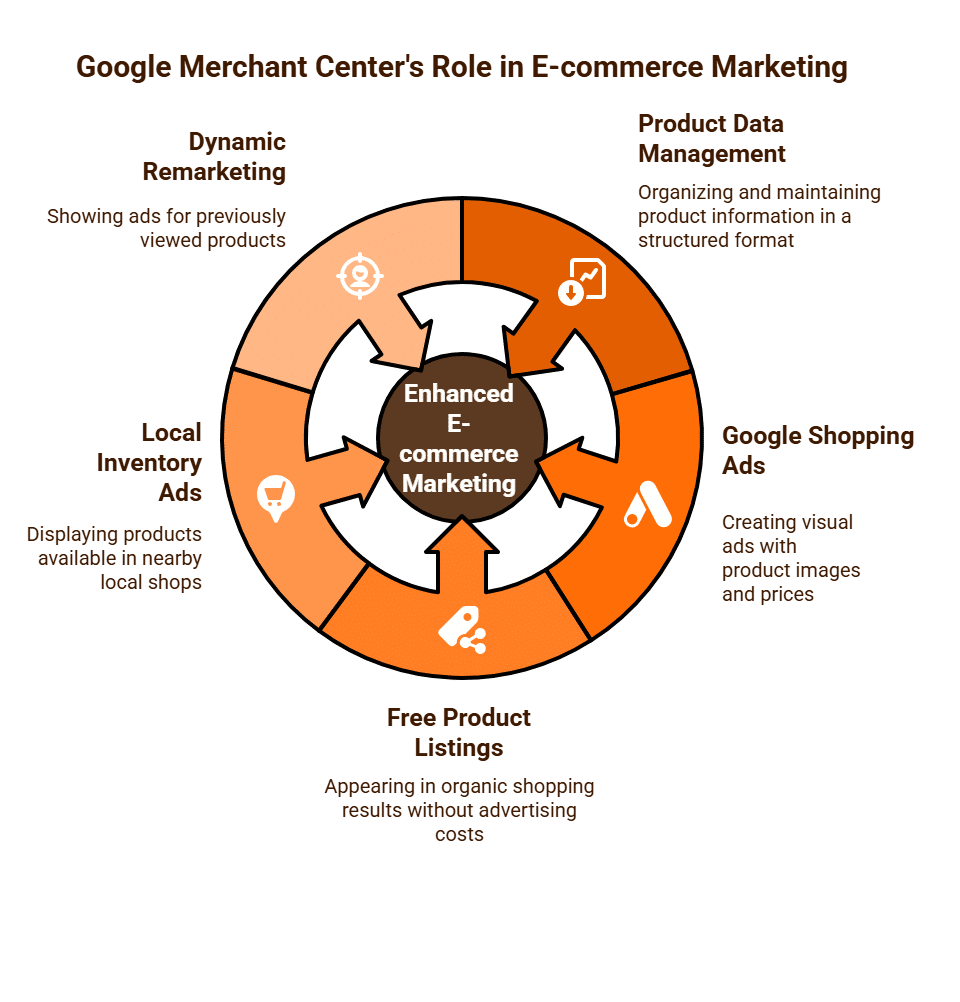
GMC is a free tool provided by Google that allows you to upload, manage, and maintain your product information in a structured format known as a product feed. This feed contains all the essential details about your inventory, such as product titles, descriptions, images, prices, availability, and unique identifiers (like GTINs). Google then uses this rich data to power various shopping-related features across its properties.
Its Key Role in E-commerce Marketing
The primary function of GMC in e-commerce marketing is to facilitate:
- Google Shopping Ads (Product Listing Ads – PLAs): These are the highly visual ads that appear prominently at the top of Google Search results, on the Google Shopping tab, and across other Google properties. They feature product images, prices, and merchant names, making them incredibly effective for attracting high-intent buyers.
- Free Product Listings: GMC also enables your products to appear in Google’s organic (unpaid) shopping results, offering increased visibility without direct advertising cost.
- Local Inventory Ads: For businesses with physical stores, GMC can connect with your Google Business Profile to display products available in nearby local shops, driving in-store traffic.
- Dynamic Remarketing: The product data from GMC can be used to power dynamic remarketing campaigns, showing ads for specific products that users have previously viewed on your site.
Essential Steps to Market with Google Merchant Center
To leverage GMC for your marketing efforts, follow these core steps:
- Set Up and Verify Your Account: Create a Google Merchant Center account, ensuring your business information (country, currency, time zone) is accurate. You’ll need to verify your website ownership (e.g., via Google Analytics, Search Console, or an HTML tag).
- Configure Tax and Shipping Information: This is a critical compliance step. Accurately set up your tax (e.g., VAT in the UK) and shipping services (rates, delivery times) for each target country within GMC. These settings must precisely match the information displayed on your e-commerce website to avoid disapprovals.
- Create and Upload Your Product Feed: This is the heart of your GMC presence.
- Data Collection: Compile all necessary product attributes (e.g., id, title, description, link, image_link, price, availability, brand, gtin if applicable, condition).
- Feed Format: Choose a suitable format (XML, CSV, or Google Sheets) and use a feed management solution or your e-commerce platform’s built-in tools to generate it.
- Quality and Accuracy: Ensure all product data is accurate, up-to-date, and meets Google’s strict product data specifications. Inaccurate data is a common cause of product disapprovals.
- Update Frequency: Schedule daily, automated updates for your feed to reflect changes in stock, pricing, or product details.
- Link to Your Google Ads Account: Connect your Google Merchant Center account directly to your Google Ads account. This seamless integration allows you to create and manage Shopping campaigns within the Google Ads interface, drawing product data directly from GMC.
- Create Google Shopping Campaigns in Google Ads: Within Google Ads, you’ll set up “Shopping” campaigns (or a Performance Max campaign, which automatically uses GMC data). Here, you’ll define your budget, bidding strategy, geographic targeting, and campaign structure, while Google automatically pulls the product information from your GMC feed to generate your ads.

Key Benefits for E-commerce Marketing
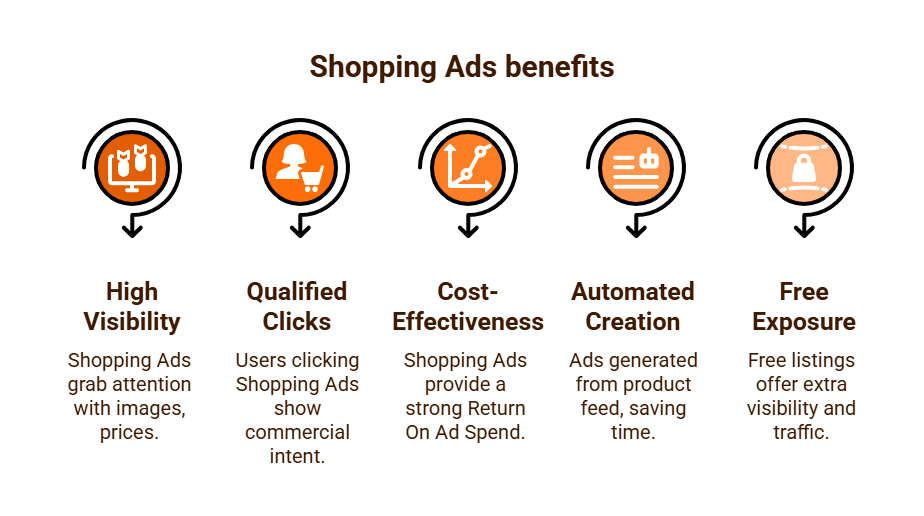
- High Visibility & Visual Impact: Shopping Ads dominate search results with appealing product images, prices, and merchant names, capturing user attention immediately.
- Highly Qualified Clicks: Users who click on Shopping Ads often have high commercial intent, having already seen the product image and price. This leads to better conversion rates.
- Cost-Effectiveness: The qualified nature of clicks from Shopping Ads typically results in a strong Return On Ad Spend (ROAS).
- Automated Ad Creation: Your ads are automatically generated from your product feed, saving significant time compared to manually creating text ads.
- Free Organic Exposure: Access to free product listings provides an additional avenue for visibility and traffic without direct ad spend.
By meticulously managing your product data in Google Merchant Center, you empower your e-commerce business to leverage Google’s powerful shopping ecosystem, reaching high-intent customers with visually rich ads and driving substantial revenue.
How Do I Research My E-commerce Competitors?
For any online store, understanding your e-commerce competitors is not merely advantageous; it’s absolutely essential for sustainable growth. E-commerce competitor research involves a deep dive into their online presence, strategies, and operational efficiencies to identify opportunities, uncover threats, and refine your own competitive edge. It goes beyond general market analysis to scrutinise the specific digital tactics that drive online sales.
1. Identify Your E-commerce Competitors
Start by pinpointing who you’re truly competing with in the online space:
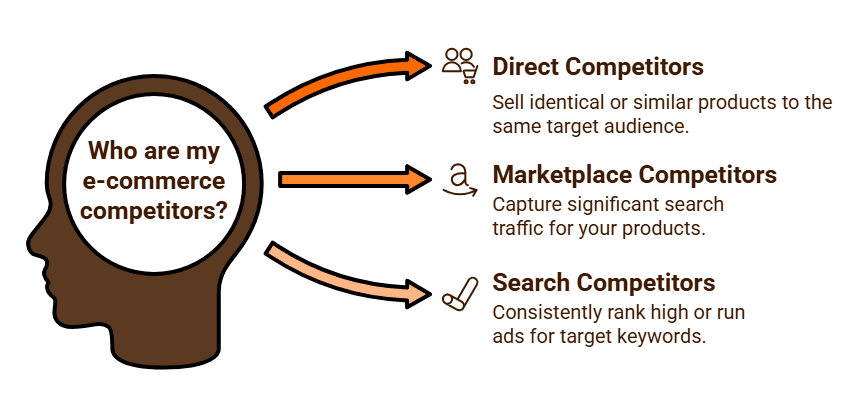
- Direct E-commerce Competitors: These sell identical or very similar products to your same target audience.
- Marketplace Competitors: Major players like Amazon, eBay, or Etsy might be direct competitors even if you don’t sell on those platforms, as they capture significant search traffic for your products.
- Search Competitors: Who consistently ranks high or runs ads for your target product and category keywords on Google? These are crucial, as they capture the same customer intent.
- Method: Perform incognito Google searches for your core product names, categories, and “buy [product] online” terms. Observe who appears in organic results and, critically, who dominates Google Shopping Ads.
2. Deep Dive into E-commerce Specifics (Tools and Methods)
Once you have your list, use a combination of tools and manual analysis to gather insights:
Product Range & Pricing Strategy:
- Catalogue Analysis: Browse their entire product catalogue. How broad or deep is their offering? Do they have unique products or exclusive brands you don’t?
- Pricing & Promotions: Monitor their pricing strategies. Are they generally higher, lower, or similar to yours? What discounts, bundles, or seasonal promotions do they run?
- Shipping & Returns: Critically analyse their shipping costs, delivery times, and returns policy. Are they offering free shipping? What are their return windows and costs? This is a huge conversion factor for customers.
Website User Experience (UX) & Conversion Funnel:
- Site Navigation & Search: How intuitive is their website navigation? Is their category structure logical? How effective is their internal search functionality?
- Product Pages: Scrutinise their product pages. How detailed are their descriptions (do they avoid generic manufacturer copy)? What quality of images/videos do they use? How prominent and compelling are their Calls-to-Action (CTAs)? Do they leverage customer reviews effectively?
- Checkout Process: Go through their checkout process. How many steps are there? Do they offer guest checkout? What payment options are available? Is pricing transparent (no hidden fees)?
- Site Speed & Mobile Responsiveness: Crucial for conversions. Use tools like Google PageSpeed Insights to check their load times and assess their mobile usability.
SEO & Content Strategy (E-commerce Focused):
- Keywords: Use paid SEO tools (e.g., Ahrefs, Semrush, Moz Keyword Explorer, SE Ranking) to discover the product, category, and long-tail keywords they rank for organically. This helps identify content gaps and profitable terms.
- Content Quality: Analyse their product descriptions (are they unique and benefit-driven?), category page content, and blog articles (e.g., buying guides, product comparisons, lifestyle content).
- Google Shopping Ads & Paid Search: Tools like Semrush’s Advertising Research or SpyFu can reveal the products they are advertising on Google Shopping, their text ad copy, and the keywords they are bidding on.
- Backlink Profile: Examine the quality and quantity of backlinks pointing to their product and category pages.
Paid Advertising Strategy (Beyond Search):
- Social Media Ads: Check platforms like Facebook’s Ad Library to see the creatives, offers, and target audiences of the ads they are currently running on Facebook and Instagram.
- Display/Remarketing: Notice if you see their ads appearing on other websites after visiting their store (remarketing campaigns).
Customer Engagement & Retention:
- Email Marketing: Sign up for their newsletter. Analyse their welcome series, promotional emails, abandoned cart sequences, and post-purchase follow-ups.
- Social Media Engagement: How do they interact with customers on social platforms? What’s their response time for customer service enquiries via social media?
- Customer Reviews: Where do they encourage reviews? What’s their average star rating? How do they manage and respond to negative reviews?

3. Synthesise Insights and Formulate Actionable Strategies
Consolidate your findings into a comprehensive report. Conduct a SWOT analysis (Strengths, Weaknesses, Opportunities, Threats) for your competitors relative to your own e-commerce business. Identify their Unique Selling Propositions (USPs).
This analysis will highlight areas where you can differentiate, improve your offerings, optimise your website, and refine your marketing tactics to gain a competitive advantage in the online retail space.
E-commerce competitor research is an ongoing process, providing continuous insights to adapt and strengthen your online business strategy.
How Do We Improve Our E-commerce Conversion Rate?
Improving e-commerce conversion rate (CR) is one of the highest-impact levers for profitability, because you’re turning existing traffic into more revenue without extra ad spend. Let’s break this down into a clear framework with site UX, trust, product presentation, checkout flow, and marketing levers:
🔑 1. Optimise Site Speed & Mobile UX
- Fast load times: Aim for <2 seconds. Each extra second can reduce conversions by up to 7%.
- Mobile-first design: Over 60% of e-commerce traffic is mobile; ensure buttons, images, and forms are optimised for smaller screens.
- Use tools like Google PageSpeed Insights or GTmetrix to identify bottlenecks.
🛍 2. Product Pages that Sell
- High-quality images & videos (multiple angles, zoom, lifestyle usage).
- Clear, benefit-driven descriptions → not just features, but how it solves the customer’s problem.
- Social proof: Reviews, star ratings, and UGC (user-generated content).
- Urgency & scarcity: “Only 3 left in stock” or “Sale ends in 24 hours.”
- Trust signals: Badges like “Money-back Guarantee,” “Secure Checkout,” “Free Returns.”
🛒 3. Streamline Checkout Process
- Guest checkout option (don’t force account creation).
- Autofill & wallet integrations (Google Pay, Apple Pay, PayPal).
- Progress indicator in multi-step checkout.
- Reduce friction: Minimise form fields (shipping, billing, email only).
- Transparent pricing → show shipping & taxes upfront to avoid cart abandonment.
💳 4. Offer Flexible Payment & Shipping
- BNPL (Buy Now Pay Later) options like Afterpay, Klarna, Zip Pay.
- Free shipping threshold: “Free shipping on orders over $100.”
- Multiple delivery speeds (standard, express).
- Clear delivery estimates (“Arrives by Friday, Aug 23”).
🎯 5. Personalisation & Remarketing
- Personalised recommendations (AI-driven or “You may also like”).
- Email & SMS remarketing → abandoned cart flows typically recover 10–15% of lost sales.
- Dynamic retargeting ads on Google & Meta to re-engage visitors with products they viewed.
- Use segmented offers (first-time buyer discount vs. loyalty perks for repeat customers).
📊 6. Data-Driven Testing
- A/B testing headlines, CTAs, and layouts (tools: Google Optimize, VWO, Optimizely).
- Heatmaps & recordings (Hotjar, Microsoft Clarity) to see where users drop off.
- Track funnel analytics in GA4 (product view → add to cart → checkout → purchase).
🌟 7. Build Trust & Brand Confidence
- Prominent returns & refund policy.
- Live chat or chatbot support.
- Display customer stories, case studies, or influencer endorsements.
- Show business legitimacy (physical address, About Us page, certifications).
🚀 8. Marketing Levers to Push Conversions
- First-purchase incentives (10% off your first order).
- Exit intent pop-ups (offer a discount before they leave).
- Bundles & upsells → “Buy 2, get 15% off” or add complementary items at checkout.
- Loyalty programs to increase repeat purchase rate.
✅ Rule of Thumb:
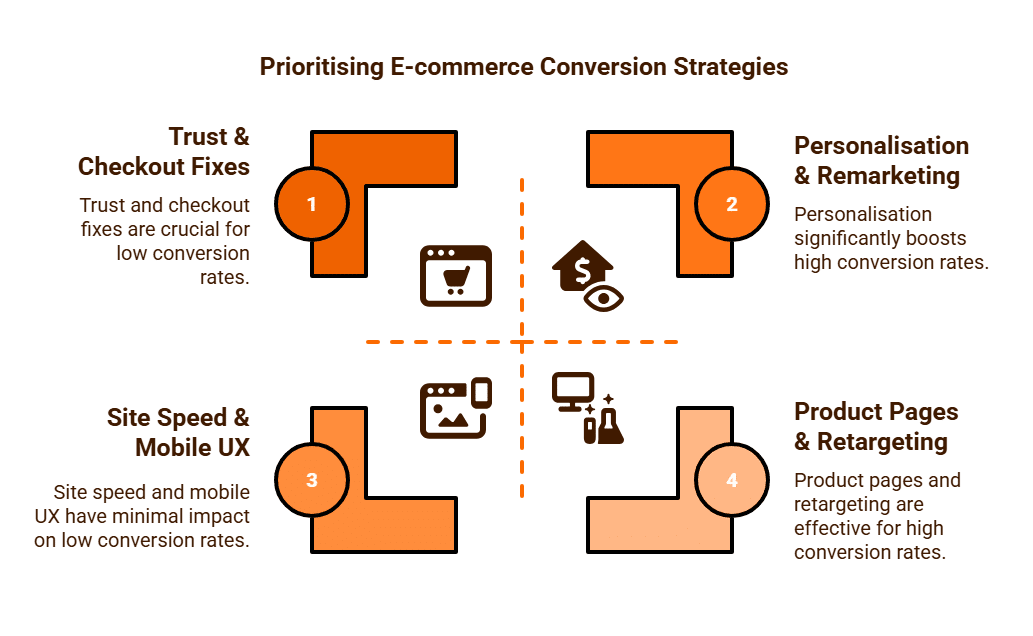
- If your current CR is <1%, start with trust & checkout fixes.
- If you’re in the 1–3% range (typical for most e-commerce), focus on product pages + retargeting.
- To push beyond 3–5%+, you’ll need personalisation, strong branding, and loyalty programs.
🛠 Step-by-Step E-commerce CRO Plan
Phase 1 – Quick Wins (Implement Within 2 Weeks)
These are low-effort, high-impact actions that can move your conversion rate almost immediately.
- Fix Site Speed & Mobile UX
- Run a speed test (Google PageSpeed Insights).
- Compress images, enable caching, and check mobile layout.
- Goal: <2 seconds load time.
- Streamline Checkout
- Add guest checkout (don’t force signups).
- Reduce form fields to essentials (name, email, shipping, payment).
- Show shipping costs and estimated delivery before payment.
- Add Trust Signals
- Display “Secure Checkout” and payment provider badges (Visa, PayPal, Afterpay).
- Highlight returns/refund policy on product pages.
- Show customer reviews on key products.
- Improve CTAs (Calls-to-Action)
- Replace generic “Buy Now” with benefit-driven CTAs like “Add to Cart – Get It by Friday.”
- Make CTAs large, contrasting, and mobile-friendly.

Phase 2 – Medium-Term (3–6 Weeks)
Once the basics are fixed, improve the shopping experience and reduce cart abandonment.
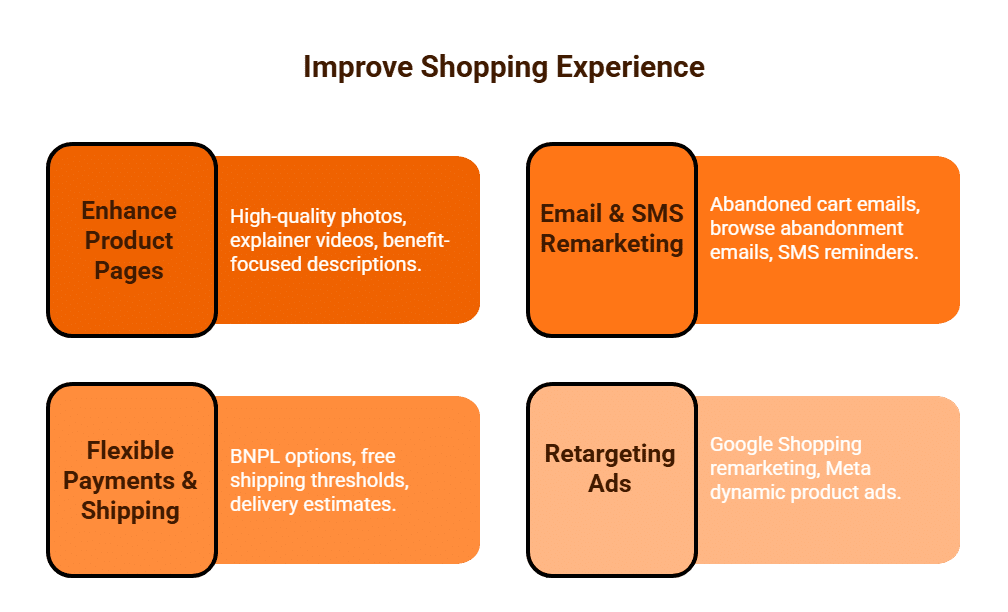
- Enhance Product Pages
- Upload high-quality photos (multiple angles + lifestyle shots).
- Add short product explainer videos where possible.
- Rewrite descriptions to focus on benefits + solutions, not just specs.
- Email & SMS Remarketing
- Set up abandoned cart emails (3-part sequence: reminder, discount, urgency).
- Add browse abandonment emails (if someone viewed a product but didn’t add to cart).
- Use SMS reminders for limited-time sales.
- Offer Flexible Payments & Shipping
- Add BNPL (Afterpay, Klarna, Zip Pay).
- Introduce free shipping thresholds (e.g., “Free shipping over $100”).
- Show delivery estimates at checkout.
- Leverage Retargeting Ads
- Run Google Shopping remarketing to show products people viewed.
- Use Meta dynamic product ads to bring users back.
Phase 3 – Long-Term Optimisation (Ongoing)
These strategies require continuous testing but yield the biggest growth.
- A/B Testing & UX Research
- Use Hotjar or Microsoft Clarity to track user behaviour.
- Test checkout flows, product page layouts, and promo banners.
- Experiment with urgency tactics (stock counters, timers).
- Personalisation & Cross-Selling
- “Recommended for you” product suggestions.
- Cross-sell complementary products at checkout.
- Use loyalty tiers (points, VIP perks).
3. Build Brand Trust & Loyalty
- Showcase customer stories and UGC (user-generated content).
- Start a loyalty program (points or rewards).
- Encourage reviews + referrals with incentives.
4. Analyse & Iterate
- Review funnel metrics:
- Product view → Add to cart
- Add to cart → Checkout start
- Checkout start → Completed purchase
- Fix the biggest drop-off first for maximum gains.
📊 Success Benchmarks
- Average e-commerce conversion rate: 2–3%
- Great e-commerce stores achieve: 3–5%+
If you’re below 1%, start with Phase 1 immediately!

How to Check if Products and Pages are Indexed by Search Engines?
Checking if your products and pages are indexed by search engines is a fundamental and critical step in any e-commerce SEO strategy. Indexing is the process by which search engines like Google discover, crawl, and store your website’s content in their database. If a page is not indexed, it cannot appear in search results, regardless of how well it is optimised. This FAQ outlines the key methods for checking your indexing status and provides guidance on how to troubleshoot common issues.
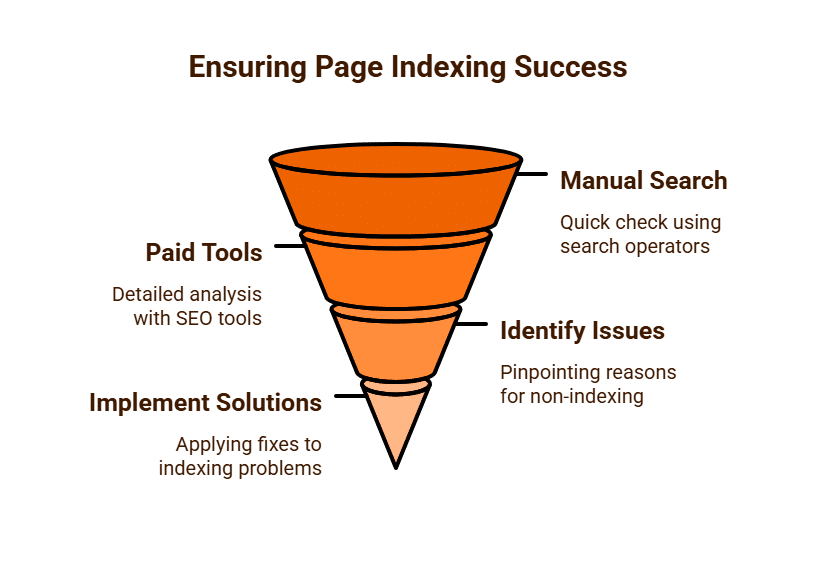
Method 1: Using Google Search Console (GSC)
Google Search Console is the most reliable and powerful tool for monitoring your website’s indexing status directly from Google. It is free and provides a direct line of communication with Google’s search index.
The URL Inspection Tool
The URL Inspection tool in GSC is your primary resource for checking individual pages.
- Navigate to Google Search Console and select your website property.
- Paste the full URL of the product or page you want to check into the search bar at the top of the GSC interface.
- GSC will then retrieve data directly from Google’s index. The result will tell you one of three things:
- “URL is on Google”: This is the ideal outcome. It means the page is indexed and eligible to appear in search results.
- “URL is not on Google”: This means the page is not indexed. GSC will provide a reason for this, such as “Page with redirect,” “Blocked by robots.txt,” “Noindex detected in ‘robots’ meta tag,” or “Excluded by ‘noindex’ tag”.
- “Discovered – currently not indexed”: This is a neutral status. It means Google is aware of the page but has not yet crawled and indexed it. This often happens with new pages or pages that Google deems less important.
The Coverage Report
The Coverage Report in GSC provides a high-level overview of your entire site’s indexing status.
- In the GSC left-hand menu, click on “Index” and then “Pages.”
- This report shows a breakdown of all pages that are indexed, excluded, or have errors.
- You can filter by status to see why pages are being excluded. The report can help you identify sitewide issues, such as a large number of pages being excluded due to crawl anomalies or a “noindex” tag.

Method 2: Manual Search Operators
For a quick, on-the-fly check, you can use a manual search operator directly in the Google search bar.
- Simply type site:yourdomain.com/exact-page-url into Google Search.
- If the page appears in the search results, it is indexed. If it does not, it is either not indexed or is being outranked by another, more relevant page (though for an exact URL search, this is unlikely).
This method is fast but lacks the diagnostic detail provided by Google Search Console. It’s a good way to get a quick confirmation before delving into a deeper investigation.
Method 3: Paid Tools
You can use paid tools like SE Ranking to identify indexed pages. SE Ranking shows the number of pages indexed in Google, Yahoo and Bing in their SEO Audit Report.
Why Pages Might Not Be Indexed (and How to Fix It)
If your products or pages are not being indexed, here are some common reasons and solutions:
- Noindex Tag: A common reason for exclusion is a noindex tag in the page’s HTML <head> section. This tag explicitly tells search engines not to index the page. You might use this for low-value pages like internal search results or user account pages. To fix it, simply remove the tag.
- robots.txt File: Your robots.txt file might be blocking search engine crawlers from accessing the page or an entire section of your site. To fix this, edit the robots.txt file to remove the disallow directive for the pages you want indexed.
- No Internal Links: Google’s crawlers follow internal links to discover new pages. If a page has no internal links pointing to it, it can be “orphaned” and go undiscovered. To fix this, strategically link to the page from other relevant pages on your site. The Wikipedia model of internal linking is mentioned in the SEO webinar presentation.
- Low-Quality or Thin Content: Google may choose not to index pages it deems to have low-quality or “thin” content that provides little value to users. To fix this, enhance the page with unique, in-depth, and valuable content.
- Canonicalisation Issues: If you have multiple URLs for the same content (e.g., a product page with different colour variations), Google may choose not to index the duplicate pages. Ensure you have a proper rel=canonical tag pointing to your preferred version of the page.
- Indexing Budget Limitations: Some SEO’s believe there is an actual budget for indexing sites as the amount of indexed data continues to grow exponentially, and Google limits the number of indexed pages for each website to reduce this bloat, especially with low-quality content or products.
By regularly monitoring your indexing status with Google Search Console and troubleshooting any issues, you can ensure your products and pages are visible and eligible to attract organic search traffic.
How to Set Up Free Google Shopping Campaigns?
Q1: What are Free Google Shopping Listings?
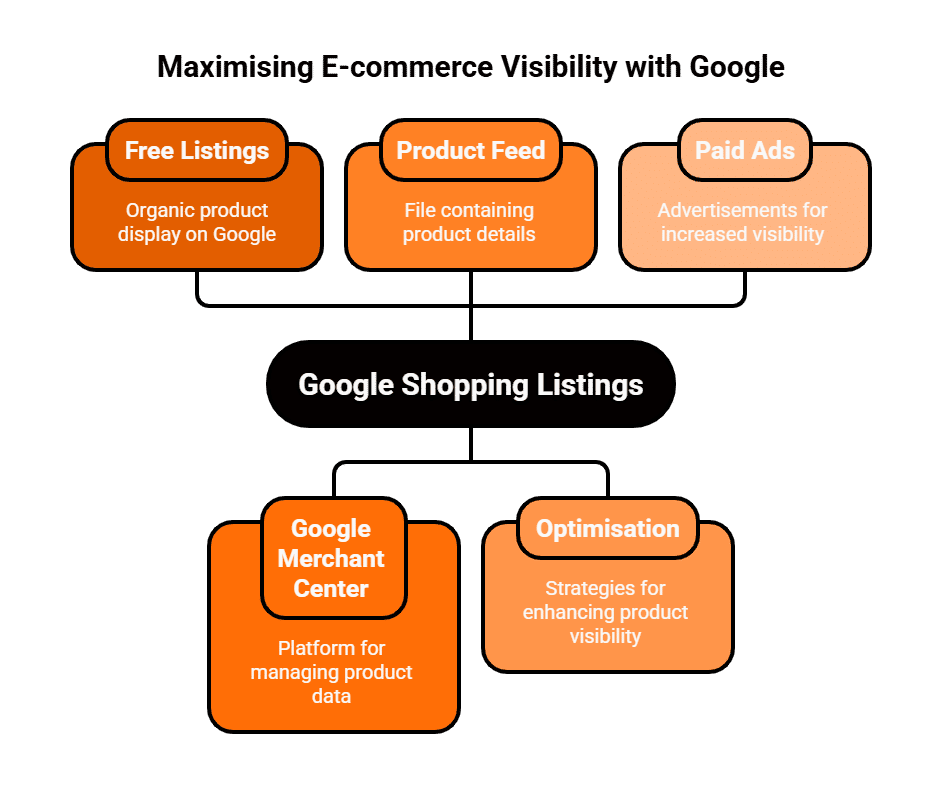
Free Google Shopping listings, also known as free product listings, are an e-commerce feature that allows retailers to display their products in Google’s Shopping tab and other surfaces without paying for advertising. These listings appear alongside paid Shopping Ads and are based on the relevance of your product data to a user’s search query, similar to how organic search results work. They are an excellent way for businesses to increase their visibility, drive qualified traffic, and generate sales without a paid advertising budget.
Q2: What is Google Merchant Center and why do I need it?
Google Merchant Center (GMC) is the central platform where you upload and manage your product data for use across Google’s various e-commerce properties. It acts as the bridge between your online store and Google’s Shopping ecosystem. You must have a Google Merchant Center account and an up-to-date product feed to be eligible for free product listings. GMC is a prerequisite for both free listings and paid Shopping Ads.
Q3: How do I set up my Google Merchant Center account for free listings?
The process is straightforward:
- Create and Verify: If you haven’t already, create a Google Merchant Center account and verify that you own your website by adding an HTML tag or linking to your Google Analytics or Search Console account.
- Provide Business Info: Fill in all your business information, including your business name, address, and contact details.
- Set Tax and Shipping: Accurately configure your tax and shipping settings for the countries where you plan to sell. These details must exactly match what you display on your e-commerce website.
- Enable the Feature: Navigate to the “Growth” section in the left-hand menu and click on “Manage programs.” Here, you will find a card for “Free product listings.” Click “Get started” to enable the feature for your account.
Q4: How do I get my products from my website to Google Merchant Center?
You get your products into GMC by creating and uploading a product feed. A product feed is a file (typically in XML or CSV format) that contains all the essential information about your products, such as id, title, description, link, image_link, price, availability, and brand. Most e-commerce platforms like Shopify, WooCommerce, or BigCommerce have apps or built-in functionalities to generate this feed automatically. You can then upload this feed to GMC, and it’s best practice to set up a scheduled fetch to ensure your product data is always current. After uploading, check the “Diagnostics” section in GMC for any errors or warnings that need to be fixed.
Q5: What are the best practices for optimising my products for free listings?
To maximise your visibility and performance, your product data must be high-quality and complete:
- Descriptive Titles: Use clear, keyword-rich product titles that include the brand, product name, and key features.
- High-Quality Images: Use professional, high-resolution product images that are clean and show the product from various angles.
- Unique Descriptions: Write unique, detailed descriptions for every product, avoiding generic manufacturer copy.
- Accurate Data: Ensure your pricing and availability data are always up-to-date and match your website.
- Customer Reviews: Encourage customer reviews, as products with good ratings can be more likely to be featured.
Q6: What is the difference between Free Listings and Paid Shopping Ads?
The key difference is how they are triggered and where they appear. Free listings are based on the organic relevance of your product data to a user’s search query and appear primarily in the Google Shopping tab. Paid Shopping Ads, on the other hand, are based on a real-time auction system (Cost-Per-Click) and appear in more prominent positions, such as at the very top of the main Google Search results page. While paid ads offer greater control and visibility, free listings provide a valuable source of traffic without direct ad spend.
Which is More Effective PPC Ads versus Free Shopping Ads?
For e-commerce businesses, getting your products visible on Google is the cornerstone of a successful digital strategy. Two primary avenues exist for this: PPC (Paid Per Click) Ads, which include paid Shopping Ads and traditional text ads, and Free Shopping Ads, which are organic product listings. The question of which is more effective isn’t a simple choice; rather, it’s about understanding their distinct roles and how they can be strategically combined to maximise visibility and profitability.
PPC Ads: The Power of Intent and Control
PPC ads operate on a real-time auction system where advertisers bid on keywords to show their ads. This category includes Google’s highly visual Shopping Ads (also known as Product Listing Ads) and standard text ads.
Key Advantages:
- Prominent Placement: Paid ads consistently appear at the very top of Google Search results, often with rich product information, making them the first thing a user sees. This prime real estate captures immediate attention and clicks.
- High-Intent Targeting: With paid ads, you have granular control over targeting. You can bid on specific, high-intent keywords (e.g., “buy noise-cancelling headphones”) that attract users who are ready to make a purchase, leading to a higher conversion rate.
- Granular Control: You have full control over your budget, bids, ad copy, and landing pages. This allows for rapid A/B split testing and optimisation to improve campaign performance.
- Speed and Predictability: You can launch a paid campaign and start generating traffic and sales almost instantly, making it a powerful tool for scaling a business quickly or during seasonal promotions.
Drawbacks:
- Cost: The main disadvantage is the cost. In competitive industries, the cost per click (CPC) can be high, which requires careful budget management and a focus on profitability metrics like ROAS (Return on Ad Spend).
- Active Management: Paid campaigns require ongoing monitoring, optimisation, and budget allocation to remain effective.

Free Shopping Ads: The Value of Organic Visibility
Free Shopping Ads are product listings that appear in the Google Shopping tab and other surfaces, based on their organic relevance to a user’s query rather than a paid auction. They are a valuable extension of Google’s shopping ecosystem.
Key Advantages:
- Zero Cost Per Click: The most significant benefit is that you don’t pay for clicks. This makes free listings an excellent source of cost-efficient organic traffic, particularly for businesses with tight advertising budgets.
- Visual Appeal: Like their paid counterparts, free listings feature a product image, price, and merchant name, attracting clicks from users who are already visually engaged.
- Good for Discovery: They offer a way for a business’s entire product catalogue to gain visibility, including products that might not be profitable to advertise in paid campaigns.
- Complements Paid Efforts: Free listings can work alongside paid campaigns, providing an additional layer of visibility and reinforcing brand presence in the search results.
Drawbacks:
- Lower Placement: Free listings typically appear lower in the Shopping tab and do not get the same prominent placement on the main search results page as paid ads.
- Less Control: You have less direct control over which products are featured and when. Their appearance is dictated by Google’s organic ranking algorithm, which can be less predictable than a paid auction.
- Slower Results: It can take time for products to gain visibility in free listings, and there is no way to “force” a product to the top for immediate results.
A Strategic Approach: Synergy, Not Substitution
The most effective e-commerce strategy does not treat PPC ads and Free Shopping Ads as mutually exclusive. Instead, it leverages the unique strengths of both for a synergistic approach.
- Use paid ads for your top-selling, high-margin products and for highly competitive, high-intent keywords to drive predictable, immediate revenue.
- Use free listings to gain organic visibility for your entire catalogue, acting as a long-term, cost-efficient engine for brand building and traffic.
PPC ads offer speed, control, and predictable results for an investment, making them ideal for aggressive growth. Free listings offer long-term, cost-efficient visibility and serve as a valuable source of traffic without a per-click cost. A successful e-commerce strategy understands this distinction and uses both to build a powerful and profitable presence on Google.
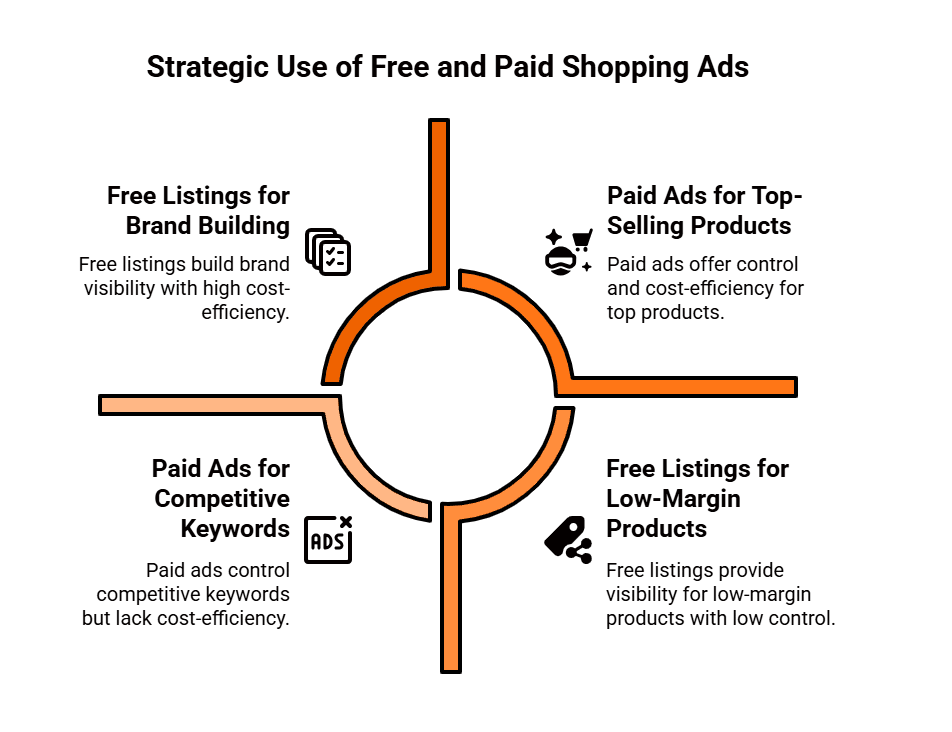
Which Incentive Converts Higher - Discounts or Value-Adds?
When considering conversion rate optimisation (CRO), a perpetual debate exists: which is the more effective tool for converting customers with a direct discount or a value-added incentive? While both strategies are designed to motivate a purchase, their psychological impact, influence on brand perception, and long term effects on profitability can be vastly different.
A direct financial incentive, such as a percentage off the price, offers immediate gratification. A value-add, such as free shipping or a complimentary gift, enhances the perceived worth of the purchase itself. The most successful businesses understand when to deploy each strategy to achieve their specific marketing goals.
The Power of Discounts: A Short Term Sales Engine
Discounts are a straightforward and powerful sales tool. Their appeal is rooted in the consumer’s desire for a good deal and the psychological satisfaction of saving money. The effect is immediate and easily quantifiable.
- Psychological Impact: Discounts offer a clear, tangible benefit. The “before and after” pricing or a prominent percentage off badge creates a sense of urgency and a compelling reason to buy now. This is particularly effective for price sensitive customers who are actively seeking the lowest possible price.
- Ideal Use Cases: Discounts are a go to strategy for a variety of scenarios. They are exceptionally effective for clearing old or seasonal stock, driving a quick, short term sales boost during holidays like Black Friday, or attracting first time buyers with an introductory offer.
- Pros and Cons: The immediate advantage of a discount is its ability to generate rapid conversions. However, this power comes at a potential cost. Overuse of discounts can devalue a brand’s products, training customers to wait for a sale rather than paying full price. It can also attract one off bargain hunters who are not loyal to the brand and are unlikely to become repeat customers. Furthermore, a constant cycle of discounting can erode profit margins, making the business less sustainable in the long run.
The Allure of Value-Adds: Building Long Term Brand Loyalty
A value-add is any incentive that enhances the customer’s purchase experience without directly reducing the price of the product. The focus shifts from saving money to gaining extra value.
- Psychological Impact: Value-adds appeal to a different kind of consumer one who prioritises quality, experience, and perceived value over price alone. An offer of free expedited shipping, for instance, makes the entire buying process more convenient and satisfying. A complimentary gift or a free consultation turns a transaction into a more rewarding and personal experience.
- Ideal Use Cases: Value-adds are a perfect fit for premium or luxury brands that need to protect their price integrity and prestige. They are also highly effective for businesses with complex products where an added service, such as a free setup or an extended warranty, provides significant peace of mind. For e-commerce businesses, offering a tiered system of value-adds (e.g., a free gift with orders over $100) can incentivise a higher average order value (AOV) without resorting to discounts.
- Pros and Cons: The primary advantage of a value-add is that it strengthens, rather than devalues, a brand. It builds customer loyalty by creating a positive purchase experience and can attract a different type of customer who values quality and the overall package. However, the value of the “add” must be clearly and immediately perceived by the customer. A poorly chosen or low value incentive may be ignored, making the campaign less effective than a simple discount.
Which Strategy Should You Choose: Discount or Value-Add?
The decision between a discount and a value-add should not be a guess; it should be a strategic choice based on your brand, your audience, and your business goals.
- Brand Positioning: A budget friendly brand might thrive on discounts, while a luxury brand would use value-adds to maintain its exclusive image.
- Customer Demographics: Understand your audience. Are they primarily price sensitive or do they value quality and a superior experience?
- Campaign Objective: If the goal is a quick, short term sales spike to clear inventory, a discount is often the most direct route. If the goal is to build long-term customer loyalty and increase Customer Lifetime Value (CLV), a value-add is a more powerful tool.
Ultimately, the only way to know for sure which strategy is more effective for your specific business is to test it. Run an A/B split test where one campaign offers a discount and another offers a value-add. Track not only the conversion rates but also the profitability of each campaign. The data from these tests will be your most reliable guide for making informed decisions that lead to sustainable business growth.
What are Suggested Apps for Shopify E-Commerce Sites?
Shopify has firmly established itself as a global e-commerce powerhouse, but its core strength lies in its vast and versatile App Store. For a business operating in the AU market, leveraging the right set of applications is not merely about added functionality; it’s a necessity for optimising performance, complying with regional demands, and gaining a competitive edge.
The difference between a sluggish, low-converting store and a highly efficient, profitable one often comes down to a carefully curated app stack. These applications automate marketing, enhance customer experience, improve logistics, and ultimately, drive up average order value (AOV) and customer lifetime value (CLV).
Category 1: Conversion and Sales Optimisation
The primary goal of any e-commerce site is to convert visitors into paying customers. These apps focus on building trust, urgency, and maximising basket size.
Social Proof and Trust
Online shoppers are heavily reliant on validation from their peers. Using apps to display authentic customer feedback is non-negotiable for building trust.
- Judge.me or Yotpo Reviews: These platforms are staples for collecting, managing, and displaying product reviews and star ratings. Beyond simply showing text, they allow for the inclusion of photo and video reviews and can integrate with Google Shopping to display seller ratings, which is crucial for visibility in Australia.
- Fomo or Nudgify: These leverage the ‘fear of missing out’ (FOMO) psychology by displaying real-time notifications of customer activity, such as “A customer from Sydney just bought this product” or “Only 3 left in stock.” This creates urgency and social proof, proven to boost conversion rates.
Increasing Average Order Value (AOV)
Once a customer commits to a purchase, the next step is encouraging them to spend slightly more.
- Bold Upsell or Candy Rack: These apps use smart algorithms to recommend relevant, supplementary products or offer upgrades right before or after checkout (post-purchase upsells/cross-sells), significantly increasing the AOV without requiring extra traffic.
- ReConvert Upsell & Cross Sell: Specialises in optimising the post-purchase Thank You page. By adding discounted offers, product recommendations, or even birthday collection forms, it turns a transaction end-point into a new sales opportunity.
Category 2: Marketing and Customer Retention
Acquiring a customer is expensive; retaining them is where profit margins grow. These apps focus on engaging, segmenting, and communicating with the customer base effectively.
Email and SMS Automation
Email remains one of the highest-performing marketing channels for e-commerce, especially when paired with data-driven segmentation.
- Klaviyo or Omnisend: These are the go-to platforms for serious Shopify merchants. They move beyond basic email blasts to offer sophisticated segmentation based on purchase history, browsing behaviour, and location. Essential flows include abandoned cart recovery, welcome series, and post-purchase follow-ups, all critical for re-engaging Australian shoppers.
- Privy: While also offering email capabilities, Privy is renowned for its conversion tools like exit-intent pop-ups and banners used for lead capture and offering immediate discounts to prevent a visitor from leaving.
Loyalty and Subscriptions
Building a loyal community and securing recurring revenue are key to long-term stability.
- Smile.io or LoyaltyLion: These create customised loyalty and rewards programmes. Customers earn points for actions (purchases, referrals, social shares) that can be redeemed for discounts. This gamification significantly boosts repeat purchase frequency and brand community.
- Recharge Subscriptions or Appstle Subscriptions: For brands selling consumables (coffee, cosmetics, supplements), these apps simplify the process of offering subscription services, handling recurring billing, customer portal management, and reducing churn.
Category 3: Store Management and Operations
Efficiency behind the scenes ensures a seamless front-end customer experience, particularly important for shipping within Australia and internationally.
Logistics and Fulfilment
- ShipStation: A multi-carrier shipping solution that integrates with major AU and international couriers. It automates label printing, order processing, and tracking updates, streamlining the entire fulfilment pipeline.
- Gorgias: This helpdesk is specifically tailored for Shopify, centralising all customer queries (email, social media, live chat) into a single ticket system. Crucially, it provides support agents with instant access to the customer’s full order history, allowing for faster, more personalised, and more efficient customer service.
Design and Data Management
- PageFly Landing Page Builder or GemPages: While standard Shopify themes are robust, these apps offer drag-and-drop editors to build custom, high-converting landing pages (for paid campaigns) and visually rich product pages without needing to write a single line of code.
- Matrixify: An indispensable tool for businesses with large, complex inventories. It excels at bulk data management, allowing merchants to efficiently import, export, and update thousands of product details, inventory levels, or customer records using human-readable Excel files, saving significant time on administrative tasks.
By integrating these suggested applications across conversion, retention, and operations, AU e-commerce businesses can transform a basic Shopify store into a highly automated, customer-focused, and profitable commercial platform. The continuous evaluation of an app stack against specific business goals is essential for sustained growth in the dynamic digital market.
What are Suggested Apps for WooCommerce Sites?
WooCommerce, as the e-commerce extension for WordPress, powers a significant portion of the world’s online stores. Its open source nature provides unparalleled flexibility, but to truly transform a basic shop into a high performing, customer centric sales machine, businesses in Australia and globally need to leverage a suite of powerful plugins and apps. The right selection of tools can automate tasks, enhance user experience, boost conversions, and streamline operations.
Here are some suggested apps (plugins) crucial for optimising your WooCommerce site, segmented by their primary function:
1. Conversion & Sales Enhancement
These plugins are designed to increase your store’s ability to turn visitors into paying customers and maximise the value of each transaction.
- Trustpilot Reviews / Judge.me (via API/integrations): While WooCommerce has native review functionality, integrating with dedicated review platforms like Trustpilot or Judge.me is paramount. These services automatically collect and display customer reviews, crucial for building social proof and trust in the Australian market. They also syndicate reviews to Google Shopping and search results, boosting visibility and credibility.
- OptinMonster / Bloom (Elegant Themes): For capturing leads and preventing cart abandonment, these are highly effective. They offer a range of sophisticated pop-ups (exit-intent, time-delayed), slide-ins, and floating bars to collect email addresses, offer discount codes, or prompt users with abandoned cart messages. Essential for building your email list, a critical asset.
- WooCommerce Product Add-Ons / Custom Product Options: These allow you to offer extra options or customisations for products directly on the product page (e.g., gift wrapping, engraving, extended warranty). This not only enhances the customer experience but also significantly boosts Average Order Value (AOV).
- WooCommerce Smart Coupons / Advanced Coupons: Beyond basic discount codes, these plugins enable sophisticated coupon strategies: BOGO (Buy One Get One), gift cards, automatically applied discounts, URL coupons, and more. They’re essential for running targeted promotions and loyalty programmes.
2. Marketing & Customer Retention
Once you’ve made a sale, the goal is to retain that customer and encourage repeat purchases.
- ActiveCampaign / MailerLite (for WooCommerce Integration): While WooCommerce can track sales, integrating with a powerful Email Service Provider (ESP) is critical for advanced marketing automation. These platforms allow for deep segmentation based on purchase history, browsing behaviour, and create automated workflows for abandoned carts, welcome series, post-purchase follow ups, and targeted promotions. This is far more powerful than basic WooCommerce emails.
- YITH WooCommerce Wishlist: Wishlists are a simple yet effective tool for customer retention. They allow users to save products they’re interested in for later, encouraging repeat visits and providing valuable data on customer preferences. Perfect for holiday seasons or gift-giving prompts.
- ReferralCandy / Loyalty Points for WooCommerce: Loyalty programmes are vital for encouraging repeat business. These plugins enable you to set up points based systems, referral programmes, or VIP tiers, rewarding customers for purchases and brand advocacy.
- PushEngage / OneSignal: Web push notifications are an immediate way to re-engage visitors, even if they’ve left your site. Use them for abandoned cart reminders, flash sales, new product announcements, or content updates, driving direct traffic back to your store.
3. Store Management & Operations
Efficient backend processes are crucial for a smooth customer experience and business scalability.
- WooCommerce Shipping (e.g., Royal Mail, DPD, Parcelforce integrations): For Australian businesses, seamless integration with local and international shipping carriers is paramount. Plugins that provide real-time shipping rates, print labels, and offer tracking information (e.g., direct integrations or through aggregators like ShipStation) are indispensable for accurate pricing and efficient dispatch.
- WooCommerce PDF Invoices & Packing Slips: Automate the generation and sending of professional, customisable PDF invoices and packing slips. This improves professionalism and streamlines order fulfilment.
- WP Rocket / LiteSpeed Cache: Website speed is critical for SEO, user experience, and conversion rates. Caching plugins dramatically improve loading times by storing static versions of your pages and optimising other aspects like CSS, JavaScript, and image loading.
- MonsterInsights / ExactMetrics (Google Analytics for WordPress): While you can manually add Google Analytics, these plugins provide seamless integration, allowing you to track crucial e-commerce metrics (transactions, revenue, product performance) directly within your WordPress dashboard. Understanding your analytics is key to making data-driven decisions.
- Advanced Dynamic Pricing for WooCommerce / Wholesale Suite: For businesses with complex pricing strategies, B2B operations, or wholesale customers, these plugins offer granular control over pricing rules, discounts, and custom pricing tiers based on user roles, quantity, or specific product categories.
By strategically implementing a selection of these suggested apps, a WooCommerce site can transcend its basic functionality. These tools empower Aussie e-commerce businesses to create a highly optimised, user-friendly, and ultimately more profitable online store, capable of competing effectively in a dynamic digital marketplace. Regular review and adaptation of your plugin stack will be key to long term success.
What Are Some Ways to Incentivise for Black Friday Sales?
1. Early Access for VIPs or Subscribers
Exclusivity remains one of the most powerful motivators in marketing. Offering early access to your Black Friday deals can reward your most loyal customers and encourage new sign-ups to your mailing list. For instance, promoting a “24-hour head start for subscribers” not only builds anticipation but also enhances your brand’s sense of community.
This approach works particularly well when paired with an engaging pre-sale email campaign. Remind your audience that they will receive first access before the public and highlight how limited the quantities will be. The sense of privilege and urgency will encourage higher participation and early conversions.
2. Bundle Offers and Value Packages
Discounting every product individually can erode margins. Instead, bundle offers help increase the average order value while giving shoppers the feeling of greater value for money. You might combine complementary products such as a skincare set, a kitchen appliance bundle, or an accessories package at a discounted price compared to purchasing each item separately.
These offers not only drive higher transaction values but also simplify the buying process by suggesting curated combinations. Bundles can also help move slower moving inventory without appearing as clearance stock.
3. Tiered Discounts to Reward Bigger Spends
Tiered discounts encourage customers to spend more to unlock greater savings. For example, you could offer:
- Spend $50, get 10% off
- Spend $100, get 20% off
- Spend $200, get 30% off
This approach creates a psychological incentive for customers to add extra items to their cart to reach the next discount threshold. It’s also highly flexible allowing businesses to protect profit margins while motivating larger purchases. Make sure to display progress bars or spend trackers on your website so customers can easily see how close they are to unlocking the next level of savings.
4. Free Gifts and Add-Ons
Few things delight shoppers more than receiving something for free. Offering a complimentary gift with every purchase, or with orders above a certain threshold, can be more persuasive than a straightforward discount. For example, a beauty brand could offer a travel-sized product with every $60 purchase, or a tech retailer might include free accessories with selected devices.
The key to success lies in choosing a gift that feels relevant and valuable without significantly reducing margins. Ideally, the freebie should complement the main purchase, providing both practical and emotional satisfaction. It also reinforces positive brand association, making customers more likely to return.
5. Limited-Time Flash Deals
Black Friday thrives on urgency. Introducing flash sales short, timed offers available for only a few hours can create excitement and encourage impulse buying. This tactic keeps customers returning to your site throughout the day to check for new deals.
Make sure to promote these flash deals clearly through email alerts, push notifications, or countdown timers on your website. Transparency and clarity are vital; customers should know exactly when the next deal will start and end to maintain trust while building anticipation.
6. Loyalty Points and Cashback Rewards
Instead of offering one-off discounts, consider rewarding customers through loyalty points or cashback incentives that can be redeemed on future purchases. This approach not only motivates sales during the Black Friday period but also encourages repeat business long after the event.
For example, offering “double loyalty points this weekend only” or “10% cashback to spend in December” transforms a short-term transaction into an ongoing relationship. It’s a strategic way to protect long-term profitability while still delivering value to your audience.
7. Free or Upgraded Delivery Options
Shipping costs are a common reason for cart abandonment. Offering free delivery or upgrading all orders to express shipping can significantly improve conversion rates during Black Friday. The perception of added convenience and savings can often outweigh small discounts.
If offering free shipping on all orders isn’t financially viable, consider setting a minimum order threshold to encourage larger baskets. Alternatively, offer free express delivery exclusively for members or subscribers as part of your loyalty incentive programme.
8. Referral or Share-to-Save Incentives
Word of mouth remains one of the most trusted forms of marketing. Encouraging your customers to share deals with friends can extend your reach dramatically. Referral programmes such as “Give $10, Get $10” reward both the referrer and the new customer, creating a win-win scenario.
Alternatively, “share to save” promotions, where customers unlock a discount by posting your deal on social media, can increase visibility while strengthening social proof. These tactics work best when the process is simple, seamless, and clearly explained.
9. Post-Black Friday Offers for Retention
The sales surge doesn’t have to end when Black Friday does. Offering exclusive follow-up incentives, such as Cyber Monday bonuses or “thank-you” discounts for returning in December, helps sustain momentum and re-engage new customers acquired during the event.
This strategy positions your brand as one that values customer loyalty beyond the initial purchase and helps convert one time shoppers into repeat buyers.
Incentivising for Black Friday sales is about more than slashing prices; it’s about creating meaningful, strategic value for both your customers and your brand. Whether through exclusivity, added value, rewards, or convenience, the right incentives can drive engagement, strengthen loyalty, and differentiate your business in one of the most competitive retail periods of the year. By planning early, aligning incentives with your long-term goals, and maintaining a consistent brand voice, you’ll be well positioned to make this Black Friday your most successful yet.
How to Research the Most Popular Products in a Specific Niche?
Whether you are launching an eCommerce store, creating affiliate content, or planning a new product line, understanding which products are most popular in your niche is crucial to success. Selling the right product to the right audience at the right time is what separates thriving online businesses from those that struggle to gain traction.
Effective product research goes beyond guesswork; it’s about identifying real consumer demand, analysing competition, and spotting opportunities before they become oversaturated.
Here’s a step-by-step approach to researching the most popular products in your niche.
1. Start with Broad Market Research
Before diving into individual products, begin by assessing the overall niche. This helps confirm that there is sufficient demand and growth potential. Use the following tools and strategies to get an overview:
- Google Trends: Start by entering your niche keywords (e.g., “eco-friendly homeware” or “pet grooming tools”) to see how search interest changes over time. Look for upward trends or steady long-term demand rather than temporary spikes.
- Industry Reports: Websites like Statista, IBISWorld, or Nielsen provide valuable data about market growth and consumer behaviour.
- Social Listening: Platforms such as Reddit, Facebook groups, and Twitter/X can reveal what consumers are discussing, recommending, or complaining about within your niche.
At this stage, your goal is to confirm that the niche is active and profitable. Once that’s clear, you can begin narrowing your focus to specific products.
2. Analyse Competitors in Your Niche
Competitor analysis is one of the fastest ways to identify what’s already selling well. Start by listing the top players in your space these could be established brands, popular Shopify stores, or niche-specific marketplaces.
Then, examine the following:
- Best-selling pages: On platforms such as Amazon or Etsy, competitors often feature “Best Seller” tags or rank products by popularity.
- Reviews and ratings: High review volumes indicate both strong demand and customer engagement. However, negative reviews can also highlight pain points or opportunities for improvement.
- Product descriptions and pricing: Notice how competitors position their products what benefits they emphasise, and how they justify pricing.
Tools like SimilarWeb or SEMrush can provide insights into competitors’ most visited product pages and traffic sources, giving you a clearer picture of what attracts buyers.
3. Use Product Research Tools and Marketplaces
Several digital tools can automate product discovery and help uncover rising trends:
- Jungle Scout or Helium 10 (for Amazon): These show estimated sales volumes, trends, and profit margins for specific listings.
- eBay’s Trending Page: Displays live data on what items are selling the most across various categories.
- AliExpress and Alibaba Analytics: Useful for identifying products with high global order counts and supplier interest.
- Google Keyword Planner: Reveals monthly search volumes for product-related keywords, helping you gauge real demand. You don’t need to be running Google Ads to use Google Keyword Planner, just create an account.
When analysing results, look for a balance between high demand and moderate competition. A product that sells well but is not yet dominated by major brands represents the ideal sweet spot.
4. Explore Social Media and Influencer Trends
Social platforms are powerful indicators of emerging consumer interests. Viral trends often begin on TikTok, Instagram, or Pinterest long before products become mainstream.
Search for hashtags related to your niche (e.g., #homefitness, #skincaretips, #sustainablefashion) and look at the types of products influencers are showcasing.
Tools such as BuzzSumo, TrendHunter, or Exploding Topics can help identify products gaining momentum online.
If you notice consistent engagement across multiple influencers or audiences, it’s a strong sign of a product trend worth exploring.
5. Study Customer Feedback and Behaviour
Customer reviews provide invaluable insight into what people truly value and what frustrates them. Beyond star ratings, pay attention to the language used in reviews, as it reveals what benefits or features customers care about most.
You can apply sentiment analysis using tools like ChatGPT, MonkeyLearn, or manual review to uncover patterns. For example:
- Are people mentioning durability, price, or ease of use most often?
- What improvements do they want?
In addition, use Amazon Q&A sections, Reddit threads, and Quora discussions to understand the exact problems customers are trying to solve. The most popular products are usually those that address these pain points effectively.
6. Validate Demand with Search Data and Ads
Before committing to inventory or content creation, validate demand using search and advertising data.
- Use Google Ads Keyword Planner to test interest levels for product-related phrases. High search volume with moderate cost-per-click (CPC) usually signals healthy demand with manageable competition.
- Run a small test campaign on Google or Meta to gauge real click-through rates (CTR) and conversion potential.
These tests don’t have to be expensive; even a short campaign can confirm whether your target audience responds well to the product idea.
7. Combine Data to Identify Winning Products
After collecting insights from trends, competitors, and customer feedback, consolidate your findings. A truly popular product will usually meet all the following criteria:
- Demonstrates consistent or growing search interest.
- Has visible social engagement and positive feedback.
- Sells well across multiple platforms.
- Solves a clear customer problem.
- Has room for differentiation or improved branding.
By cross referencing multiple sources, you minimise the risk of chasing short-lived fads and instead focus on sustainable demand.
Researching popular products in a niche is not about copying what others sell it’s about understanding why those products succeed and how you can serve the same audience better.
Combine quantitative data (sales, search volume, engagement) with qualitative insight (reviews, conversations, sentiment). The goal is to find products that not only perform well statistically but also resonate emotionally with buyers.
With the right research process, you’ll identify products that deliver value to customers and long-term profitability for your business.