

What is On-Page SEO?
On-page SEO, also known as “on-site SEO,” is the practice of optimising the elements on a website page to improve its ranking in search engine results pages (SERPs) and attract more organic traffic. Unlike off-page SEO, which involves external signals like backlinks, on-page SEO is everything you have direct control over on your own website.
The ultimate goal of on-page SEO is simple: to make your webpage’s content clear, relevant, and easy for both human users and search engine crawlers (like Googlebot) to understand. This ensures that when a user types a specific query into a search engine, your page is easily identified as the best and most helpful answer to their search intent.
Key Elements of On-Page SEO
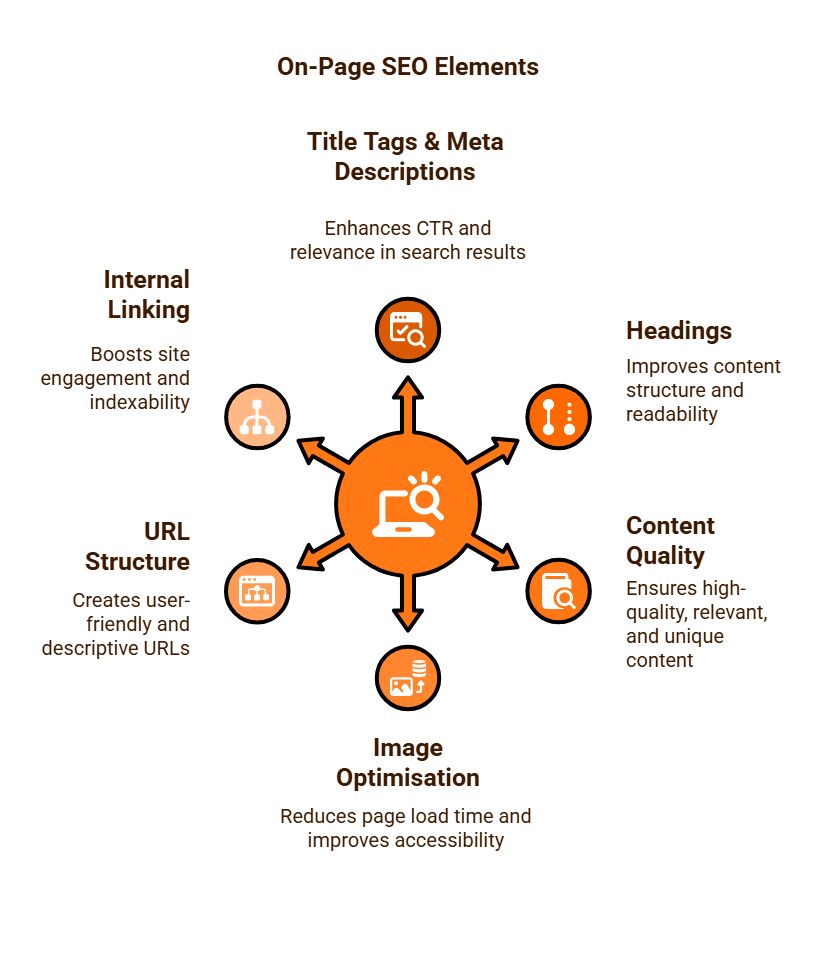
A robust on-page SEO strategy involves optimising several critical elements. Think of this as your internal checklist for every webpage or blog post you create:
Title Tags and Meta Descriptions:
These are arguably the most important on-page elements. The title tag is the clickable headline that appears in the SERPs, and the meta description is the short summary below it. While the meta description is not a direct ranking factor, a compelling and relevant one can significantly increase your click-through rate (CTR) from the search results, which is a positive signal to Google. You should include your primary keyword in both.
Headings (H1, H2, H3, etc.):
Headings provide a clear structure for your content, making it scannable and easy to read for users. For search engines, they signal the hierarchy and main topics on the page. Every page should have a single H1 heading that reflects the page’s core topic, with H2 and H3 subheadings used to break down the content into logical sections.
Content Quality and Relevance: At its core, on-page SEO is about creating high-quality, comprehensive, and unique content that genuinely answers a user’s query. This means avoiding “thin” content, covering subtopics, and providing valuable insights that demonstrate E-E-A-T (Experience, Expertise, Authoritativeness, and Trustworthiness). Modern SEO is less about keyword stuffing and more about covering a topic in depth using relevant terms and synonyms that naturally occur in the content.
Image Optimisation: Images can significantly slow down your page if not optimised. You should compress images to reduce file size and use descriptive filenames. Most importantly, fill in the Image Alt Text (alternative text). This provides a text description of the image for search engines and visually impaired users, helping search engines understand the image’s content and its relevance to the page.
URL Structure: A clean, user-friendly URL is crucial. A well-optimised URL should be short, descriptive, and ideally include your target keyword, with words separated by hyphens. For example, www.yourwebsite.com/guide/on-page-seo is far better than www.yourwebsite.com/page?id=12345.
Internal Linking: This involves linking from one page on your website to another relevant page on the same site. Internal links help search engines discover and index new content, pass “link equity” (or authority) between pages, and keep users engaged on your site for longer, which can improve your site’s “dwell time.”
On-Page vs. Off-Page SEO
Think of on-page SEO as building a strong, well-organised, and fully functional house. You control the layout, the content within each room, and the furniture. Off-page SEO is then about building your reputation in the neighbourhood—getting other houses (websites) to vouch for you by linking to your house. Both are essential, but you must have a solid foundation (on-page) before you can build a strong reputation (off-page).
By diligently optimising these on-page factors, you are essentially creating a user-friendly and search-engine-friendly experience, laying the essential groundwork for your website to rank higher and attract valuable, qualified traffic.
What is Off-Page SEO?
Off-page SEO refers to all the optimisation activities performed outside of your website to improve its search engine ranking. Unlike on-page SEO, which focuses on elements directly within your control on your website (like content, keywords, and technical structure), off-page SEO deals with external signals that tell search engines about your website’s authority, trustworthiness, and relevance.
Think of it as building your website’s reputation and credibility in the wider online world. Search engines like Google interpret these external signals as “votes of confidence” for your content. The more high-quality, relevant “votes” your website receives, the higher it is likely to rank in search results.
Key Components of Off-Page SEO
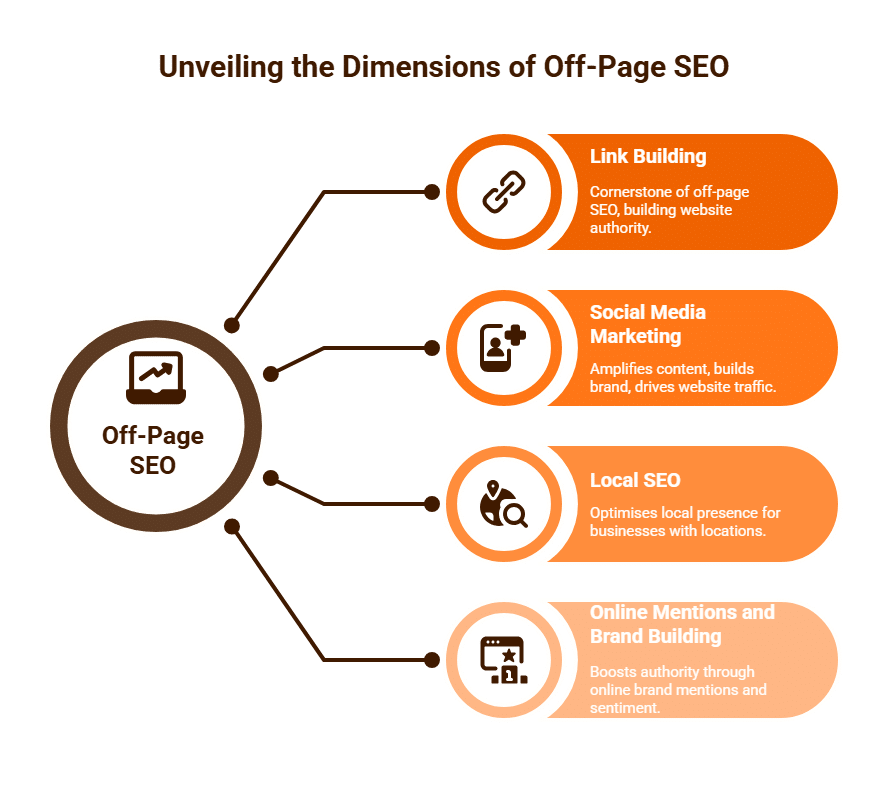
While the primary component of off-page SEO is link building, it encompasses a broader range of activities that contribute to a website’s overall authority and visibility beyond its own domain.
Link Building (Backlinks): This is the cornerstone of off-page SEO. A backlink is simply a hyperlink from one website to another. When a reputable website links to your content, it signals to search engines that your content is valuable, trustworthy, and authoritative.
-
-
- Quality over Quantity: Not all backlinks are equal. A link from a highly authoritative, relevant website (e.g., a national news publication, a respected industry blog, a university website) carries significantly more weight than a link from a low-quality, spammy, or irrelevant site.
- Relevance: Links from websites within your industry or a closely related niche are more valuable. If you sell organic dog food, a link from a pet care blog is highly relevant, whereas a link from a car dealership website is not.
- Anchor Text: This is the visible, clickable text of a hyperlink. Optimised anchor text (that includes relevant keywords) can help search engines understand the context of the linked page.
- Types of Links: Backlinks can be acquired through various methods:
- Editorial Links: Earned naturally when other websites cite your content as a source of information. This is the most valuable type.
- Guest Posting: Writing articles for other relevant websites that include a link back to your site.
- Broken Link Building: Finding broken links on other websites and suggesting your content as a replacement.
- Resource Page Links: Getting your site listed on useful resource pages within your niche.
- Brand Mentions: Even unlinked mentions of your brand can contribute to authority.
- Business Directories: Most business niches will have related business directory listings
-
-
Social Media Marketing:
While social signals (likes, shares, comments) are not direct ranking factors, social media plays an indirect but crucial role in off-page SEO:
- Content Amplification: Social media helps to distribute your content to a wider audience, increasing its visibility and potential for organic shares and backlinks.
- Brand Building: A strong social media presence builds brand awareness and trust, which can indirectly influence search engine rankings.
- Driving Traffic: Social media can drive direct traffic to your website, which is a positive user behaviour signal for search engines.
-
Local SEO (for Businesses with Physical Locations):
For businesses that serve a local area (e.g., a plumber, a restaurant, a local shop), off-page local SEO is vital:
- Google Business Profile (GBP) Optimisation: Claiming and optimising your GBP listing is paramount. This includes accurate Name, Address, Phone (NAP) information, business hours, photos, and regular posts.
- Online Citations: Consistent NAP information across local directories, review sites (e.g., Yelp, TripAdvisor), and industry-specific listings. Inconsistent NAP can confuse search engines and harm local rankings.
- Online Reviews: Positive reviews on GBP and other platforms are strong trust signals for both users and search engines.
-
Online Mentions and Brand Building:
This refers to any mention of your brand, products, or services online, even without a direct link. Search engines are increasingly sophisticated at understanding brand sentiment and popularity. Press mentions, news articles, and unlinked brand mentions on influential sites contribute to your overall online authority.
Off-page SEO is about cultivating your website’s external reputation. By strategically building high-quality backlinks, leveraging social media, ensuring consistent local presence, and fostering positive brand mentions, you signal to search engines that your website is a trusted, relevant, and authoritative resource in its field, ultimately leading to improved search engine rankings and increased organic traffic.
What is PageRank?
PageRank is a foundational algorithm developed by Google’s co-founders, Larry Page and Sergey Brin, in the late 1990s. It was a revolutionary method for measuring the importance and authority of web pages by analysing the quantity and, more crucially, the quality of links pointing to them. While Google’s ranking algorithms have evolved significantly since its inception, PageRank remains an integral, albeit more sophisticated and secretive, component of how Google assesses a webpage’s value.
The Core Concept: Links as Votes
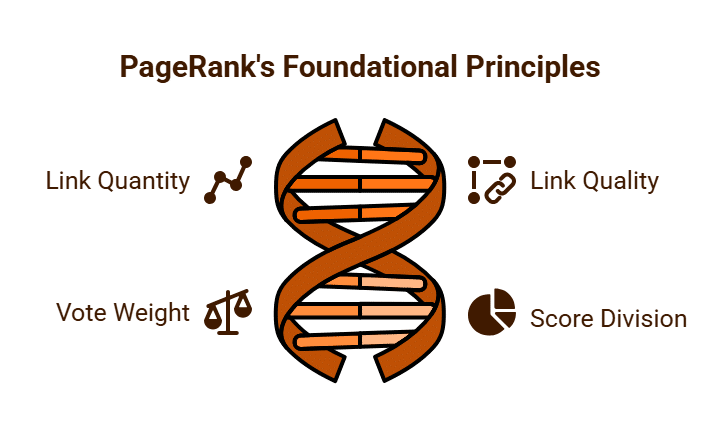
At its heart, PageRank operates on a democratic principle: a link from one webpage to another is considered a “vote of confidence” or an endorsement. The more votes a page receives, the more important it is deemed to be. However, Page and Brin’s genius lay in understanding that not all votes are equal. A vote (link) from a highly important or authoritative page carries more weight than a vote from a less important page.
Imagine a network of web pages. If Page A links to Page B, Page A is essentially casting a vote for Page B. The “weight” of that vote depends on Page A’s own PageRank. Furthermore, if Page A links to multiple other pages, its PageRank “score” is divided among all its outgoing links. So, a link from a high-PageRank page that links to very few other pages will pass more authority than a link from a high-PageRank page that links to hundreds of others.
How it Works (Simplified): The Random Surfer Model
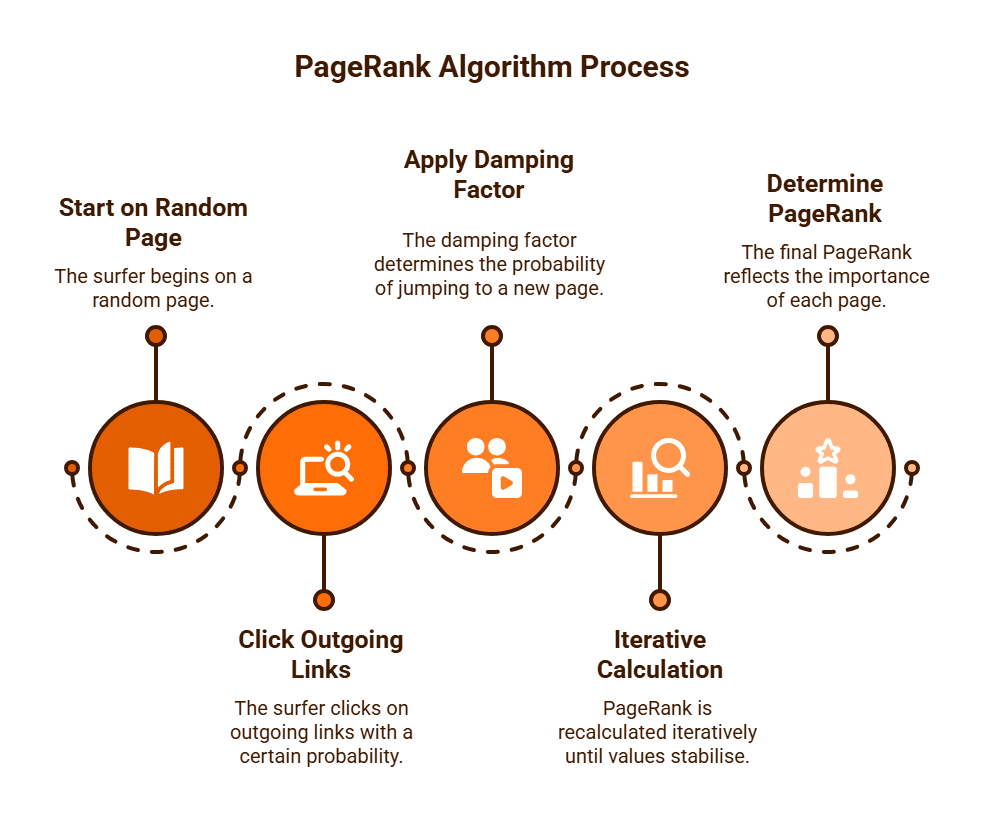
The mathematical algorithm behind PageRank can be complex, but it’s often explained using the “random surfer model”:
Imagine a hypothetical web surfer who randomly clicks on links.
- Starts Anywhere: The surfer begins on a random page on the internet.
- Clicks Links: From that page, the surfer has a certain probability of clicking on any outgoing link.
- Damping Factor: There’s also a “damping factor” (typically set at around 0.85). This represents the probability that the random surfer will eventually get “bored” of clicking links on a page and will instead jump to a completely random new page on the internet. This prevents “link sinks” (pages with no outgoing links) from accumulating all the PageRank.
- Iterative Calculation: PageRank is not calculated in a single pass. Instead, it’s an iterative process. Initially, all pages might be assigned an equal, small PageRank value. In subsequent “iterations,” each page’s PageRank is recalculated based on the PageRank of the pages linking to it. This process repeats many times until the PageRank values “converge” and stabilise, reflecting the relative importance of each page within the entire web graph.
The higher the probability that a random surfer will land on a particular page, the higher that page’s PageRank.
PageRank Today: Still Relevant, But Different
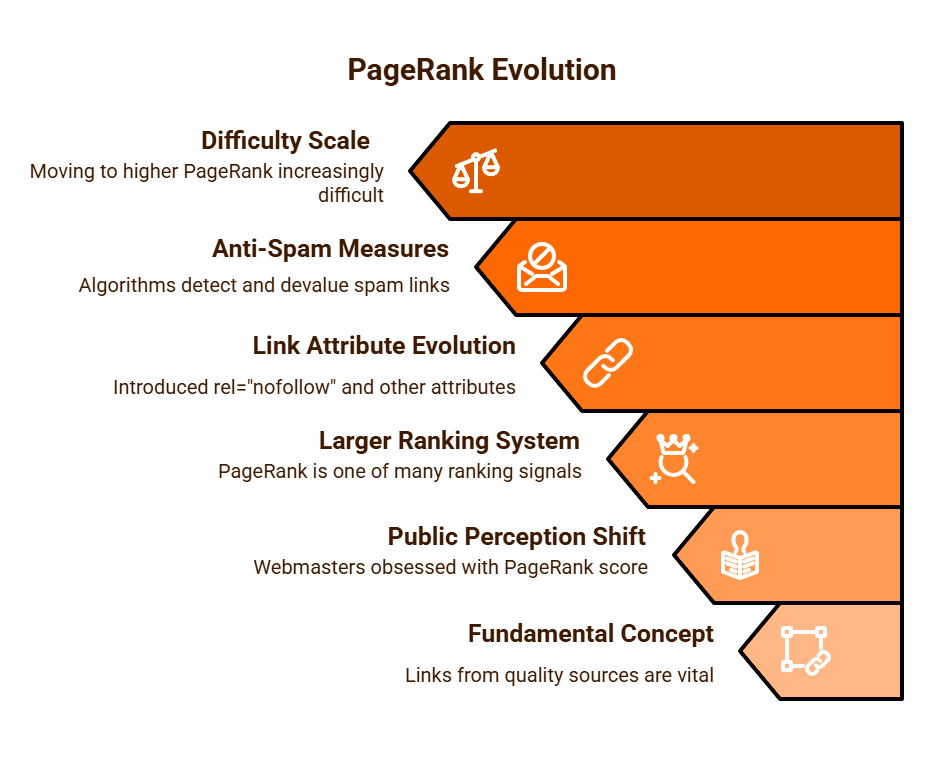
While the fundamental concept of PageRank – that links from quality sources are vital – remains central to Google’s ranking algorithms, its public perception and actual implementation have changed significantly:
- No Longer Publicly Displayed: Google famously removed the public PageRank toolbar metric in 2016. This was largely because webmasters became overly obsessed with this single number and engaged in manipulative link-building schemes solely to increase their “PageRank score,” rather than focusing on building genuinely useful content.
- Part of a Larger System: PageRank is now just one of hundreds (if not thousands) of signals Google uses to rank web pages. Modern algorithms consider factors like content quality, user experience (Core Web Vitals), mobile-friendliness, E-E-A-T (Experience, Expertise, Authoritativeness, and Trustworthiness), and searcher intent, alongside link signals.
- Evolution of Link Attributes: To combat spam, Google introduced rel=”nofollow” (2005) and later rel=”ugc” (user-generated content) and rel=”sponsored” (paid links) in 2019. These attributes give webmasters more control over how their links are interpreted by search engines regarding PageRank flow.
- Sophisticated Anti-Spam Measures: Google has developed highly advanced algorithms (like Penguin) to detect and devalue manipulative or unnatural link schemes, ensuring that only genuine, earned links contribute positively.
- Sliding Scale of Difficulty: Considering page rank ranges from 0-10, it’s important to understand that to move from PR0 to PR1 is much easier than to go from PR1 to PR 2 and it becomes increasingly difficult as your pages move through this process in the higher page ranks.
PageRank remains a core concept within Google’s complex ranking infrastructure, underscoring the enduring importance of high-quality backlinks as a signal of authority and trust. While you can no longer see a specific PageRank score for your website, the principle it established – that the web is a network where votes (links) from authoritative sources matter – continues to guide effective off-page SEO strategies.
Are Backlinks Still Important for SEO?
In the ever-evolving landscape of Search Engine Optimisation (SEO), a persistent question remains: are backlinks still a crucial ranking factor? The unequivocal answer, even in 2025, is a resounding yes, absolutely. While Google’s algorithms have become immensely more sophisticated since their inception, backlinks remain a fundamental signal of a website’s authority, trustworthiness, and relevance.
Backlinks: The Enduring Power of the “Vote of Confidence”
At its core, a backlink (a hyperlink from one website to another) functions as a “vote of confidence” or an endorsement. When a reputable website links to your content, it essentially tells search engines like Google that your page offers valuable, relevant, and credible information. Google’s original PageRank algorithm, developed by its founders, was built on this very premise: the more quality “votes” a page received, the more important it was deemed.
While PageRank itself is now just one component of a vastly more complex ranking system, the principle remains. Backlinks continue to signal to search engines that:
- Authority and Trust: If established, authoritative sites in your industry link to you, it suggests that your website is also a reliable source of information. This builds “domain authority” in Google’s eyes.
- Relevance: Links from sites relevant to your niche indicate that your content is on-topic and useful to a specific audience.
- Popularity and Value: A high number of quality backlinks suggests that your content is popular and provides genuine value, making it worthy of higher rankings.
The Evolution of Backlink Importance: Quality Over Quantity
The significance of backlinks has shifted from a mere quantitative pursuit to a qualitative one. In the early days of SEO, simply acquiring a large number of links, regardless of their source, could boost rankings. However, Google’s continuous algorithmic updates, particularly those like “Penguin,” were specifically designed to combat manipulative and spammy link-building practices (e.g., buying links, link farms, irrelevant directory submissions).
Today, the emphasis is heavily on:
- Quality: A single backlink from a highly authoritative and relevant website is far more valuable than dozens of links from low-quality, spammy, or irrelevant sites. In fact, too many low-quality links can actually harm your SEO.
- Relevance: The linking site should ideally be topically related to your website. A link from a reputable tech blog to a tech review site is highly relevant; a link from a gardening blog to a car parts store is not.
- Naturalness: Links should appear to be earned organically, because your content is genuinely useful and worthy of citation. Google is adept at detecting unnatural link patterns.
- Anchor Text: The clickable text of the link should be natural and, when appropriate, include relevant keywords, but not be overly optimised or stuffed with exact match keywords.

How to Earn Valuable Backlinks
Given their continued importance, acquiring high-quality backlinks should be a core component of any robust SEO strategy. This isn’t about manipulation, but about creating content that naturally attracts links:
- Create Exceptional Content: Produce unique, in-depth, original research, valuable guides, or engaging visual content that others want to reference and link to. This is often called “link-worthy content.”
- Guest Blogging: Write high-quality articles for other reputable websites in your niche, including a contextual link back to your site.
- Broken Link Building: Find broken links on relevant, authoritative websites and suggest your content as a replacement.
- Digital PR & Outreach: Promote your content to journalists, bloggers, and influencers who might feature or link to your site.
- Resource Pages: Identify websites that compile lists of useful resources in your industry and suggest your site for inclusion.
Despite the numerous changes in Google’s algorithms, backlinks still remain a critical signal for search engine rankings. While the focus has definitively shifted from quantity to the quality, relevance, and naturalness of links, they are still a powerful indicator of a website’s authority and trustworthiness. Therefore, investing in a strategic and ethical link-building strategy is, and will continue to be, essential for achieving strong organic search visibility.

How to Identify Current Backlinks to Your Site?
Identify Current Backlinks to Your Site
Understanding your website’s backlink profile is fundamental to effective SEO. Backlinks, or inbound links from other websites, act as “votes of confidence” in the eyes of search engines like Google, significantly influencing your site’s authority and ranking potential. Regularly identifying and analysing your current backlinks allows you to assess the health of your link profile, identify new opportunities, and detect potentially harmful links.
There are several reliable methods and tools available to help you achieve a comprehensive view of your backlink profile:
1. Google Search Console (GSC): The Essential Free Tool
Your first port of call should always be Google Search Console. This free service from Google provides direct insights into how Google views your website, including a report on the backlinks it has discovered.
- Accessing the Report:
-
- Sign in to your Google Search Console account.
- In the left-hand navigation menu, click “Links.”
- Under the “External links” section, you’ll see various reports:
- Top linked pages: Shows which pages on your site have the most backlinks. This helps you understand which content resonates most with other sites.
- Top linking sites: Lists the domains that link to your site most frequently. This is excellent for identifying your most valuable referring domains.
- Top linking text: Displays the most commonly used anchor text in backlinks to your site. This is crucial for monitoring for naturalness and identifying potential over-optimisation (an overuse of exact match keywords in anchor text, which can appear unnatural).
- Limitations: While invaluable, Google Search Console typically shows a sample of your backlinks, not an exhaustive list. It also only shows links that Google has indexed. For a more complete picture, you’ll need to use third-party tools.
2. Bing Webmaster Tools: Another Free Option
Similar to GSC, Bing Webmaster Tools offers a “Backlinks” section that provides insights into links detected by Bing’s crawler. While Bing’s market share is smaller than Google’s, checking this tool can sometimes reveal links that Google Search Console might not show, offering a slightly different perspective.
3. Professional SEO Tools: For In-Depth Analysis
For a truly comprehensive and actionable backlink analysis, professional SEO tools are indispensable. These tools maintain vast databases of crawled links and offer advanced filtering and reporting capabilities.
- Ahrefs: Widely regarded as having one of the largest and freshest backlink databases. Its “Site Explorer” tool allows you to enter your domain and view:
- Total number of backlinks and referring domains.
- Domain Rating (DR) and URL Rating (UR) of linking pages/domains (Ahrefs’ proprietary authority metrics).
- Follow/nofollow status of links.
- Anchor text distribution.
- New and lost backlinks over time.
- Broken backlinks.
- Competitor backlink analysis (identifying “link gaps” where competitors have links you don’t).
- Semrush: Another industry-leading SEO platform with a robust “Backlink Analytics” tool. Semrush offers similar features to Ahrefs, including:
- Comprehensive backlink data and referring domains.
- Authority Score (Semrush’s proprietary metric).
- Toxic link identification (helping you spot potentially harmful spam links).
- Backlink audit features for cleaning up your profile.
- Competitor comparison tools.
- Moz Link Explorer: Part of the Moz Pro suite, this tool provides backlink data along with Moz’s proprietary Domain Authority (DA) and Page Authority (PA) metrics, which are useful for assessing link quality.
- Majestic: Specialises almost exclusively in backlink analysis, boasting an extensive link intelligence database. It offers unique metrics like Trust Flow and Citation Flow to evaluate link quality.
- SE Ranking: An all-in-one SEO platform that includes backlink monitoring, allowing you to track your profile, identify new/lost links, and analyse competitor backlinks.

Why a Comprehensive View Matters
Relying solely on Google Search Console can give you an incomplete picture. Using a combination of GSC and at least one robust third-party tool allows you to:
- Identify all active backlinks: Uncover links that Google might not be showing you.
- Assess link quality: Determine the authority and relevance of linking domains.
- Monitor changes: Track new links gained and old links lost over time.
- Detect harmful links: Identify spammy or low-quality links that could potentially negatively impact your SEO, allowing you to consider disavowing them.
- Analyse competitors: Understand their link-building strategies and identify opportunities for your own site.
Regularly auditing your backlink profile using these tools is essential for maintaining a healthy, strong, and effective SEO presence.
No single tool will identify all of your current backlinks. Purge Digital currently uses 8 different tools, paid and free, to monitor and manage our client’s backlink profiles.
What is a robots.txt File and Why Use Them?
Search engine bots, often referred to as “crawlers” or “spiders,” are constantly at work, exploring websites to understand their content and decide how they should appear in search results. While allowing these bots access is generally beneficial for visibility, there are often parts of a website that you don’t want them to see or index. This is where the robots.txt file comes into play.
A robots.txt file acts as a polite, text-based directive for these web crawlers, essentially telling them which areas of your site they are permitted to visit and which they should avoid. Understanding this small yet powerful file is crucial for effective website management, especially for Search Engine Optimisation (SEO) and site security.
What is a robots.txt File?
A robots.txt file is a simple text file located in the root directory of a website. Its primary purpose is to communicate with web crawlers (like Googlebot, Bingbot, etc.) about which parts of the site they should not access. It uses a specific, straightforward syntax to issue instructions.
For example, a common robots.txt file might look like this:
User-agent: *
Disallow: /wp-admin/
Disallow: /wp-includes/
Disallow: /private/
Let’s break down the components:
-
User-agent:: This specifies which web crawler the following directives apply to.-
User-agent: *: The asterisk acts as a wildcard, meaning “these rules apply to all web crawlers.“ -
You can also specify particular crawlers, e.g.,
User-agent: Googlebotfor rules only for Google.
-
-
Disallow:: This is the core instruction. It tells the specified user-agent(s) not to crawl the specified directory or file path.-
Disallow: /wp-admin/: Tells all crawlers not to access anything within the/wp-admin/directory. -
Disallow: /private/: Tells crawlers to avoid the/private/folder.
-
-
Allow:(Less Common but Useful): In some cases, you might disallow a whole directory but want to allow a specific file within that directory.-
Disallow: /folder/ -
Allow: /folder/important-file.pdf
-
-
Sitemap:: This directive (though not a “robot rule” in the traditional sense) is often included in robots.txt. It helps search engines find your XML sitemap, which lists all the pages you do want them to crawl and index.-
Sitemap: https://www.yourwebsite.com/sitemap.xml
-
Why Use a robots.txt File? The Benefits
Using a robots.txt file offers several significant advantages for website owners, impacting everything from server load to SEO performance.
1. Optimising Crawler Efficiency (Crawl Budget)
Large websites, or those with frequently updated content, often have what’s known as a “crawl budget”; the number of pages a search engine bot will crawl on a site within a given timeframe.
-
Efficiency: By disallowing bots from unimportant or duplicate content (e.g., login pages, thank you pages, internal search results), you ensure they spend their crawl budget on your most valuable, indexable content. This improves the chances of important pages being crawled and indexed more frequently.
-
Server Load: Excessive crawling can put a strain on your server resources. Directing bots away from heavy, dynamic, or unimportant areas reduces server load, especially for sites with limited hosting capacity.
2. Preventing Indexing of Unwanted Content
This is one of the most common reasons to use robots.txt.
-
Private or Staging Areas: You might have development or staging versions of your site, admin panels, or internal documents that should never appear in public search results. Disallowing these paths keeps them private.
-
Duplicate Content: Many e-commerce sites generate dynamic URLs for filtering or sorting products (e.g.,
/?sort=price_asc). These can create thousands of duplicate content pages, which can confuse search engines. Disallowing these dynamic parameters helps Google focus on the canonical product pages. -
Low-Value Pages: Pages like “thank you” pages after a form submission, privacy policy pages (which might not need to rank), or internal search results are often not valuable for organic search and can dilute your site’s overall quality signal if indexed.
3. Improving User Experience and SEO Relevance
By guiding crawlers away from irrelevant content, you help ensure that only the most useful and user-facing pages are indexed.
-
Cleaner Search Results: When users search for your brand, they will only find relevant product pages, service descriptions, and blog posts, rather than internal admin pages or temporary content.
-
Stronger SEO Signal: A site that presents a clean, well-organised index of high-quality content to search engines is generally perceived as more authoritative and relevant, contributing to better rankings for your core pages.
4. Basic Security through Obscurity (with Caveats)
While robots.txt is not a security mechanism (it doesn’t prevent access, only requests crawlers not to index), it can play a minor role in “security through obscurity.”
-
Hiding Admin Paths: Disallowing
/wp-admin/doesn’t stop a malicious actor from trying to access it, but it prevents that path from being easily discoverable via a simple Google search.
Important Caveat: Never rely on robots.txt alone to protect sensitive information. If a page or file is truly confidential, it should be protected by passwords, server-side permissions, or other robust security measures, as a determined crawler or user can bypass robots.txt directives.
Where to Find and Manage Your robots.txt
The robots.txt file is always located at the root of your domain, for example: https://www.yourwebsite.com/robots.txt.
-
Manual Creation/Editing: You can create or edit it directly using an FTP client or your hosting provider’s File Manager.
-
WordPress Plugins: Many SEO plugins for WordPress (like Yoast SEO or Rank Math) provide an interface within the dashboard to easily view and edit your robots.txt file, making it accessible even for those without direct server access skills.
-
Google Search Console: Google provides a “robots.txt Tester” tool within Search Console, allowing you to test your file’s syntax and see how Googlebot interprets your rules.
In summary, the robots.txt file is a small but mighty tool in a website owner’s arsenal. By intelligently guiding search engine crawlers, it helps optimise site performance, ensures privacy of administrative areas, and ultimately contributes to a cleaner, more effective, and better-indexed website in search engine results.
What is Negative SEO?
Negative SEO refers to the malicious practice of employing unethical or “black hat” SEO techniques against a competitor’s website with the express intention of harming their search engine rankings. The goal is to undermine a rival’s visibility, causing their site to drop in Search Engine Results Pages (SERPs), thereby allowing the attacker’s own website (or another competitor’s) to potentially rise in the rankings.
While Google has significantly advanced its algorithms to detect and largely ignore such nefarious tactics, the threat of negative SEO remains a concern, making vigilance essential for any website owner.
Common Negative SEO Tactics
Attackers employ various methods, though their effectiveness has diminished over time due to Google’s sophisticated spam detection:
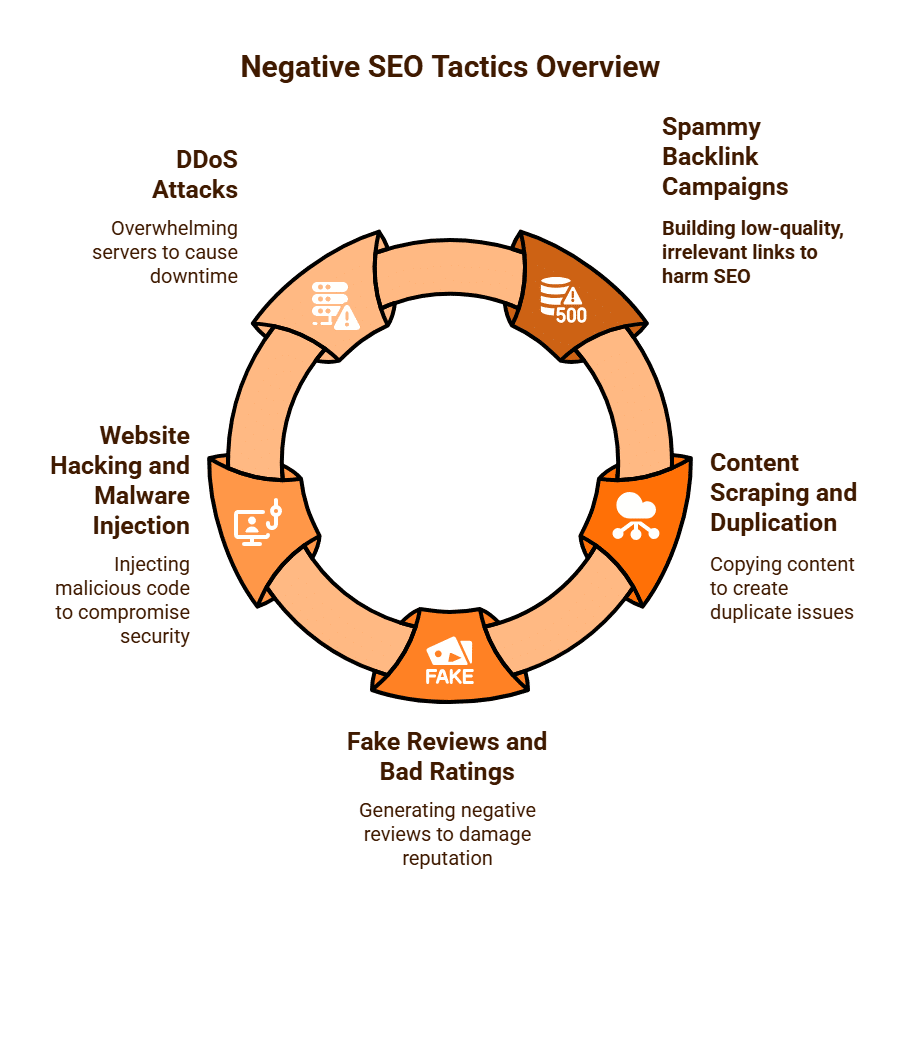
- Spammy Backlink Campaigns: This is perhaps the most prevalent negative SEO tactic. An attacker might build thousands of low-quality, irrelevant, or spammy backlinks pointing to a competitor’s website. These links often come from dubious sources like pornography sites, foreign-language blogs, or automated link farms, using irrelevant or abusive anchor text. The aim is to make Google believe the target site is engaging in manipulative link schemes, leading to a penalty.
- Content Scraping and Duplication: Attackers can scrape a website’s content and republish it across numerous low-quality domains, sometimes even copying entire websites. The objective is to create a mass of duplicate content, potentially confusing search engines about the original source or flagging the target site for content originality issues.
- Fake Reviews and Bad Ratings: For businesses with local listings (like Google Business Profile), negative SEO can involve generating a flurry of fake, negative reviews to damage reputation and deter potential customers.
- Website Hacking and Malware Injection: More severe forms of negative SEO can involve attempting to hack into a competitor’s website to inject spammy links, malicious code, or even deface the site. This directly impacts security and SEO performance.
- DDoS (Distributed Denial-of-Service) Attacks: While not directly an SEO tactic, a DDoS attack can take a website offline for extended periods. This can lead to frequent crawl errors for search engines, negatively impacting rankings due to perceived unreliability and poor user experience.
The Impact and Google’s Stance
Historically, negative SEO could have a significant detrimental impact, leading to sharp drops in rankings and traffic. However, Google has repeatedly stated that its algorithms are designed to ignore or devalue manipulative links and other negative SEO attempts. John Mueller, a prominent Google spokesperson, has often reassured webmasters that it is “very, very rare” for negative SEO to genuinely harm a site’s ranking if the site’s own SEO is legitimate and follows Google’s Webmaster Guidelines.
Despite Google’s reassurances, it is prudent for website owners to remain proactive. While a direct algorithmic penalty from negative SEO is less likely, these attacks can still:
- Waste Google’s crawl budget on spammy pages.
- Cause confusion for search engines.
- Damage brand reputation (e.g., through fake reviews).
- Create unnecessary stress for the website owner.
Mitigating Negative SEO
The best defence against negative SEO is a combination of vigilance and strong fundamental SEO practices:
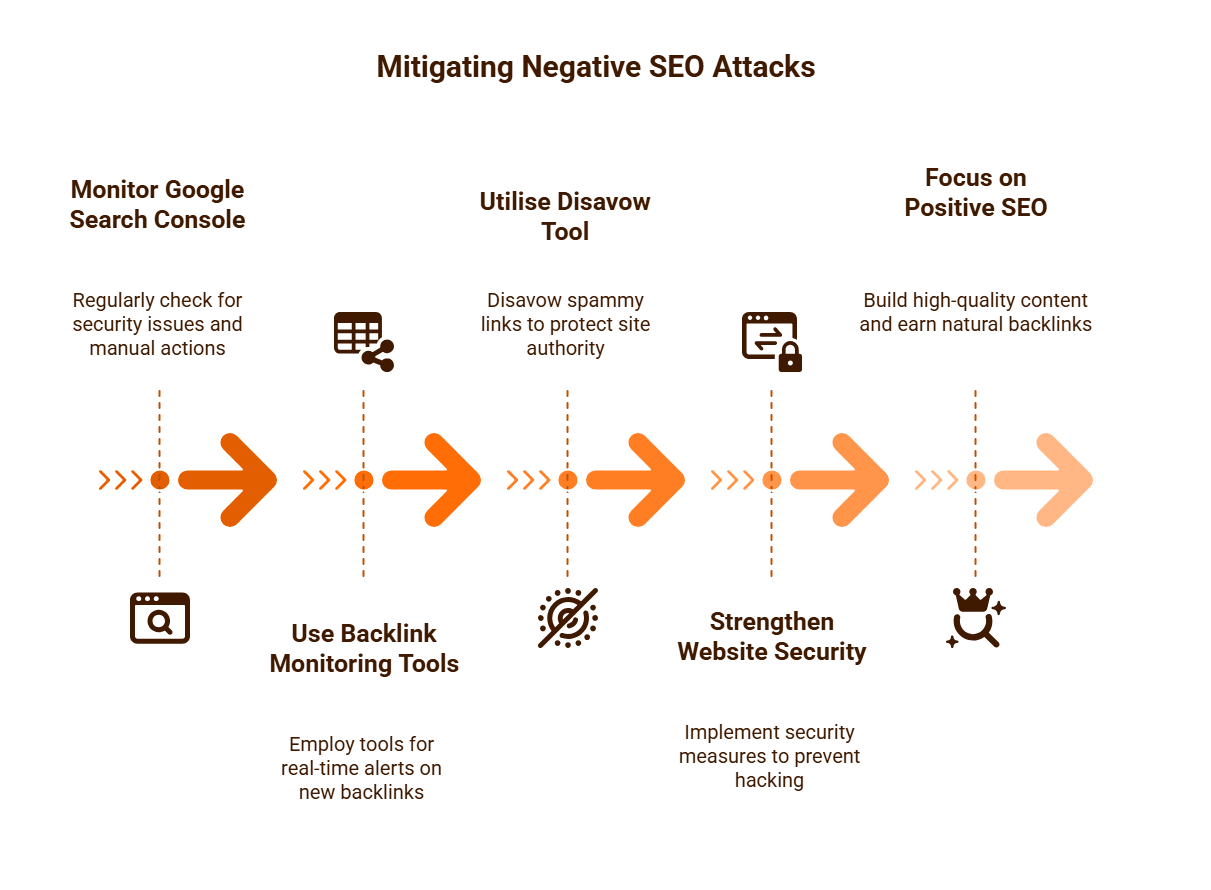
- Monitor Google Search Console (GSC): Regularly check GSC for:
- Security issues: To detect hacking or malware.
- Manual Actions: To see if Google has applied any penalties.
- Links Report: To monitor new and unusual backlinks, especially a sudden influx of low-quality links.
- Use Backlink Monitoring Tools: Invest in professional SEO tools (e.g., Ahrefs, Semrush, Moz, SE Ranking) that provide real-time alerts for new backlinks. This allows you to quickly identify and investigate suspicious links.
- The Disavow Tool: If you discover a significant number of clearly spammy, unnatural, or malicious links pointing to your site, you can use Google’s Disavow Tool. This tells Google to ignore these links when assessing your site’s authority. This tool should be used cautiously and only when you are certain the links are spammy and not natural.
- Strengthen Website Security: Implement strong passwords, two-factor authentication, regular software updates, and robust security plugins to prevent hacking attempts.
- Focus on Positive SEO: The best long-term strategy is to consistently build high-quality content, earn natural backlinks, and provide an excellent user experience. A strong, healthy link profile built on legitimate efforts is more resilient to negative SEO attacks.
While negative SEO is a real phenomenon, its capacity to inflict lasting damage has diminished. Proactive monitoring and adherence to best SEO practices remain the most effective strategies for protecting your website’s search performance.
What is a Disavow File?
In the world of Search Engine Optimisation (SEO), a disavow file is a plain text file that website owners can submit to Google via Google Search Console. Its purpose is to tell Google to ignore specific backlinks (inbound links) when assessing a website’s overall authority and trustworthiness. Essentially, it’s a way for a website owner to disassociate their site from problematic or spammy links that they believe might be negatively impacting their search engine rankings.
Why Would You Need a Disavow File?
The primary reason to create and submit a disavow file is to counteract the effects of unnatural, low-quality, or spammy backlinks pointing to your site. While Google’s algorithms are increasingly sophisticated at identifying and ignoring such links automatically, there are specific scenarios where manual intervention might be necessary:
- Google Manual Action: If your site has received a “manual action” penalty from Google due to “unnatural links to your site” (often related to manipulative link schemes), submitting a disavow file is typically a prerequisite for a reconsideration request. Google’s manual review team will require evidence that you have attempted to clean up or disavow the problematic links.
- Negative SEO Attack: Although Google often states that it’s rare for negative SEO (where competitors point spammy links to your site to harm your rankings) to be effective, in cases of a severe and persistent attack with a large volume of clearly malicious links, a disavow file can be a proactive measure to protect your site.
- Past SEO Mistakes: If a website previously engaged in outdated or black-hat SEO practices (e.g., buying links, participating in link schemes, excessive directory submissions) and now wishes to clean up its link profile, disavowing these legacy links can be part of the remediation process.
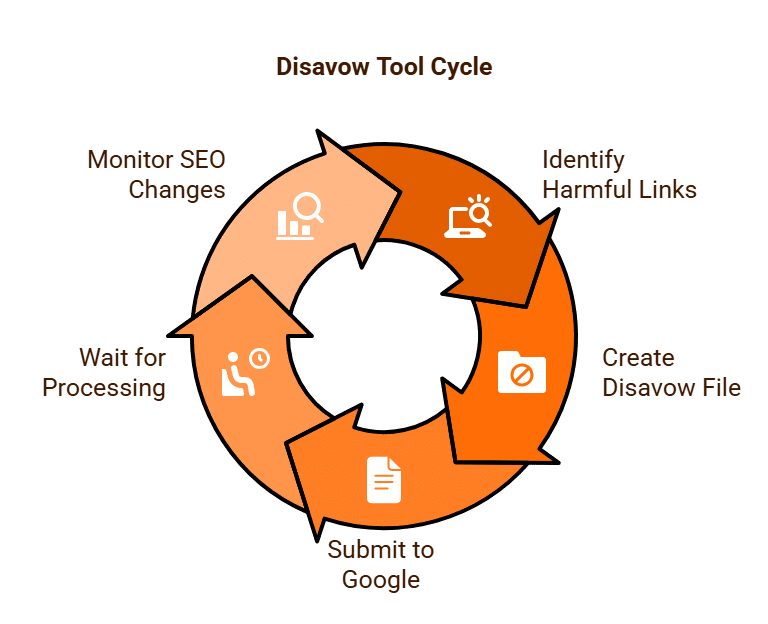
How it Works: Identifying and Submitting
The process of creating and submitting a disavow file requires careful consideration:
- Identify Problematic Links: This is the most critical and time-consuming step. You need to identify links that are:
-
-
- Irrelevant: From websites totally unrelated to your niche.
- Low Quality: From spammy sites, link farms, or sites with very low domain authority.
- Unnatural Anchor Text: Links using highly keyword-stuffed or generic anchor text (e.g., “click here,” “best product”) that don’t fit the context.
- From Penalised Sites: Links from sites that have themselves been penalised by Google.
- Unwanted or Unsolicited: Links you did not request or sanction.
Tools like Ahrefs, Semrush, Moz Link Explorer, and SE Ranking are invaluable for conducting a comprehensive backlink audit.
-
- Attempt Removal (Optional but Recommended): Before disavowing, Google recommends attempting to contact the webmasters of the linking sites to request removal. This demonstrates a genuine effort to clean up your link profile. However, this is often impractical for large-scale spam campaigns.
- Create the Disavow File:
-
-
- The file must be a plain .txt file.
- Each problematic URL should be on its own line.
- To disavow an entire domain (e.g., all links from spammysite.com), precede the domain with domain:, like domain:spammysite.com.
- To Disavow a particular page use the entire url including https://
- You can add comments by starting a line with #.
-
- Submit to Google Search Console:
-
- Use Google’s dedicated Disavow Links tool in GSC.
- Select the correct property (website).
- Upload your .txt file.

Important Considerations and Risks
- Use with Caution: The Disavow Tool is powerful and should be used with extreme caution. Google explicitly states that “most sites don’t need to use this tool.” If used incorrectly (e.g., disavowing legitimate, high-quality links), it can actually harm your SEO.
- Google’s Automation: Google’s algorithms are generally good at ignoring low-quality links on their own. The disavow tool is primarily for those rare cases where persistent, unnatural links are genuinely causing harm or leading to a manual action.
- Timeframe: It can take several weeks or even months for Google to process a disavow file and for any associated ranking changes to take effect.
A disavow file serves as a crucial mechanism for website owners to actively inform Google about backlinks they wish to distance themselves from. While not a routine SEO task, understanding its purpose and proper usage is vital for protecting your website’s integrity and maintaining a healthy search engine presence, particularly in the face of malicious attacks or past link-building errors.
What is Content Marketing?
Content marketing is a strategic marketing approach focused on creating and distributing valuable, relevant, and consistent content to attract and retain a clearly defined audience, ultimately driving profitable customer action and can help with improved on-page SEO. Unlike traditional advertising, which often involves direct sales pitches, content marketing seeks to educate, inform, entertain, or inspire its audience, thereby building trust and establishing a brand as a thought leader and reliable resource.
At its core, content marketing is about delivering genuine value before asking for a sale. It operates on the principle that by consistently providing useful information, businesses can build a loyal community of customers who appreciate their expertise and are more likely to engage with their products or services when the time comes.
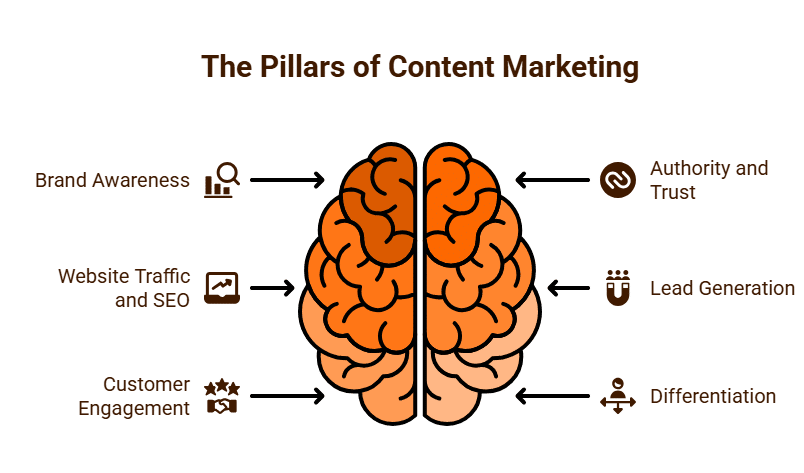
The Purpose and Pillars of Content Marketing
The primary objectives of content marketing extend beyond immediate sales, encompassing a broader spectrum of business goals:
- Building Brand Awareness and Recognition: By consistently publishing high-quality content, a brand becomes more visible and memorable to its target audience.
- Establishing Authority and Trust: When a company consistently provides valuable insights and answers customer questions, it positions itself as an expert in its field, fostering trust and credibility.
- Driving Website Traffic and SEO: Fresh, relevant content attracts organic search traffic. Each piece of content represents an opportunity to rank for new keywords, earn backlinks, and improve overall search engine optimisation (SEO).
- Generating and Nurturing Leads: Content can attract potential customers at various stages of the buyer’s journey, providing the information they need to move closer to a purchase decision. Gated content (like e-books or whitepapers) can also be used for lead capture.
- Enhancing Customer Engagement and Loyalty: Providing ongoing value through content keeps existing customers engaged, strengthens relationships, and encourages repeat business.
- Differentiation from Competitors: A strong content strategy allows a brand to showcase its unique perspective, values, and expertise, helping it stand out in a crowded marketplace.
Common Types of Content
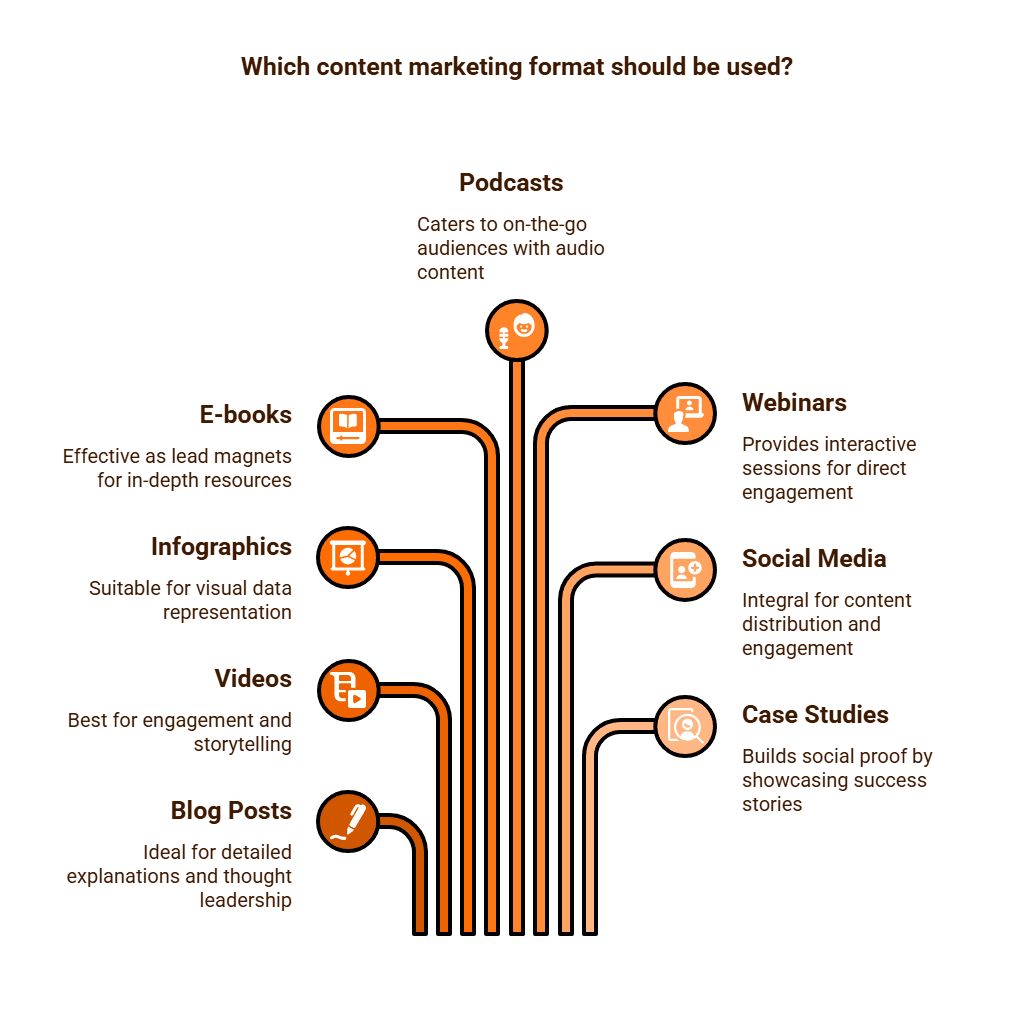
Content marketing manifests in various forms, chosen based on the target audience, the message, and the platform:
- Blog Posts and Articles: The most common format, used for detailed explanations, guides, news, and thought leadership.
- Videos: Highly engaging, suitable for tutorials, product demonstrations, behind-the-scenes glimpses, and storytelling (e.g., YouTube, TikTok, Instagram Reels).
- Infographics: Visual representations of data or complex information, easily digestible and shareable.
- E-books, Whitepapers, and Guides: Longer-form, in-depth resources, often used as lead magnets.
- Podcasts: Audio content offering interviews, discussions, or educational series, catering to an on-the-go audience.
- Webinars and Online Courses: Interactive, live or pre-recorded sessions providing in-depth knowledge and fostering direct engagement.
- Social Media Content: While often promotional, strategic social media posts, stories, and live sessions are integral to content distribution and engagement.
- Case Studies and Testimonials: Showcasing how products or services have successfully solved customer problems, building social proof.
The Strategic Approach
Effective content marketing is never ad-hoc. It requires a well-defined strategy that includes:
- Understanding the target audience’s needs, questions, and pain points.
- Setting clear, measurable goals.
- Planning content themes, formats, and a consistent publishing schedule.
- Distributing content across appropriate channels.
- Measuring performance against established KPIs (Key Performance Indicators) to continually refine the strategy.
Content marketing is a long-term investment that shifts the focus from directly selling to genuinely serving an audience. By consistently delivering valuable content, businesses can build a strong foundation of trust and authority, leading to more sustainable customer relationships and ultimately, profitable growth.
How Often Should We Publish Content?
The question of how frequently a business should publish content is one that frequently arises in content marketing strategies. There’s no universal, one-size-fits-all answer, as the optimal publishing schedule is highly dependent on a variety of factors unique to each business, its audience, and its objectives. However, understanding these influencing factors can help establish a sustainable and effective content cadence.
Key Factors Influencing Publishing Frequency:
- Audience Expectations and Behaviour:
Your audience is paramount. How often do they consume content? Are they looking for daily news updates, or do they prefer in-depth monthly guides? Overwhelming your audience with too much content can lead to unsubscribe fatigue, while too little might cause them to forget about your brand. Analysing audience engagement rates (opens, clicks, time on page) can provide valuable insights. - Resources and Quality:
Perhaps the most practical constraint is your internal capacity. Producing high-quality content – be it blog posts, videos, or infographics – requires time, skill, and budget. It is always better to publish less frequently but maintain high quality than to push out sub-standard content just to meet an arbitrary schedule. Poor quality can damage your brand reputation and offer little to no SEO benefit. - Industry and Niche:
Some industries are inherently more dynamic and require more frequent updates. A news portal or a tech review site, for instance, thrives on daily or even hourly content to stay relevant. Conversely, a B2B consultancy specialising in niche industrial machinery might find that a comprehensive, well-researched article published monthly is far more impactful than weekly short posts. - Competitor Activity:
While you shouldn’t blindly mimic competitors, it’s wise to observe their content publishing frequency and the types of content they produce. This can offer benchmarks, but your strategy should ultimately be tailored to your unique value proposition. - SEO Goals:
Content frequency can impact SEO in several ways, though not always as directly as once thought:- Keyword Coverage: More content naturally means more opportunities to target a wider array of keywords and cover topics in greater depth.
- Crawl Budget: For very large sites, regular updates can signal to search engines that your site is active and worthy of more frequent crawling, helping new content get indexed faster.
- Backlink Potential: High-quality, fresh content has a greater chance of attracting natural backlinks, which remain a crucial ranking factor.
- “Freshness” Signal: While not as potent as it used to be, Google still considers content freshness for certain types of queries.

General Guidelines and Prioritisation:
- For most small to medium-sized businesses aiming for organic growth: Publishing 1-2 high-quality blog posts per week is often a sustainable and effective starting point. This allows for thorough research, writing, and promotion.
- For larger enterprises or content-heavy niches: 3-5 times per week might be achievable with a dedicated content team and a diverse content calendar.
- For social media platforms: The frequency will be much higher, often daily or multiple times a day, given the ephemeral nature of social feeds.
Ultimately, consistency and quality should always take precedence over sheer volume. A consistent publishing schedule helps build audience habits and signals reliability to search engines. High-quality content is what genuinely engages users, generates shares, attracts backlinks, and establishes your authority.
Begin with a frequency that your resources can comfortably sustain without compromising quality. Monitor your analytics closely – track website traffic, engagement metrics, lead generation, and conversions. These data points will provide the best insights into whether your current publishing frequency is working and where adjustments might be needed to optimise your return on investment.
What is Keyword Density?
Keyword density is a metric, expressed as a percentage, that represents the frequency with which a particular keyword or phrase appears within a webpage’s content relative to the total word count of that page. For example, if a page has 100 words and the keyword “digital marketing” appears 3 times, the keyword density for “digital marketing” would be 3%.
Historically, keyword density was a prominent metric in the early days of Search Engine Optimisation (SEO). It was believed that a higher keyword density directly correlated with better search engine rankings for that specific keyword. SEO practitioners would often aim for a certain percentage (e.g., 2-5%) in their content, believing it was a direct signal to search engines about the page’s topic.
The Rise and Fall of Keyword Density’s Importance
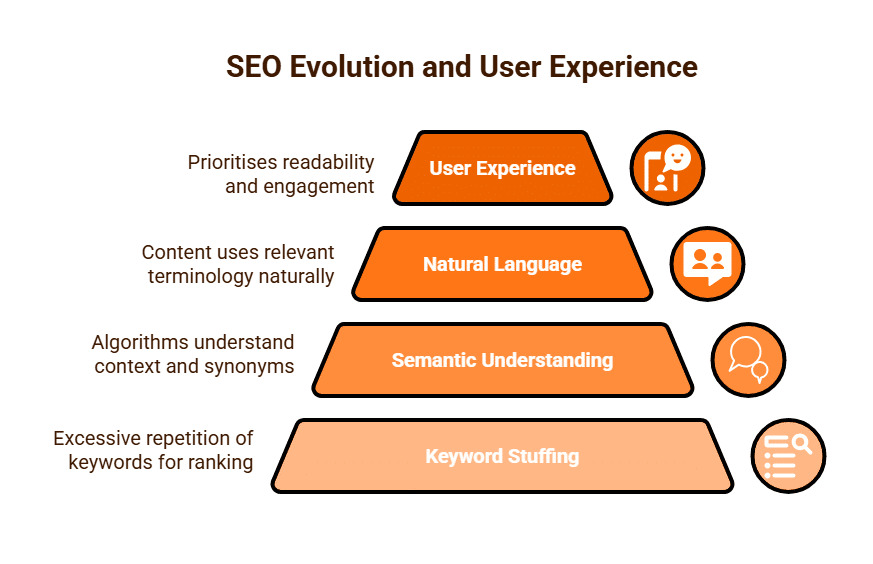
In the infancy of search engines, their algorithms were simpler. They heavily relied on keyword occurrences to understand what a webpage was about. This led to a practice known as keyword stuffing, where webmasters would excessively repeat target keywords in their content, often making it unnatural, unreadable, and frustrating for human users. An example might be: “We sell digital marketing. Our digital marketing services are the best digital marketing. For all your digital marketing needs, choose our digital marketing solutions.”
However, as search engines, particularly Google, became exponentially more sophisticated, the direct importance of a specific keyword density percentage rapidly diminished. Google’s algorithms evolved to understand context, synonyms, latent semantic indexing (LSI), and natural language processing. They moved beyond merely counting keywords to understanding the overall topic, relevance, and intent behind the content.
Why It’s Largely Irrelevant (and Potentially Harmful) Today
Today, obsessing over a precise keyword density percentage is not only outdated but can also be detrimental to your SEO efforts:
- Google Penalties: Keyword stuffing is now considered a black-hat SEO tactic and can lead to algorithmic penalties, causing your site to drop significantly in rankings or even be de-indexed.
- Poor User Experience (UX): Content that is written for a specific keyword density rather than for human readability is often awkward, repetitive, and provides a terrible user experience. Google prioritises user experience, and frustrated visitors will quickly leave your site, increasing bounce rates and sending negative signals to search engines.
- Semantic Understanding: Modern search engines understand the relationships between words and concepts. If you write comprehensively about “car repair,” Google will understand that terms like “mechanic,” “engine,” “tyres,” “brakes,” and “servicing” are all relevant, even if you don’t explicitly mention “car repair” a dozen times.
- Focus on Natural Language: Google’s goal is to provide the best answer to a user’s query. The best answer is usually a well-written, informative, and engaging piece of content that naturally uses relevant terminology.
The Modern Approach: Context and Comprehensiveness
Instead of focusing on a specific keyword density, contemporary SEO best practices advocate for:
- Writing for Humans First: Prioritise readability, natural language, and providing genuine value to your audience.
- Keyword Prominence (Not Density): Naturally include your primary keyword in important on-page elements like the page title, main headings (H1, H2), and within the first paragraph or two of your content.
- Semantic SEO: Cover your topic thoroughly and naturally. Use synonyms, related terms, and long-tail variations of your keywords throughout the content. This signals to search engines that you have a comprehensive understanding of the subject matter.
- Contextual Relevance: Ensure your content is highly relevant to the user’s search intent and provides a complete answer or solution.
Keyword density is largely a legacy metric from an earlier era of SEO. While your target keywords should certainly appear in your content, the focus has entirely shifted to creating high-quality, comprehensive, and naturally written content that satisfies user intent. Obsessing over a specific percentage is counterproductive and risks harming both your user experience and your search engine rankings.

What is Latent Semantic Indexing (LSI)?
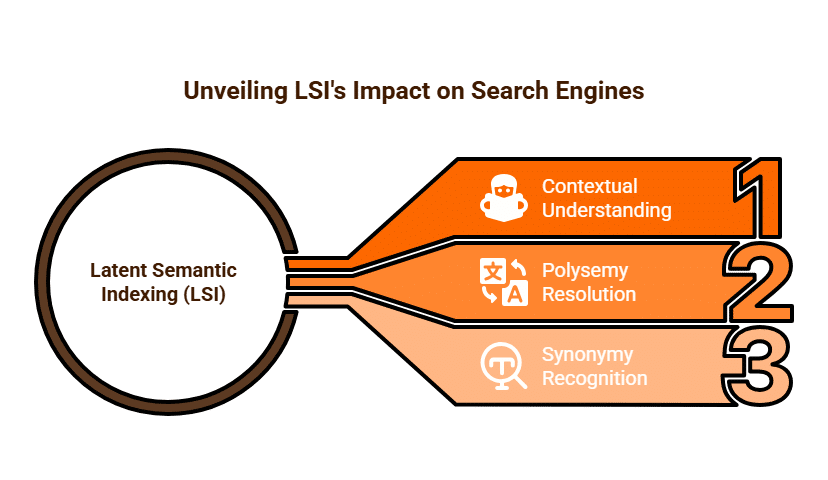
Latent Semantic Indexing (LSI) is a mathematical method used by search engines, including Google, to understand the relationships between terms and concepts within a body of text. At its core, LSI enables search engines to grasp the context and meaning of content, rather than simply relying on exact keyword matches. It’s a fundamental aspect of how modern search algorithms provide more accurate and relevant results to user queries.
The Problem LSI Solved
In the early days of search engines, algorithms were relatively basic. They primarily relied on keyword matching – if a user searched for “apple,” the search engine would look for pages that frequently contained the word “apple.” This approach presented two significant problems:
- Polysemy (Ambiguity): Many words have multiple meanings. For example, “apple” could refer to the fruit or the technology company. Without understanding context, early search engines might return irrelevant results.
- Synonymy: Users might search for “motorcycle” while a relevant page uses the term “motorbike.” A simple keyword matching algorithm would miss this connection, failing to deliver the most helpful content.
LSI was developed to overcome these limitations. It allows search engines to move beyond mere word-for-word matching and understand the broader semantic relationships between words and phrases within a document, and across the entire web.
How LSI Works (A Simplified Explanation)
Instead of just counting how many times a specific keyword appears, LSI analyses a large collection of documents to identify patterns of co-occurring words and phrases.
Imagine Google analysing millions of documents about “cars.” It would notice that words like “engine,” “wheels,” “tyres,” “driving,” “road,” “fuel,” and “headlights” frequently appear together in these documents. Through this statistical analysis, LSI infers that these terms are semantically related and belong to the same conceptual domain: “automobiles.”
Therefore, when a user searches for “vehicle performance,” an LSI-enabled search engine understands that pages containing terms like “engine power,” “acceleration,” “handling,” and “torque” are highly relevant, even if the exact phrase “vehicle performance” isn’t explicitly used multiple times. It builds a “conceptual map” of topics, rather than just a list of keywords.
Impact on Content Creation (Modern SEO)
The rise of LSI and subsequent advancements in natural language processing (NLP) have profoundly influenced modern SEO strategies:
- Focus on Topic Comprehensiveness: The emphasis has shifted from keyword stuffing to creating truly comprehensive content that covers a topic in depth. By naturally incorporating a rich vocabulary of semantically related terms and synonyms, you signal to search engines that your content provides thorough and valuable information.
- Natural Language Writing: There’s no need to force keywords into your text to achieve a specific “keyword density.” Instead, write naturally for your human audience. LSI helps search engines understand content written in a conversational, human-like manner.
- Context is King: LSI allows search engines to understand the context of ambiguous terms. If your article discusses “jaguar” alongside “engine,” “speed,” and “sports car,” Google knows you’re talking about the vehicle, not the animal.
- Improved User Experience: Content created with semantic understanding in mind is inherently more readable and valuable to users because it addresses the topic broadly and answers related questions, rather than just repeating a single phrase.
Common Misconceptions about “LSI Keywords”
It’s important to clarify a common misconception: some SEO tools claim to provide “LSI keywords.” These are not keywords that Google explicitly labels as “LSI.” Instead, they are usually semantically related terms and phrases that naturally co-occur with your primary keyword within high-ranking content. The concept of LSI is about Google’s internal understanding of word relationships, not about a specific set of keywords you need to “plug in.”
Latent Semantic Indexing represents a significant leap in how search engines process and rank content. It moved the needle from simple keyword matching to a sophisticated understanding of context and semantic relationships. For content creators, this means focusing on producing high-quality, comprehensive, and naturally written content that genuinely satisfies user intent, knowing that Google’s algorithms will grasp the full breadth of the topic being discussed.

What Data Does Google Search Console Measure?
Google Search Console (GSC)
GSC is s an indispensable, free tool provided by Google that offers website owners and SEO professionals direct insights into how their site performs in Google Search. Unlike Google Analytics, which focuses on user behaviour after they land on your site, GSC primarily measures your website’s visibility and performance within Google Search results. It acts as a communication channel between your website and Google, helping you monitor, maintain, and troubleshoot your site’s presence.
Here’s a breakdown of the key data and metrics Google Search Console measures:
1. Performance Reports (Search Results, Discover, News)
These are arguably the most frequently used reports in GSC, providing a wealth of data on how users are finding and interacting with your site in Google Search.
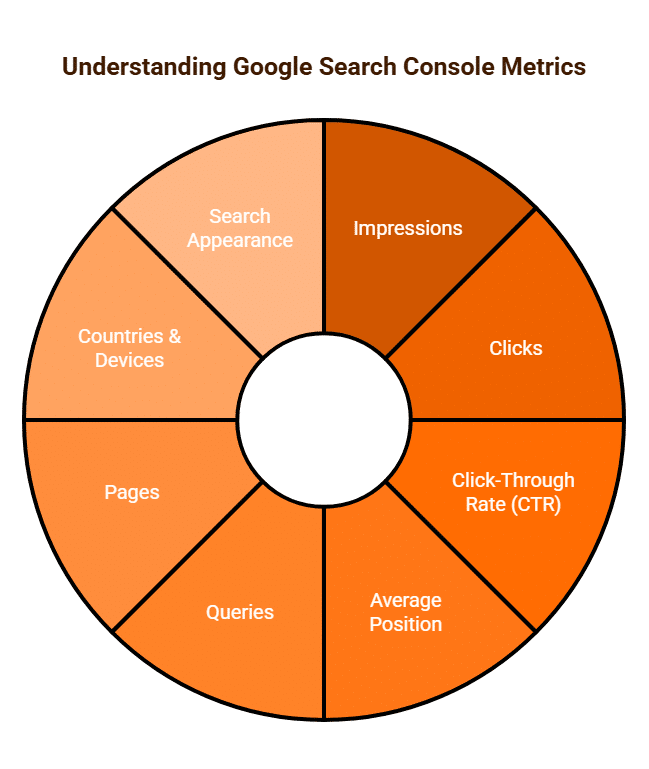
- Impressions: This metric measures how many times a link to your website was displayed to a user in Google Search results. An impression is counted even if the user doesn’t scroll down to see your specific listing (though for infinitely scrolling results, it typically needs to be scrolled into view). It indicates your site’s visibility for particular queries.
- Clicks: This metric counts the number of times a user clicked on a link to your website from Google Search results, leading them to your property. This is a direct measure of traffic gained from search.
- Click-Through Rate (CTR): Calculated as (Clicks ÷ Impressions) x 100, CTR indicates the percentage of users who saw your link in search results and then clicked on it. A high CTR suggests your title tags and meta descriptions are compelling and relevant to the user’s search intent.
- Average Position: This shows the average ranking position of your website’s topmost result for a specific query or page. A lower number indicates a higher ranking (e.g., position 1 is the top spot).
- Queries: GSC reveals the actual search terms (keywords) users typed into Google that led to your site appearing in search results. This is invaluable for understanding user intent and identifying new content opportunities. Note that some very rare or sensitive queries may be anonymised to protect user privacy.
- Pages: This report shows which specific pages on your website are appearing in search results and generating clicks and impressions.
- Countries & Devices: GSC breaks down performance data by the geographic location of users and the devices they used (desktop, mobile, tablet), helping you tailor content or optimise for specific audiences.
- Search Appearance: This shows how your content is displayed in rich results (e.g., review snippets, FAQs, recipes, videos) and measures their impressions and clicks.
2. Index Coverage Report
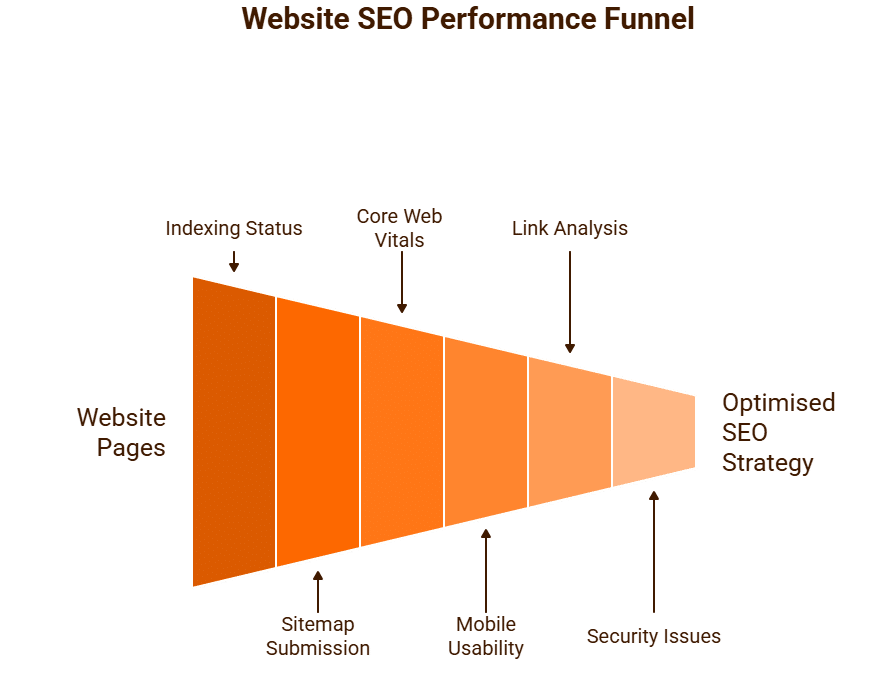
This vital report helps you understand which of your pages Google has indexed (added to its search database) and any issues preventing pages from being indexed.
- Indexed Pages: Shows the number of pages from your site that are successfully indexed and eligible to appear in search results.
- Errors: Identifies critical issues preventing pages from being indexed (e.g., server errors, redirects, noindex directives, 404 errors).
- Warnings: Highlights potential issues that might hinder indexing but aren’t outright errors.
- Excluded Pages: Lists pages that are intentionally or unintentionally excluded from indexing (e.g., robots.txt blocked, noindex tag, canonicalisation issues, crawled but not indexed).
3. Sitemaps Report
This report allows you to submit XML sitemaps to Google and monitor their status. A sitemap helps Google discover all the important pages on your site. GSC will show if the sitemap was successfully processed and if any errors were found within it.
4. Core Web Vitals (Experience)
GSC provides reports on Core Web Vitals, which are crucial metrics for user experience and a key Google ranking factor. These include:
- Largest Contentful Paint (LCP): Measures loading performance.
- First Input Delay (FID): Measures interactivity (though replaced by INP soon).
- Cumulative Layout Shift (CLS): Measures visual stability.
GSC highlights which pages are “Good,” “Needs Improvement,” or “Poor” based on these metrics for both mobile and desktop.
5. Mobile Usability
This report identifies pages on your site that have mobile usability errors (e.g., text too small to read, clickable elements too close together), helping you fix issues that could negatively impact mobile rankings.
6. Links Report (Backlinks and Internal Links)
GSC provides data on both external (backlinks) and internal links:
- Top linking sites: The domains that link to your site most frequently.
- Top linked pages: Which of your pages receive the most external links.
- Top linking text: The most common anchor text used in external links.
- Internal links: Shows which pages on your site have the most internal links, indicating their perceived importance within your site’s structure.
7. Security Issues & Manual Actions
GSC alerts you if Google detects security issues (e.g., malware, spam injection) on your site. It also notifies you of any “manual actions” (penalties) applied to your site by a Google human reviewer due to policy violations.
Google Search Console provides the raw data directly from Google’s index and search results, giving you an unparalleled view of your website’s organic search performance and health. Regularly monitoring these metrics is vital for diagnosing problems, identifying opportunities, and guiding your SEO strategy.
What Data Does GA4 Analytics Measure?
Google Analytics 4 (GA4)
G4 represents a significant shift in how Google measures user interactions on websites and mobile applications. Unlike its predecessor, Universal Analytics (UA), which was session-based, GA4 operates on an event-based data model. This fundamental change allows for a more flexible, comprehensive, and user-centric understanding of the entire customer journey across various platforms and devices.
GA4’s primary goal is to provide a unified view of user behaviour, offering insights into who is visiting your site or app, how they are interacting, and what actions they are taking.
Here’s a breakdown of the key data and metrics GA4 measures:
1. Events (The Foundation of GA4 Data)
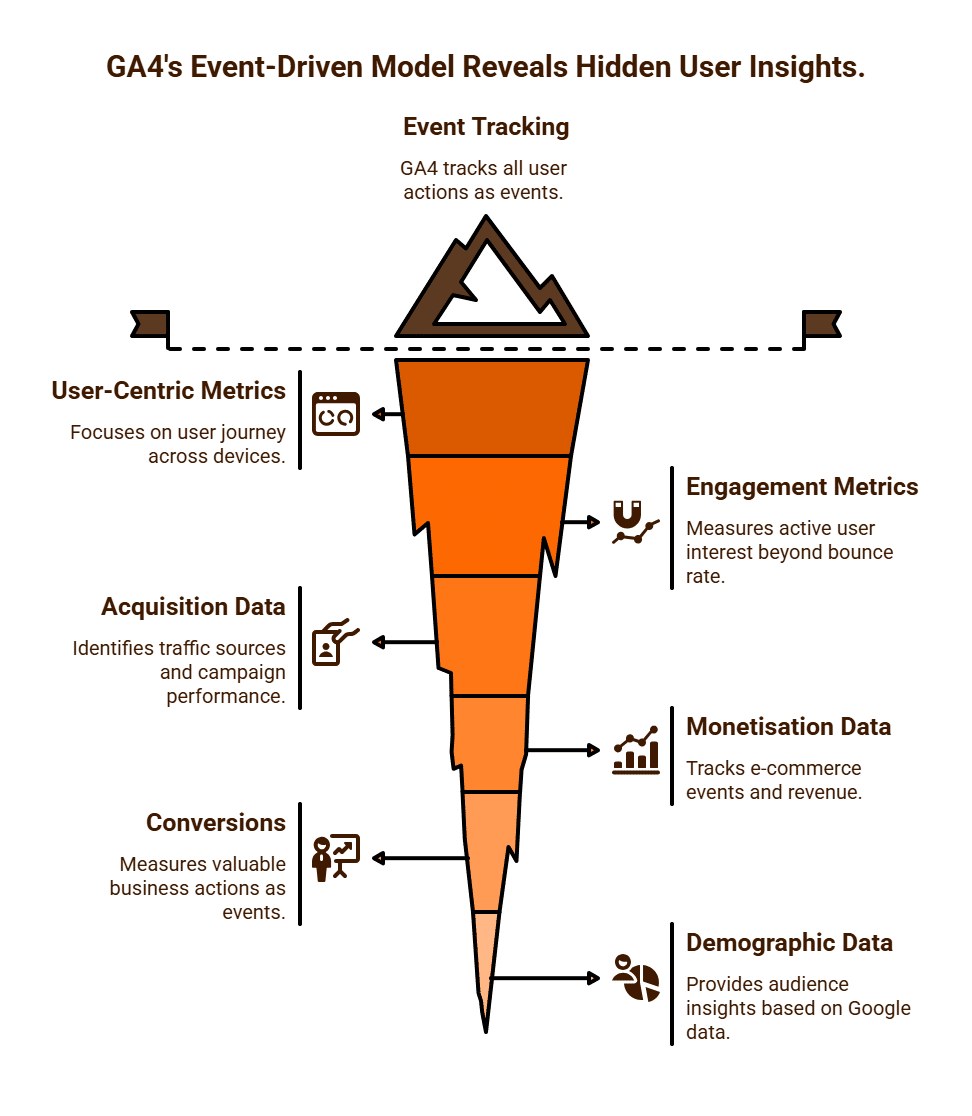
In GA4, everything is an event. A page view is an event, a click is an event, a purchase is an event, and a scroll is an event. This unified model allows for incredibly granular tracking of user interactions.
- Automatically Collected Events: GA4 collects several events by default, often without any additional coding. These include:
- first_visit: The first time a user visits your website or app.
- session_start: When a user begins a session.
- page_view: When a page loads (equivalent to a pageview in UA).
- scroll: When a user scrolls to the bottom of a page.
- click: When a user clicks an outbound link.
- file_download: When a user downloads a file.
- video_start, video_progress, video_complete: Tracking engagement with embedded videos.
- Enhanced Measurement Events: These are automatically enabled for web data streams and include common interactions like those listed above.
- Recommended Events: These are predefined events that Google recommends implementing for specific industries (e.g., e-commerce, games) to capture valuable actions like add_to_cart, begin_checkout, purchase.
- Custom Events: You can define and implement your own custom events to track unique interactions specific to your business (e.g., form submissions, specific button clicks, pop-up interactions).
2. User-Centric Metrics
GA4 places a strong emphasis on understanding the user journey across devices, rather than just isolated sessions.
- Users:
-
- Total Users: The total number of unique individuals who interacted with your site or app.
- New Users: The number of unique users who interacted with your site or app for the first time.
- Active Users: The primary user metric in GA4, representing the number of distinct users who had an “engaged session” (see below) or logged a first_visit or first_open event.
- User Lifetime Value (LTV): For e-commerce, GA4 can track and predict the long-term value of users based on their engagement and purchase behaviour.
3. Engagement Metrics (Replacing “Bounce Rate”)
GA4 introduces new and more nuanced metrics for engagement, moving beyond UA’s “bounce rate” to provide a more holistic view of user interaction.
- Engaged Sessions: A session is considered “engaged” if it lasts longer than 10 seconds, has a conversion event, or includes at least two pageviews/screenviews. This is a more meaningful indicator of active user interest.
- Engagement Rate: The percentage of engaged sessions. This is essentially the inverse of the old “bounce rate” (low engagement rate implies a high bounce rate).
- Average Engagement Time: The average duration a user spends actively engaged with your website or app, excluding idle time.
4. Acquisition Data
These reports provide insights into where your users are coming from.
- Traffic Sources: Identifies the channels bringing users to your site (e.g., Organic Search, Paid Search, Social, Referral, Direct).
- Campaigns: Tracks the performance of your marketing campaigns, allowing you to see which campaigns are driving traffic and engagement.
- Medium & Source: More granular details about how users arrived (e.g., “organic,” “cpc,” “email”).
5. Monetisation and E-commerce Data
For online stores, GA4 offers comprehensive e-commerce tracking.
- Purchases: Measures the number of completed purchase events.
- Purchase Revenue: The total revenue generated from purchases.
- Item Views, Add to Carts: Tracks specific e-commerce events, providing insights into the shopping funnel.
- Item Promotion Views/Clicks: Measures engagement with promotions on your site.
- Refunds: Tracks refund events.
6. Measure Conversions
In GA4, any event can be marked as a conversion if it represents a significant action valuable to your business (e.g., a purchase, a form submission, a newsletter signup, a key video completion). GA4 counts every instance of a conversion event, even if it occurs multiple times within a single session.
7. Demographic and Technical Data
- Demographics: Information about your audience’s age, gender, and interests (based on Google’s advertising data).
- Technology & Devices: Data on the devices (desktop, mobile, tablet), operating systems, and browsers users are employing to access your content.
In essence, GA4 provides a flexible, event-driven framework to understand the full user journey, from initial acquisition to long-term retention and monetisation. Its focus on user-centric metrics and cross-platform tracking makes it a powerful tool for businesses seeking deeper insights into their digital performance.
What is Bounce Rate?
Bounce Rate Explained
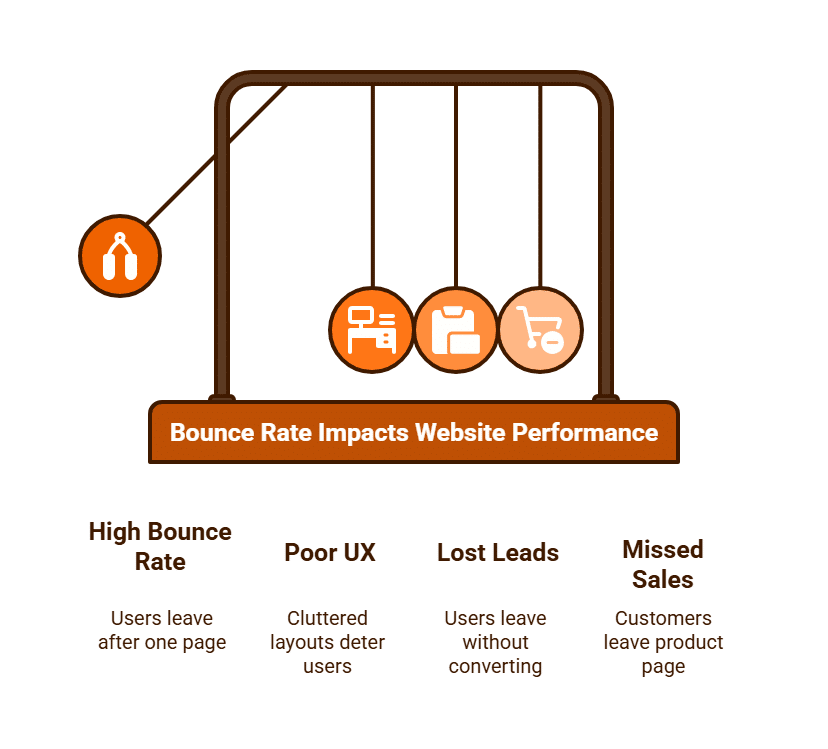
is a crucial metric in web analytics that measures the percentage of visitors who land on a single page of your website and then leave without interacting further or navigating to any other page within your site. Essentially, it quantifies how many users “bounce” away after viewing only one page.
Historically, in Universal Analytics (UA), a bounce was defined as a session that triggered only a single request to the Analytics server. This meant if a user landed on a page and then immediately closed the browser, hit the back button, or simply became inactive, it was counted as a bounce. These single-page sessions would also register a session duration of 0 seconds.
With the advent of Google Analytics 4 (GA4), the definition of bounce rate has evolved to be more nuanced and aligned with user engagement. In GA4, bounce rate is the percentage of sessions that are not engaged. A session is considered “engaged” if it meets any of the following criteria:
- It lasts longer than 10 seconds.
- It includes a conversion event.
- It includes at least two page views or screen views.
Therefore, in GA4, if a user lands on a page, stays for 15 seconds, and then leaves, it’s not a bounce, even if they didn’t visit a second page. This provides a more meaningful measure of user interaction.
Why Bounce Rate Matters (and When It Doesn’t)
Interpreting bounce rate requires context, as a high bounce rate isn’t always a negative indicator:
When a High Bounce Rate Can Be Negative:
- E-commerce Product Pages: If a customer lands on a product page and immediately leaves, it could signal issues with product information, pricing, design, or a confusing call to action. In e-commerce, you typically want users to browse multiple pages, add to cart, and proceed to checkout. See our article on e-commerce SEO.
- Landing Pages (for Lead Generation): If the purpose of a landing page is to capture leads via a form, and users are leaving without filling it out, a high bounce rate indicates a problem with the offer, form design, or persuasive copy.
- Mismatch of Expectations: If your ad or search result meta description promises one thing, but the landing page delivers something else entirely, users will bounce due to misaligned expectations.
- Technical Issues: Slow page load times, broken links, non-responsive design on mobile, or technical errors (like a 404 page) will almost always lead to a high bounce rate as users abandon the site out of frustration.
- Poor User Experience (UX): Cluttered layouts, intrusive pop-ups, difficult navigation, or low-quality content can deter users from exploring further.
When a High Bounce Rate Can Be Neutral or Even Positive:
- Blogs/Informational Articles: If a user searches for a specific piece of information, lands on your blog post, finds the exact answer they need, and then leaves, they “bounced.” However, they achieved their goal, which is a positive outcome.
- Contact Pages: A user might visit your contact page simply to find a phone number or email address, complete that action offline, and then leave. This would be a bounce, but a successful interaction.
- Single-Page Sites/Landing Pages (Specific Goal): For a one-page brochure website or a very focused landing page designed to direct users to an external site (e.g., to buy tickets), a high bounce rate can be normal, as the user’s primary goal doesn’t involve navigating deeper into your site.
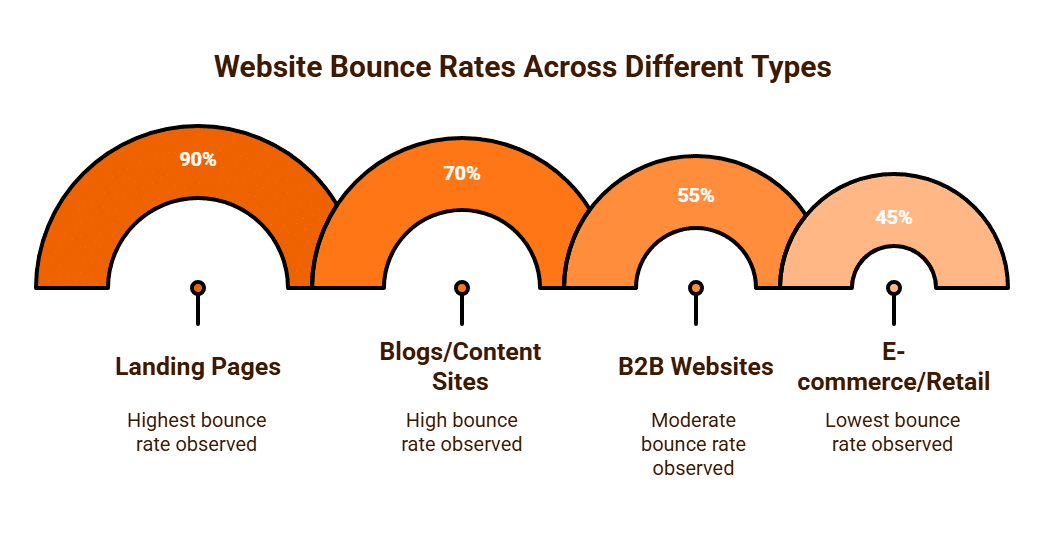
Average Bounce Rates (General Guidelines, GA4)
Bounce rates vary significantly by industry, content type, and traffic source. While there’s no “perfect” bounce rate, here are some general benchmarks (often inversed from engagement rates in GA4):
- E-commerce/Retail: 20-45% (lower is better, as users should browse)
- B2B Websites: 25-55%
- Lead Generation Sites: 30-55%
- Blogs/Content-Heavy Sites: 40-70% (can be higher for specific article pages)
- Landing Pages (Single Action): 60-90% (often higher for very specific informational pages)
How to Improve Bounce Rate (and Engagement)
Improving bounce rate fundamentally involves enhancing user experience and content relevance:
- Optimise Page Load Speed: Faster pages retain users.
- Improve Content Quality and Relevance: Ensure your content directly matches user intent and delivers value.
- Enhance User Experience (UX): Ensure clear navigation, intuitive design, and mobile responsiveness. Avoid intrusive pop-ups or confusing layouts.
- Clear Calls to Action (CTAs): Guide users to the next step, whether it’s reading another article, buying a product, or filling a form.
- Effective Internal Linking: Encourage users to explore more of your site by providing relevant links to other pages within your content.
- Targeted Traffic: Ensure your marketing efforts (ads, SEO keywords) are bringing in the right audience who are genuinely interested in your content.
Bounce rate is a valuable metric that, when analysed in context, can reveal significant insights into user engagement and potential issues with your website’s content, design, or targeting. The shift to an event-based model in GA4 provides a more nuanced understanding, allowing businesses to focus on truly “engaged” sessions.
What is the Difference Between Long-Tail vs. Short-Tail Keywords?
Long-Tail vs. Short-Tail Keywords: A Strategic Guide to Google SERPs
In the world of search engine optimisation (SEO), keywords are the foundation of any successful strategy. However, not all keywords are created equal. Understanding the difference between long-tail and short-tail keywords and knowing when to use each is crucial for effectively ranking on Google SERPs (Search Engine Results Pages) and attracting the right kind of traffic. This distinction is a cornerstone of modern keyword research, moving beyond simple popularity to focus on user intent and conversion potential.
What Are Short-Tail Keywords?
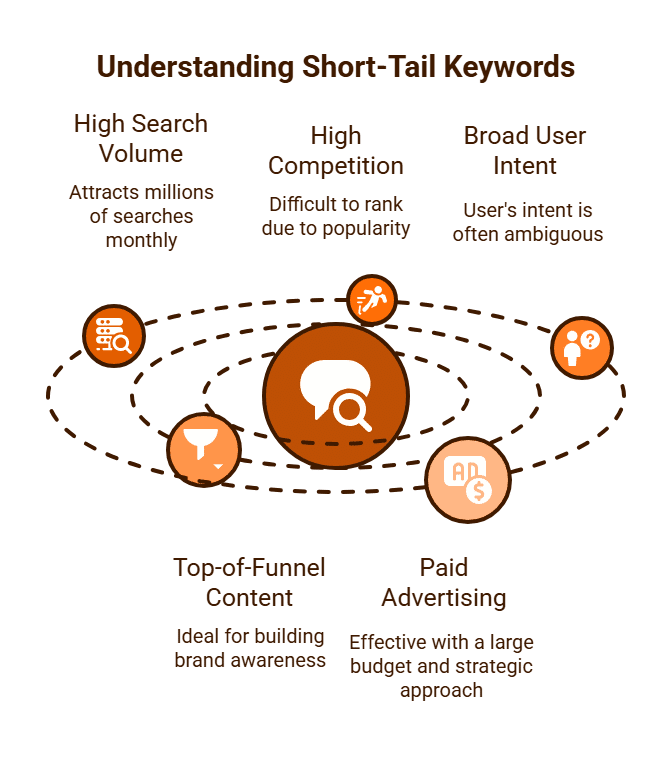
Short-tail keywords, also known as “head terms,” are short, broad, and highly competitive search phrases. They are typically one to two words long and represent a general topic or category.
- Characteristics:
- High Search Volume: Thousands, if not millions, of people search for these terms each month.
- High Competition: Because they are so popular, it is incredibly difficult and expensive to rank for them, especially for smaller businesses.
- Broad User Intent: The user’s intent is often ambiguous. For example, a search for “shoes” could mean they want to buy shoes, see pictures of shoes, or learn about the history of shoes.
- When to Use Them:
- Top-of-Funnel Content: Short-tail keywords are best for building brand awareness and establishing authority. They are ideal for high-level content like homepages, main category pages, or broad informational articles that serve as a central hub for a topic.
- Paid Advertising: They can be effective in Google Ads campaigns where you have a large budget to compete for a top position, but they require a strategic approach with precise negative keywords to manage costs.
What Are Long-Tail Keywords?
Long-tail keywords are longer, more specific search phrases that typically consist of three or more words. They represent a more defined and often transactional user intent.
- Characteristics:
- Lower Search Volume: They are searched for less frequently than short-tail keywords.
- Lower Competition: Due to their specificity, there is significantly less competition to rank for them.
- High User Intent: The user’s intent is very clear. For example, a search for “best lightweight running shoes for marathon” leaves little doubt about what the user wants.
- Higher Conversion Rates: Because of their high user intent, visitors who land on your site from long-tail keywords are much more likely to convert into a customer or lead.
- When to Use Them:
- Targeted Content: Long-tail keywords are ideal for blog posts, product pages, and sub-category pages. They are perfect for answering specific questions, providing in-depth reviews, or offering detailed product information.
- Conversion-Focused Campaigns: For e-commerce stores, long-tail keywords are invaluable for targeting customers who are in the final stages of the buying cycle.
- SEO for Smaller Businesses: For businesses with limited resources, focusing on a portfolio of long-tail keywords is a far more strategic and achievable goal than trying to rank for a competitive short-tail term. The cumulative traffic from many long-tail keywords can often surpass the traffic from a single short-tail term.

A Strategic Approach: Blending Both
A balanced and effective SEO strategy should not rely on one type of keyword exclusively. Instead, it should use both short-tail and long-tail keywords in a complementary fashion.
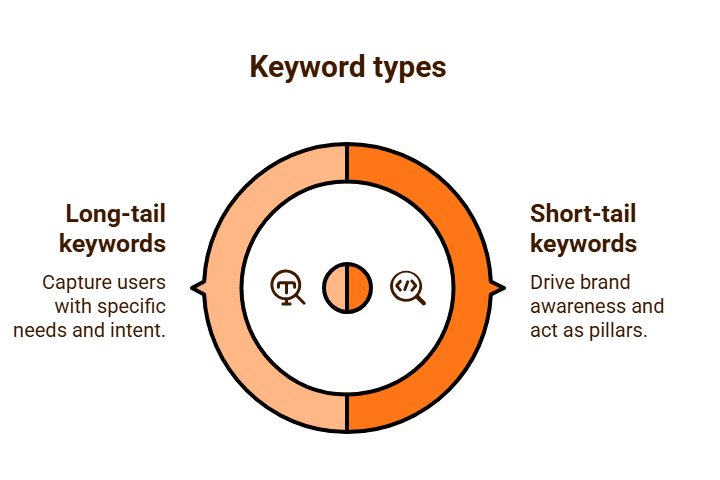
- Short-tail keywords act as the foundation, driving broad brand awareness and serving as pillars for your site’s main categories.
- Long-tail keywords provide the detailed pathways to your content, capturing users with specific needs and high purchase intent.
Your homepage and main category pages might be optimised for short-tail keywords like “digital camera.” Within that category, you would have sub-category pages and blog posts optimised for long-tail keywords such as “best digital camera for beginners,” “waterproof digital camera for kids,” and “DSLR camera price comparison.”
This approach builds a robust and comprehensive presence that captures users at every stage of their search journey, from initial research to final purchase. In essence, it’s about building a digital funnel that funnels broad interest into specific, high-value conversions.
What is the Average Time on Site by Industry from Google Searches?
Q1: What is “Time on Site” and how is it a valuable metric?
“Time on Site” (or “Average Session Duration” in Google Analytics) is a metric that measures the average amount of time a user spends on your website during a single visit. It is often seen as an indicator of content quality, user engagement, and relevance. A longer time on site generally suggests that users are finding your content interesting and are spending more time exploring your offerings. Conversely, a very short time on site can signal that the content is not relevant to their search query, the user experience is poor, or the page loads too slowly.
Average Session Duration by Industry
From Hike SEO, they report average session durations in minutes:
-
Automotive: 2:41
-
Cybersecurity: 2:49
-
Fintech: 3:28
-
Real estate: 3:52
-
Software development: 2:38
-
B2B SaaS: 4:26
-
eCommerce: 2:03
-
Financial services: 4:56
-
Healthcare: 2:58
-
Pharmaceutical: 3:47
First Page Sage (data from ~170 companies) shares very similar metrics (in minutes:seconds):
-
Addiction Treatment: 3:15
-
Automotive: 2:41
-
B2B SaaS: 4:26
-
Financial Services: 4:56
-
Fintech: 3:28
-
Healthcare: 2:58
-
Pharmaceutical: 3:47
-
Real Estate: 3:52
-
eCommerce: 2:03
Broader Benchmarks & Insights
- Overall median session duration for SMBs in GA4 is around 2 minutes and 19 seconds.
A general “good” average session duration is anything over 2 minutes. Under 1 minute is considered poor.
One report finds the average session duration across all industries is approximately 2 minutes and 17 seconds.
eCommerce Insights
Especially for eCommerce:
-
Average total session duration is about 4.41 minutes.
-
“Good” product page engagement ranges from 60–120 seconds, category pages around 30–45 seconds, and checkout pages ideally 3–4 minutes.
Average Time on Page (Not Total Session)
If you’re interested in “average time on page” rather than session duration:
-
A general benchmark across industries is around 52 seconds on average.
-
B2B websites tend to see ~82 seconds per page.
Summary Table
| Industry / Segment | Avg. Session Duration (approx.) |
|---|---|
| B2B SaaS | ~4 minutes 26 seconds |
| Financial Services | ~4:56 |
| Real Estate | ~3:52 |
| Fintech | ~3:28 |
| Pharmaceutical | ~3:47 |
| Healthcare | ~2:58 |
| Automotive | ~2:41 |
| eCommerce (overall) | ~2:03 (site average) |
| eCommerce (total session) | ~4:41 |
| GA4 SMB median | ~2:19 |
| Overall benchmark | ~2:17 |
| “Good” threshold | >2:00 |
| Poor threshold | <1:00 |
What This Means for You
-
Industries like B2B SaaS, Financial Services, and Real Estate tend to have much longer engagement—typically 3 to 5 minutes per session.
-
Other sectors like Automotive, Healthcare, and eCommerce (basic session averages) fall between 2 to 3 minutes.
-
For eCommerce specifically, when including deeper exploration (product browsing + checkout), average sessions can be notably longer (~4.4 minutes).
-
If your site falls significantly below these benchmarks—for example under 2 minutes—you may want to dig into content, navigation, or user experience factors that could be disengaging users.
It’s important to note that with the introduction of Google Analytics 4 (GA4), the primary metric has shifted to “Average Engagement Time.” This more nuanced metric measures the average time a user spends actively engaged with your content, excluding periods of inactivity, offering a more accurate reflection of true user interest.
Q2: Is there a single, reliable average time on site for all industries?
No, there is no single, reliable “average” time on site that applies to all industries. The metric varies dramatically based on a multitude of factors, including the type of content, the user’s search intent, the industry’s business model, and the device being used (mobile vs. desktop). A search for a simple fact might result in a very short time on site, while a user reading an in-depth research paper would naturally spend much longer. Therefore, comparing your website’s performance to a generic, one-size-fits-all average can be misleading.
Q3: What kind of benchmarks can I expect for different industries?
While specific numbers are hard to define universally, we can discuss qualitative benchmarks based on common industry behaviour:
- Content-Heavy Websites (e.g., Blogs, News, Educational Sites): These sites often have a much higher time on site, as users are there to read, learn, and consume content. An average of several minutes would be a positive indicator.
- E-commerce Stores: Time on site here is a blend. A user browsing multiple product pages might spend a significant amount of time, but a user looking for a specific item might be in and out quickly. A healthy time on site indicates that users are actively exploring products and not bouncing immediately.
- Service-Based Business Websites: A user on a service page is looking for key information (e.g., pricing, testimonials, contact details). A shorter time on site might be acceptable if they quickly find a phone number and call, but a longer time on site could signal that the user is actively reading case studies and testimonials, moving them closer to a conversion.
- B2B (Business-to-Business) Websites: These sites often have longer time on site averages, as the purchasing cycle is longer and involves more detailed research, whitepaper downloads, or video content consumption.
Q4: What factors can cause a low time on site?
A consistently low time on site for your target pages can be a signal of several issues:
- Poor Content Relevance: The content on your page doesn’t match the user’s search intent.
- Slow Page Load Speed: Users get frustrated and leave before the page fully loads.
- Bad User Experience (UX): The website is difficult to navigate, cluttered, or not mobile-friendly.
- Technical Errors: Broken links, formatting issues, or other technical glitches.
- Unclear Call-to-Action: The user doesn’t know what to do next.
Q5: How can I measure my own time on site and improve it?
You can measure your time on site by using analytics platforms like Google Analytics 4 (GA4). By tracking your own data over time, you can establish a unique benchmark for your business.
To improve your time on site, focus on:
- Creating High-Quality, Relevant Content: Ensure your content directly answers the user’s query and provides additional value.
- Improving Website Speed: Optimise images, leverage browser caching, and use a Content Delivery Network (CDN).
- Enhancing User Experience: Use clear headings, internal links to other relevant content, and an intuitive navigation.
- Using Internal Linking: Strategically link to other relevant pages on your site to encourage further exploration.
- Adding Multimedia: Incorporate videos, images, and infographics to make content more engaging.
By focusing on these areas, you can create a more engaging and valuable experience for your visitors, naturally increasing the time they spend on your site and improving your chances of conversion.
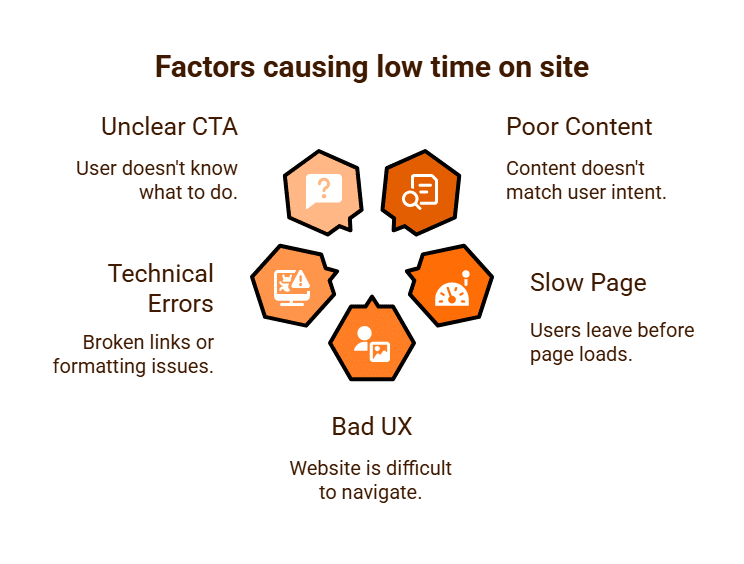
What is Answer Engine Optimisation (AEO)?
Answer Engine Optimisation (AEO) is a modern, strategic approach to digital marketing that focuses on optimising content to be directly featured in search engine results pages (SERPs), particularly by generative AI features and rich snippets. Unlike traditional SEO, which has historically focused on driving clicks to a website, AEO is about being the authoritative source that provides the answer directly on the SERP, thereby capturing the user’s attention and building brand visibility in a “zero-click” environment.
This shift is a direct response to the evolution of search engines, which are increasingly moving from being a directory of links to becoming direct answer engines. With the rise of AI-powered features, users can get comprehensive, synthesised answers to their queries without needing to click on any external links. AEO is the practice of positioning your content to be that authoritative, trusted source.
The Shift from SEO to AEO
Traditional SEO principles remain vital for a website’s overall health and ranking. However, AEO introduces a new layer of strategy. While SEO aims to get you to the top of the search results, AEO aims to get your content directly into the answer box or the generative AI snippet at the very top of the page. This is a crucial distinction, as a successful AEO strategy can be highly effective even if it doesn’t lead to an immediate click.
Key AEO Optimisation Tactics
- Structured Data and Rich Snippets: Structured data, or Schema Markup, is a form of code that helps search engines explicitly understand the content on your page. For AEO, this is a powerful tool. Implementing FAQ Schema for a question-and-answer section or “How To” Schema for a guide, for instance, makes it much easier for search engines to extract your content and present it in a visually rich format directly on the SERP.
- Direct and Concise Answers: Optimise your content to provide clear, direct, and factual answers to common questions. Instead of burying the answer within a long paragraph, start a section with a question (e.g., “What is a Demand Gen campaign?”) and follow it with a concise, easy-to-read answer. This makes your content a perfect candidate for a featured snippet or a generative AI summary.
- Q&A and FAQ Format: Structuring your content in a question-and-answer format is a simple yet highly effective AEO tactic. This not only improves readability for users but also provides a clear, structured source that AI systems can easily parse for information.
- Demonstrating E-E-A-T (Experience, Expertise, Authoritativeness, and Trustworthiness): As search engines rely more on AI, the importance of E-E-A-T has been amplified. AI answers will prioritise sources that are perceived as credible and authoritative. AEO requires focusing on building your brand’s authority through high-quality backlinks, expert-authored content, and transparent authorship.
- Semantic Search and Topical Authority: AEO is not about just having a single paragraph that answers a question. It’s about providing a comprehensive, in-depth piece of content that covers a topic thoroughly, using a wide range of related terms and concepts. This signals to search engines that your website is a true authority on the subject, making it a more trusted source for an AI answer.
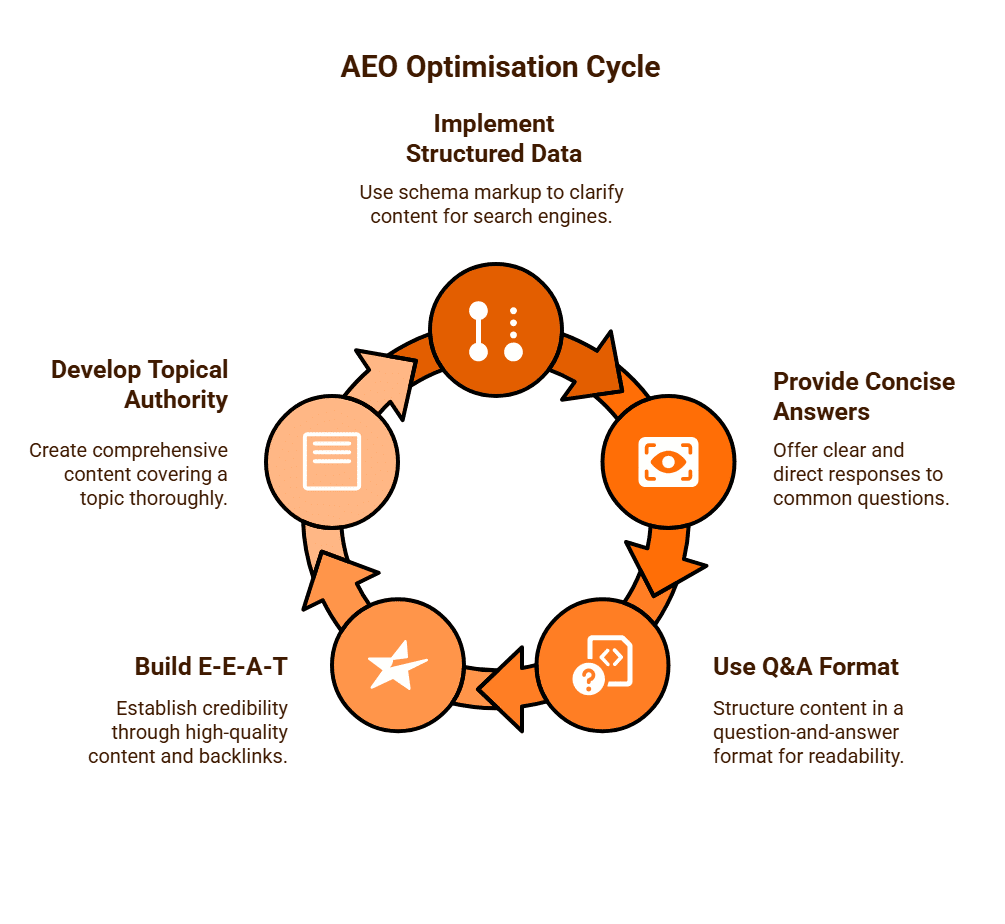
The Impact on Digital Marketing
AEO fundamentally changes the way we measure success. While an immediate drop in click-through rate may be a concern, AEO shifts the focus to:
- Brand Visibility and Authority: Even without a click, having your brand featured as the source for a prominent AI answer builds trust, credibility, and brand recognition in the minds of users.
- Diversifying Traffic Sources: Acknowledging the rise of zero-click searches, a modern marketing strategy must diversify its traffic streams to include a blend of organic search, paid advertising, social media, and direct outreach.
AEO is a forward-thinking strategy that adapts to the new search landscape. It is not a replacement for traditional SEO but a vital extension of it. By focusing on creating structured, authoritative content designed to be a definitive answer, businesses can continue to build brand visibility and trust in an era where the search engine is also a powerful answer engine.

How Do I Optimise for AI LLM's?
The rise of Large Language Models (LLMs) and generative AI in search results is fundamentally changing the digital marketing landscape. Where traditional SEO focused on driving clicks to a website, a new discipline, Answer Engine Optimisation (AEO), is emerging. AEO is the practice of optimising a website to be the definitive, authoritative source from which an LLM can draw its answers, thereby building brand visibility and authority in a “zero-click” search environment.
Structure Your Content for AI Readability
LLMs are designed to process and understand vast amounts of text. To make your content as accessible as possible, you must structure it logically. Using clear headings (<h3>), bullet points, and numbered lists makes your content scannable for both human readers and AI. This structure helps AI to parse and extract key information efficiently, making it more likely to be used in a generative AI snippet.
Provide Direct and Authoritative Answers
AI is built to provide clear, factual answers to user queries. Your content should be structured to facilitate this. Instead of burying key information within long paragraphs, present it clearly and concisely. Adopting a question-and-answer format, where a heading poses a question and the following paragraph provides a direct answer, is a highly effective strategy for AEO. It also signals to search engines that your content is an authoritative source. This is a direct reflection of the importance of E-E-A-T (Experience, Expertise, Authoritativeness, and Trustworthiness). Content created by a subject matter expert and backed by data is far more likely to be selected as a credible source by an LLM.
Leverage Schema Markup for Context
Schema Markup is a form of structured data that provides search engines with explicit information about the content on your page. For AEO, it is a powerful tool for adding context and meaning to your content. By implementing specific schemas, you can explicitly tell AI systems that a section of your content is a question-and-answer section (FAQPage Schema) or that a page is a “how-to” guide (HowTo Schema). This makes your content a prime candidate for a rich snippet in the SERP, which can significantly improve visibility and click-through rate, even if an LLM is providing a direct answer.
Build a Robust and Trustworthy Backlink Profile
Backlinks have long been a foundational element of SEO, acting as a “vote of confidence” from one website to another. For LLMs, backlinks play an even more vital role as a crucial signal of authority and trust. A website with a healthy, authoritative backlink profile is far more likely to be selected as a credible source than a site with few or no backlinks. A high-quality, natural backlink profile built from reputable websites (.gov.au, .edu.au) signals credibility and trustworthiness to AI.
Optimise for Mobile-First Indexing and Speed
The foundation of AEO is ensuring that your website is technically sound. LLMs cannot use content that is not indexed, so a focus on crawlability and site performance is paramount. AI often crawls the mobile version of a website first, so a fast-loading, mobile-responsive website is essential for AEO. A good user experience and fast page speed are strong signals of quality to both users and search engines, and by extension, to AI.
AEO is a strategic evolution of SEO that focuses on content quality, authority, and structured data to position a website as a definitive source of information in the age of AI. By focusing on these key areas, businesses can continue to build brand visibility and trust in an era where the search engine is also a powerful answer engine.

How to Optimise Images for SEO?
Image optimisation is a fundamental component of a comprehensive SEO strategy, extending beyond just text-based content. It involves a strategic blend of technical and creative practices to ensure that your images are discoverable by search engines, load quickly for users, and contribute to the overall user experience of your website. By optimising images, you not only improve your chances of ranking in Google Images but also positively impact your website’s organic search visibility and performance.
File Naming and Format Selection
The way you name and save your image files is the first and most critical step in image optimisation.
- Descriptive Filenames: Use clear, descriptive, and keyword-rich filenames. A file name like IMG_4567.jpg is meaningless to a search engine. Instead, a name like black-leather-bifold-wallet-front-view.jpg provides context and relevance. Use hyphens to separate words, as search engines read them as spaces.
- Optimal File Formats: Choosing the right file format is essential for balancing visual quality with file size.
- JPEG is ideal for photographs and complex images, as it offers a good balance between compression and quality.
- PNG is best for images with transparency, logos, or simple graphics with sharp lines and solid colours, as it uses lossless compression.
- WebP and AVIF are modern, “next-gen” formats that offer superior compression and smaller file sizes than JPEGs and PNGs without a noticeable loss of quality. Using these formats can significantly boost your page’s load speed.
Alt Text (Alternative Text)
Alt Text is a textual description of an image that is embedded in the HTML code. It serves two vital purposes:
- Accessibility: Screen readers for the visually impaired read the Alt Text aloud, allowing them to understand the image content. This makes your website more accessible and inclusive.
- SEO: Search engine crawlers cannot “see” images. The Alt Text helps them understand the context and subject of the image, which can contribute to the page’s relevance for a specific search query.
When writing Alt Text, follow these guidelines:
- Be descriptive and concise.
- Include your target keyword naturally if relevant, but avoid keyword stuffing.
- Describe what is in the image, as if you were explaining it to someone over the phone.
- Bad Alt Text: alt=”wallet”
- Good Alt Text: alt=”Front view of a men’s black leather bifold wallet”
Image Compression and Page Speed
Large image files are a major contributor to slow page load times. A slow website frustrates users, increases bounce rates, and can harm your search rankings.
- Compress Images: Use image compression tools (e.g., TinyPNG, ImageOptim, or a plugin for your content management system) to reduce file size without a significant loss in visual quality. You can often reduce an image’s size by 50% or more without any visible difference.
- Resizing: Ensure that images are resized to the maximum dimensions they will be displayed on your website. Uploading a 4000-pixel wide image for a 500-pixel wide display is inefficient and unnecessary.
- Responsive Images: Use responsive image techniques (e.g., HTML’s srcset attribute) to serve appropriately sized images to users based on their device (desktop, tablet, or mobile).
Context and Placement
The placement of an image on a page and its relationship to the surrounding content are also important SEO factors. An image should be placed near relevant text content that provides additional context and meaning for both users and search engines. For example, an image of a product should be placed on a product page with a detailed description, customer reviews, and specifications.
Image Sitemaps
For websites with a large number of images, an Image Sitemap is a useful tool. This is an XML file that lists the URLs of all the images on your site, helping search engines discover and index your images more efficiently, particularly images that might not be found through regular crawling.
Optimising your images for SEO is a strategic process that involves a blend of technical and content-focused efforts. By focusing on descriptive filenames, accurate Alt Text, efficient compression, and contextual placement, you can improve your website’s performance, enhance its accessibility, and increase its visibility in both organic search and image search results.

How to Optimise Videos for Search?
As YouTube is the second most searched site on the planet, it’s important to make sure your Video content is optimised for search. Consequently, optimising videos for search, a practice known as Video SEO, is an essential strategy for any business looking to enhance its online visibility. Effective video optimisation requires an approach that combines on-platform best practices with on-page technical elements to ensure your videos are not only discovered but also watched and engaged with by your target audience.
On-Platform Optimisation
The majority of a video’s optimisation takes place on the platform where it is hosted, with YouTube being the most critical.
- Descriptive and Keyword-Rich Titles: Your video’s title is its primary ranking factor. It should be compelling and include your primary keyword naturally at the beginning. A good title should accurately describe the video’s content while also sparking curiosity and encouraging a click. We still need to abide by the 60 character limit for meta titles.
- Detailed and Optimised Descriptions: The video description is a crucial space for providing context to both search engines and viewers. Write a detailed description that includes relevant keywords, a brief summary of the video, and links to your website or other social media channels. Including a full transcript in the description can significantly boost your video’s SEO by providing a large body of keyword-rich content for search engines to crawl. We still need to abide by the 160 character limit for meta descriptions.
- Strategic Tagging: Tags are another way to provide context to YouTube and help its algorithm understand your video’s content. Use a mix of broad and specific tags that are relevant to your video’s topic. A good strategy is to include your primary keyword as a tag, as well as several long-tail variations and related terms.
- Eye-Catching Thumbnails: The video thumbnail is your video’s first impression. A high-quality, custom-made thumbnail with clear text and a compelling image can dramatically increase your video’s click-through rate (CTR), which is a powerful ranking signal for YouTube.
- Audience Engagement Features: Use features like end screens and cards to promote other videos on your channel, encourage subscriptions, or link to your website. These features help to increase viewer engagement and watch time, which are strong ranking signals for YouTube’s algorithm.
On-Page and Technical Optimisation
If you are hosting a video on your own website, you must also optimise the page it is embedded on to help search engines understand the content.
- Video Placement: Embed videos on relevant pages of your website, such as a blog post or a product page. The surrounding text and context will help search engines understand the video’s content and its relevance to the page.
- Video Schema Markup: Use VideoObject Schema Markup to provide search engines with explicit information about your video content. This structured data can include the video’s title, description, thumbnail URL, and upload date, which helps search engines to display your video in rich snippets in the search results.
- Video Sitemaps: For websites with a large number of videos, a dedicated video sitemap can be used to help search engines discover and index your video content more efficiently. This is especially useful for videos that might not be easily discoverable through regular crawling.
Promotion and Measurement
A good video needs a good audience. Once your video is optimised, you must promote it to get it in front of your target audience. Share it on your social media channels, include it in your email newsletters, and embed it on relevant blog posts. To measure success, monitor key metrics like watch time, audience retention, and comments, as these are strong signals of viewer engagement for search engines.
Tracking video traffic is easy with G4 Analytics, so make sure you understand how to filter for video traffic results. There are other video platforms like Vimeo, so explore other video-hosting platforms as well.
A successful video SEO strategy is a holistic effort that combines on-platform optimisation on YouTube with on-page technical elements on your website. By focusing on creating valuable, high-quality video content and strategically optimising it for both search engines and viewers, you can significantly increase your video’s visibility and its contribution to your overall digital marketing strategy.
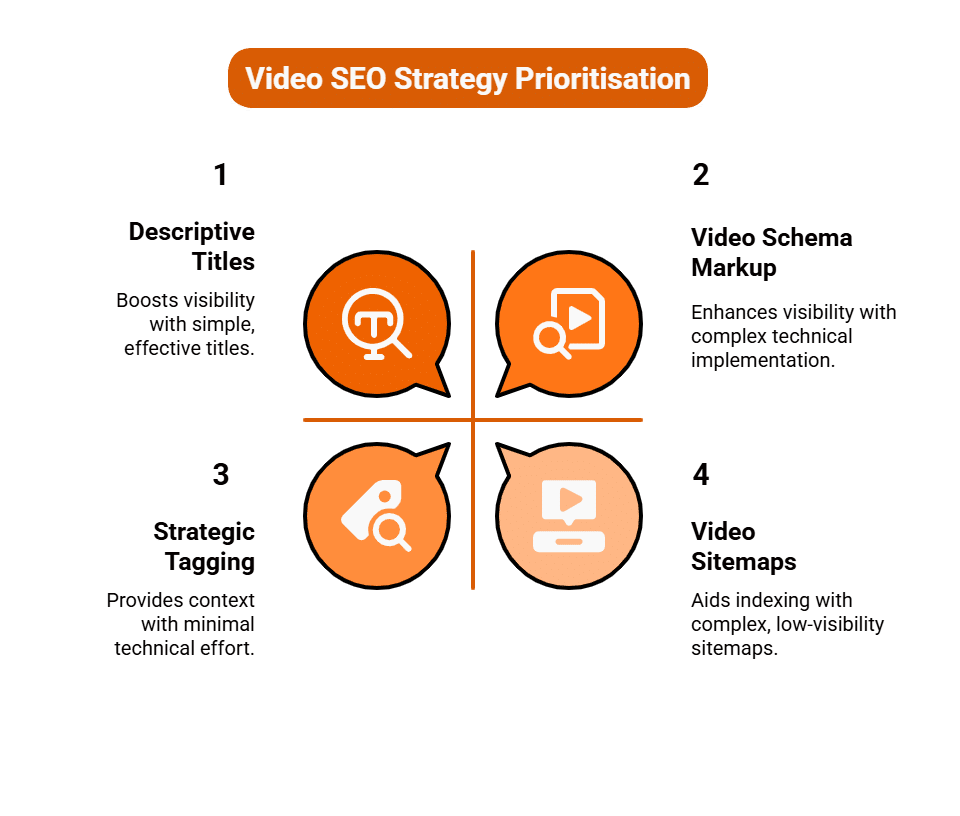
How to Research Relevant Keywords for My Business’s Website?
Keyword research is the fundamental cornerstone of any successful search engine optimisation (SEO) strategy. It is the process of identifying the exact words and phrases that potential customers use when searching for products, services, or information related to your business.
The goal is not merely to find terms with high search volume, but to pinpoint keywords that align with user intent and offer a realistic opportunity for your website to rank. This methodical, data-driven approach ensures that every piece of content you create serves a specific, profit-driven purpose.
Step 1: Understand Your Audience and Business
Effective keyword research begins internally, not with a tool. You must first develop a deep understanding of your own business and the people you aim to serve.
Begin by compiling a seed list, a brainstorming session that captures every core offering, product, and service. Crucially, focus on user intent, classifying how a user interacts with a keyword: are they looking for information (e.g., “what is a pension plan”), navigation (e.g., “Commonwealth Bank login”), or are they ready to buy (e.g., “best AU mortgage broker”)?
Next, delve into buyer personas. Consider the precise vocabulary your customers use to describe their pain points. A professional might search for “B2B accounting software for SMEs,” while a consumer might search for “best way to do tax return.” Aligning your keywords with this specific language is essential for relevance.
Step 2: Utilise Keyword Research Tools
Once you have a robust seed list, you can leverage professional keyword research tools to quantify the demand for those terms. Essential platforms include Google Keyword Planner (free with a Google Ads account), Semrush, SE Ranking, Ahrefs, and Ubersuggest.
These tools provide the crucial metrics needed to filter and prioritise your list:
- Search Volume: This metric indicates the average number of times a term is searched each month. It quantifies the potential size of the audience you could reach.
- Keyword Difficulty (KD) / Competition: This score, typically on a scale of 1 to 100, measures how challenging it is to rank organically for that term, based on the authority of the current top-ranking websites.
- Cost Per Click (CPC): While this is an advertising metric, a high CPC often signifies strong commercial intent. If businesses are willing to pay a lot for a click, the search term likely leads to high-value conversions.
Use your initial seed keywords to generate hundreds of related terms, phrases, and questions that your customers might be searching for.
Step 3: Analyse Search Intent and Long-Tail Keywords
Filtering your expanded list by search intent is the key to maximising conversion rates. It helps you deliver the right type of content at the right stage of the buyer’s journey.
- Transactional Keywords (e.g., “buy handmade leather belt online,” “Sydney solicitor consultation”) should be targeted by your product pages, service pages, and contact pages. These are high-value terms.
- Informational Keywords (e.g., “how long does a leather belt last,” “history of Sydney solicitors”) should be targeted by your blog posts and resource guides. These terms build trust and authority.
Focusing on long-tail keywords longer, more specific phrases of three or more words is highly advantageous. While these phrases have lower individual search volumes, they often reveal very specific user needs and boast much higher conversion rates because the intent is clearer. Furthermore, their lower competition makes them easier targets for a new or smaller website to rank for initially.
Step 4: Evaluate the Competition
Before committing to a set of keywords, you must analyse the current Search Engine Results Pages (SERPs) for those terms. This step moves beyond the raw numbers and into qualitative analysis.
Enter your target keywords into Google and examine the top 10 results. Ask yourself:
- Who is ranking? If the results are dominated by giants like Amazon, the BBC, or major government websites, the keyword is likely too competitive.
- What is the quality of the content? Look for opportunities where the ranking pages have thin content, don’t directly answer the user’s question, or have poorly optimised title tags. A weak competitive landscape signals a chance for your high-quality content to take a top position.
Step 5: Map Keywords to Content Strategy
The final, essential step is to allocate your chosen keywords to specific pages on your website. This is known as keyword mapping.
Assign one primary keyword and a handful of closely related secondary keywords to each unique page (e.g., a service page, a blog post, a product page). Ensure that you avoid keyword cannibalisation, a scenario where two or more of your own pages target the exact same primary keyword, forcing them to compete against each other in search results.
This strategic allocation ensures that every page is optimised for a unique search purpose, providing a clear path for search engines to categorise and rank your entire site structure. Keyword research is not a one-time task; it is an ongoing, cyclical process that requires continuous monitoring and refinement to maintain and grow your organic search presence.
What is Generative Engine Optimisation (GEO)?
As digital marketing evolves, businesses are constantly seeking new ways to stand out and connect with their audience. For years, Search Engine Optimisation (SEO) has been the cornerstone of online visibility, a complex yet vital discipline focused on making websites discoverable through traditional search engines. However, a seismic shift is underway, heralded by the rise of Large Language Models (LLMs) and their integration into search experiences. This paradigm shift gives birth to a new discipline: Generative Engine Optimisation (GEO).
While the name might sound similar, GEO is not merely a rebrand of SEO. It represents a fundamental rethinking of how digital content is discovered, consumed, and optimised in an age where AI-driven generative responses are increasingly front and centre. To truly understand GEO, we must first acknowledge the profound transformation of the search landscape itself.
The Evolution of Search: From Links to Logic
Traditional SEO, for all its sophistication, primarily operates within a framework of links, keywords, and relevance scores. Its goal is to signal to search engine crawlers that a webpage offers the best answer or resource for a user’s query. This often involves meticulous keyword research, technical optimisation, high-quality content creation, and strategic link building. The output is typically a list of blue links, each leading to a distinct website.
Enter generative AI. LLMs like OpenAI’s GPT series, Google’s Gemini, and others, have revolutionised content creation and, crucially, information retrieval. When integrated into search engines, these models don’t just present a list of links; they synthesise information from multiple sources to provide a direct, coherent, and often conversational answer to a user’s query. This is the “generative” aspect – the AI generates a unique response rather than simply pointing to existing ones. Google’s Search Generative Experience (SGE), for instance, offers an AI-powered “snapshot” at the top of results pages, summarising information and suggesting follow-up questions.
Defining Generative Engine Optimisation (GEO)
Generative Engine Optimisation, then, is the strategic practice of optimising digital content and assets to achieve maximum visibility and favourable representation within AI-driven generative search results and conversational AI interfaces. It’s about ensuring that when an LLM synthesises information, your brand, products, services, or expertise are accurately and prominently featured as part of that generated answer.
Key Pillars of Generative Engine Optimisation
The methodologies underpinning GEO differ significantly from traditional SEO, demanding a more nuanced approach to content strategy and data structuring.
- Factuality and Authority:
- The Challenge: LLMs are powerful pattern-matchers, but they can “hallucinate” or present incorrect information if their training data is flawed or if sources lack authority.
- The GEO Solution: For content to be reliably chosen and accurately represented by an LLM, it must be demonstrably factual, well-researched, and backed by credible sources. Brands need to establish themselves as undeniable authorities in their niche. This means publishing original research, citing reputable sources diligently, and demonstrating verifiable expertise. A strong E-E-A-T (Experience, Expertise, Authoritativeness, Trustworthiness) profile, already crucial for SEO, becomes even more paramount in GEO.
- Clarity and Conciseness:
- The Challenge: LLMs are designed to summarise and synthesise. Overly verbose, convoluted, or jargon-filled content is harder for them to process and integrate effectively.
- The GEO Solution: Content must be clear, direct, and unambiguous. Information should be presented in a structured, easily digestible format; think bullet points, numbered lists, concise paragraphs, and clear headings. An LLM needs to quickly extract the core facts and sentiments without sifting through unnecessary fluff.
- Semantic Richness and Contextual Depth:
- The Challenge: Traditional SEO often relies on exact-match keywords. LLMs, however, understand the semantic meaning and context of queries.
- The GEO Solution: Content needs to cover topics comprehensively, exploring related concepts, answering common follow-up questions, and providing a holistic view. This moves beyond isolated keywords to a focus on “topic clusters” and semantic fields. By addressing a subject from multiple angles, you increase the likelihood that an LLM will draw upon your content to answer a diverse range of semantically related queries.
- Structured Data and Schema Markup:
- The Challenge: LLMs need structured, machine-readable data to efficiently understand the nature of content (e.g., product, event, recipe, FAQ).
- The GEO Solution: Implementing robust schema markup (e.g., FAQ schema, Product schema, How-To schema) becomes even more critical. This provides explicit signals to AI models about the type of information presented, making it easier for them to extract and incorporate relevant details into generative responses.
- Brand Mentions and Entity Recognition:
- The Challenge: For an LLM to recommend your brand or product, it must recognise your brand as a distinct entity.
- The GEO Solution: Consistent and clear brand mentions across the web, alongside a strong public profile, contribute to entity recognition. When an LLM is asked about the “best waterproof hiking boots,” if your brand (e.g., “PeakStride”) consistently appears in high-quality reviews, expert guides, and product comparisons, it increases the chance of your brand being included in the generative response.
The Interplay with Traditional SEO
It’s crucial to understand that GEO does not replace SEO; rather, it builds upon it and expands its scope. A technically sound website, fast loading speeds, a strong backlink profile, and relevant keyword targeting remain important. These foundational SEO elements still help LLMs discover and trust your content. However, GEO adds an additional layer of optimisation focused on how that content is interpreted and presented by AI.
The Future of GEO
As LLMs become more sophisticated and deeply embedded in how users access information, Generative Engine Optimisation will become an indispensable part of any comprehensive digital marketing strategy. Businesses that embrace GEO early will be well-positioned to dominate the new frontier of AI-driven search, ensuring their expertise, products, and services are not just found, but intelligently synthesised and presented to a discerning audience. The future of online visibility isn’t just about being seen; it’s about being understood and articulated by the most powerful information engines ever conceived.
How to Optimise a Website for LLM Searches?
For decades, the internet has been navigated primarily through traditional search engines, where users input queries and receive a ranked list of “blue links” directing them to websites. However, the advent of Large Language Models (LLMs) and their integration into search experiences, epitomised by Google’s Search Generative Experience (SGE) and similar initiatives, marks the dawn of generative search.
This shift demands a new paradigm in website optimisation. It’s no longer enough to simply rank high in a list; the goal is now to ensure your content is not only discoverable but also synthesised and accurately represented within the AI’s generated answers. This new discipline, which we might call Generative Engine Optimisation (GEO), requires a holistic and strategic approach, moving beyond keywords to focus on trust, context, and semantic clarity.
Understanding the LLM Search Paradigm
Before diving into optimisation tactics, it’s vital to grasp how LLMs fundamentally change search:
- Direct Answers: Instead of a list of links, LLMs aim to provide a direct, conversational answer to a user’s query, often drawing information from multiple sources.
- Synthesis, Not Just Retrieval: LLMs don’t just find documents; they understand, summarise, and combine information to create a new, tailored response.
- Contextual Understanding: LLMs excel at understanding the intent and nuance behind a query, going beyond exact keyword matches to grasp semantic meaning.
- Trust and Authority: For an LLM to rely on your content for its generated answer, it must perceive your website as a highly authoritative and trustworthy source.
Core Principles of LLM Optimisation (GEO)
Optimising for generative search is less about gaming algorithms and more about building a fundamentally excellent, authoritative, and user-centric website.
1. Prioritise E-E-A-T (Experience, Expertise, Authoritativeness, Trustworthiness)
Google has consistently emphasised E-E-A-T, and it becomes the bedrock of LLM optimisation. If an LLM is to confidently cite or summarise your content, it must “believe” your site is a credible source.
- Experience: Demonstrate real-world usage or personal experience with the topic. Show, don’t just tell.
- Expertise: Publish content written by demonstrable experts in your field. Feature author bios with credentials.
- Authoritativeness: Build a strong online reputation. Gain backlinks from other authoritative sites, receive mentions from industry leaders, and be cited in reputable publications.
- Trustworthiness: Ensure your site is secure (HTTPS), transparent about its purpose, provides accurate contact information, and has clear privacy policies. Avoid misleading claims.
2. Master Semantic Content and Topical Authority
Move beyond optimising for individual keywords. LLMs understand topics and concepts.
- Comprehensive Topic Coverage: Instead of just writing about “SEO tips,” cover the entire topic cluster: “what is SEO,” “types of SEO,” “SEO tools,” “how SEO works,” etc. This establishes your site as a holistic resource.
- Semantic Richness: Use natural language that includes synonyms, related terms, and contextual phrases. LLMs will understand the nuances of your content better than traditional keyword matching.
- Answer User Intent Directly: Structure your content to directly answer questions users might ask. Use clear headings that phrase answers as questions (e.g., “What is Generative AI?”).
3. Structure for Clarity and Extractability
LLMs need to easily parse and extract information. Well-structured content is paramount.
- Logical Hierarchy: Use clear H1 (main title), H2 (major sections), and H3 (sub-sections) tags to outline your content logically. This helps LLMs understand the main points and sub-points.
- Concise Paragraphs: Avoid overly dense blocks of text. Break content into shorter, digestible paragraphs.
- Lists and Tables: Use bulleted and numbered lists, as well as HTML tables, to present information clearly and concisely. This format is highly amenable to LLM extraction and summarisation.
- Definitions and Summaries: Include clear definitions of key terms and provide concise summaries at the beginning or end of sections. This is prime material for an LLM’s generative response.
- Schema Markup (Structured Data): This is non-negotiable. Implement relevant schema types (e.g., FAQPage, HowTo, Product, Review, Article) to explicitly tell search engines and LLMs what your content is about. This provides machine-readable context, increasing the likelihood of your content being used for rich results or direct answers.
4. Prioritise Factuality and Verifiability
LLMs can “hallucinate” if their training data is flawed or if sources are ambiguous. Ensure your content is a reliable wellspring of truth.
- Cite Sources: Where appropriate, link to authoritative external sources (studies, government websites, academic papers). This boosts your trustworthiness.
- Provide Data and Evidence: Back up claims with statistics, case studies, and verifiable facts. LLMs are more likely to trust and use information that is demonstrably true.
- Regular Updates: Keep your content fresh and accurate. Outdated information is less likely to be considered authoritative by an LLM.
5. Optimise for Conversational Search and Natural Language
The rise of voice search and conversational AI means queries are becoming more natural and less keyword-driven.
- Answer Questions: Think about the full questions users might ask, not just keywords. Integrate these questions (and their answers) naturally into your content.
- Long-Tail Queries: While LLMs understand broad topics, optimising for specific, longer, and more conversational queries will still help an LLM connect your content to highly specific user needs.
- Clarity of Purpose: Ensure your content clearly states its purpose and provides a definitive answer or solution to the implied user need.
6. Technical SEO Fundamentals Remain Critical
While GEO adds new layers, the foundational elements of technical SEO are still essential for discoverability.
- Site Speed: Fast loading times are crucial for user experience and are a ranking factor. LLMs won’t bother with slow, frustrating sites.
- Mobile-Friendliness: Most generative searches will occur on mobile devices.
- Crawlability and Indexability: Ensure your site is easily discoverable by search engine crawlers.
- Internal Linking: A robust internal linking structure helps establish topical authority and distributes “link equity” across your site.
The Future
Optimising for LLM searches is not a fleeting trend; it’s the future of online visibility. It demands a shift from a keyword-centric view to a more holistic understanding of user intent, content quality, and digital authority. Businesses that proactively embrace E-E-A-T, semantic richness, structured data, and uncompromising factuality will be the ones whose expertise is not just found, but intelligently synthesised and presented to a new generation of searchers by the generative engines. This is about becoming the answer, not just a link to the answer.
How LLM's Use Schemas for Search Results?
The advent of Large Language Models (LLMs) has fundamentally shifted the paradigm of online searches. No longer confined to presenting a list of blue links, search engines are increasingly integrating AI-powered generative responses that aim to answer user queries directly and comprehensively. For this new era of “generative search” to be effective, LLMs need to not just find information, but truly understand it. This is where schemas, or structured data markup, play an increasingly pivotal role.
Schemas provide a machine readable language that helps LLMs interpret the context and meaning of content with unparalleled precision. Without this structured guidance, even the most advanced LLM would be grappling with ambiguity, making assumptions that could lead to less accurate or less relevant generative answers.
The Challenge for LLMs: Ambiguity in Natural Language
Imagine an LLM trying to understand a webpage about a film. Natural language processing (NLP) can identify words like “director,” “cast,” “release date,” and “genre.” However, without explicit clues, the LLM still faces challenges:
- Is “120 minutes” referring to a running time or a delivery_time for a pizza?
- Is “Sydney” a filming location for the film, or the address of the production company?
- Is “Christopher Nolan” the director, actor, or producer?
This ambiguity, prevalent in unstructured text, makes it harder for an LLM to confidently extract precise facts, establish relationships between entities, and synthesise information accurately. This is where schemas become the indispensable roadmap.
Schemas as the Rosetta Stone for LLMs
Schemas, primarily from Schema.org, act as a universal vocabulary for defining entities and their properties on a webpage. When implemented using JSON-LD (Google’s preferred format), they embed explicit, machine-readable labels into the HTML.
Here’s how LLMs leverage these schemas:
- Enhanced Entity Recognition and Resolution:
- Clarifying Identity: When a webpage uses Person schema to identify “John Smith” as the author of an Article, an LLM immediately knows “John Smith” is a person entity with a specific role in relation to the content. This is crucial for evaluating E-E-A-T (Experience, Expertise, Authoritativeness, Trustworthiness).
- Disambiguation: If “apple” appears in text, an LLM might infer it’s a fruit or a tech company. But if the page also includes Product schema describing an “Apple iPhone 15 Pro,” the LLM definitively understands it refers to the tech giant’s product, preventing misinterpretation.
- Accurate Fact Extraction for Generative Answers:
- Precise Data Points: When a user asks an LLM, “What is the price of the new iPhone 15 Pro?”, and your product page has Product schema with offers, price, and priceCurrency, the LLM can extract “$1,199” with absolute certainty that it’s the price in Australian Dollars. This direct access to structured data reduces the likelihood of the LLM “hallucinating” or providing an incorrect figure.
- Structured Summaries: For “how-to” queries (e.g., “how do I change a car tyre?”), a webpage with HowTo schema provides steps, tools, and estimated time in a structured list. The LLM can then directly convert this into a clear, step-by-step generative answer, making the information highly actionable for the user.
- Building and Enriching the Knowledge Graph:
- Connecting the Dots: Schemas help LLMs (and underlying knowledge graphs like Google’s Knowledge Graph) understand the relationships between different entities. For example, LocalBusiness schema connects a business name to its address, telephone, and hasMap. An Event schema links an event to its location, startDate, and performer.
- Semantic Network: By consuming millions of schema-rich pages, LLMs build a vast semantic network, allowing them to draw connections and provide more comprehensive answers, even for complex multi-entity queries. If a user asks, “What’s a good restaurant near the Globe Theatre that’s open tonight?”, the LLM can cross reference LocalBusiness schema data (restaurants with their operating hours) with Place schema data (the theatre’s location).
- Assessing E-E-A-T and Source Credibility:
- Authoritative Signals: Schemas like Article or MedicalWebPage allow you to explicitly declare the author, their url to a Person profile, and even reviewedBy a MedicalOrganization. These explicit signals are vital for LLMs when evaluating the trustworthiness and expertise of a source, ensuring they don’t cite unreliable information.
- Verifiable Information: If schema marked-up facts about an entity (e.g., a company’s founder, a product’s specifications) are consistent across multiple authoritative, schema-rich sources, the LLM’s confidence in that information significantly increases.
- Optimising for the Future of Conversational AI:
- Voice Search Readiness: As voice assistants powered by LLMs become ubiquitous, schemas enable them to provide concise, accurate, and contextually relevant spoken answers without having to read out entire webpages.
- AI-Powered Recommendations: For e-commerce queries, Product and Offer schemas help LLMs not just list products, but potentially recommend the “best value” or “most popular” item based on structured pricing, reviews, and sales data.
In essence, schemas serve as the instruction manual for LLMs, clarifying the structure and meaning of web content. While LLMs are incredibly adept at understanding natural language, schemas provide a layer of unambiguous data that enhances their accuracy, efficiency, and ability to generate truly helpful and precise answers. For any website aiming to thrive in the generative search future, implementing robust and accurate schema markup is no longer an SEO tactic; it’s a fundamental requirement for effective AI communication.
How to Conduct a NAP Audit for SEO?
When focussing on local search optimisation, few factors are as fundamental as NAP consistency, that is, the accuracy and uniformity of your Name, Address, and Phone number across the web. Google uses this information to verify your business’s legitimacy and location, and any inconsistencies can harm your visibility in local search results.
A NAP audit is the process of reviewing and correcting all instances of your business details online. It ensures that search engines and potential customers can find and trust your business easily. This FAQ article outlines how to conduct an effective NAP audit step by step.
1. Understand Why NAP Consistency Matters
Before starting your audit, it’s important to understand why NAP data impacts SEO.
Search engines like Google cross-reference business information from multiple sources; your website, directories, review platforms, and social media profiles to determine accuracy and trustworthiness. If your business name or contact details appear inconsistently, search engines may interpret this as conflicting information and lower your local ranking.
From a user perspective, inconsistency creates confusion and erodes trust. A potential customer who sees two different phone numbers or addresses might question your credibility.
In short, NAP consistency helps you:
- Improve local pack visibility (Google Maps results)
- Strengthen business authority
- Enhance user trust and conversions
2. Establish Your Official NAP Format
Before you can identify inconsistencies, you need a master record of your official business details. This should match exactly how you want your information to appear everywhere online.
Write down your preferred NAP format, paying attention to:
- Business Name: Ensure it matches your registered trading name. Avoid abbreviations or unnecessary keywords.
- Address: Include suite numbers, abbreviations, and punctuation consistently (e.g., “Street” vs “St”).
- Phone Number: Use a single, primary number, preferably with your local area code.
If your business operates multiple locations, create separate NAP entries for each branch and keep them consistent across all platforms.
3. Compile a List of All Existing Citations
A citation is any mention of your NAP information on the web. The next step is to locate every place your business details appear.
Start with your core listings, including:
- Google Business Profile
- Bing Places
- Apple Maps
- Facebook, Instagram, LinkedIn
- Yelp, Yellow Pages, and TrueLocal (in Australia)
- Industry-specific directories (e.g., Houzz, HealthEngine, TripAdvisor)
Use tools like Moz Local, BrightLocal, Whitespark, or Semrush’s Listing Management Tool to automatically scan for citations. Alternatively, you can conduct manual searches using variations of your business name and address in quotation marks on Google, such as:
“Your Business Name” + “Suburb”
“Your Phone Number”
“Your Address”
This will help you uncover hidden or outdated listings.
4. Review and Compare Each Listing
Once you’ve compiled a list, begin cross-referencing each entry against your master NAP record.
Look for:
- Spelling variations or abbreviations (e.g., “&” vs “and”)
- Missing suite or unit numbers
- Old or secondary phone numbers
- Different postcodes or suburbs
- Outdated website URLs
Even minor differences such as an extra comma or incorrect capitalisation can create discrepancies in Google’s indexing. Aim for complete uniformity.
You may find multiple variations of your business name or address, particularly if you’ve rebranded, moved premises, or used different agencies for marketing in the past.
5. Correct and Standardise Inaccurate Listings
After identifying inconsistencies, prioritise updating the most authoritative directories first, as they carry the most SEO weight. Start with:
- Google Business Profile
- Bing Places
- Apple Maps
- Top-tier local directories (e.g., Yelp, Yellow Pages)
For platforms where you have ownership, simply log in and correct your details. For listings you don’t control, use the “suggest an edit” feature or contact support to request an update.
If you discover duplicate listings, remove or merge them to avoid confusing both users and search engines.
6. Update Your Website and Structured Data
Your website should always serve as the primary source of truth for your NAP details. Make sure your contact information is displayed prominently on your homepage, contact page, and footer.
Additionally, use LocalBusiness schema markup (structured data) to reinforce your NAP information for search engines. Tools such as Google’s Structured Data Markup Helper can assist in creating the appropriate code.
Example:
{
“@context”: “https://schema.org”,
“@type”: “LocalBusiness”,
“name”: “Purge Digital”,
“address”: {
“@type”: “PostalAddress”,
“streetAddress”: “Unit 5 / 106 Fison Ave West“,
“addressLocality”: “Eagle Farm”,
“postalCode”: “4009”,
“addressCountry”: “AU”
},
“telephone”: “+61 7 3053 5322“,
“url”: “https://purgedigital.com.au”
}
Implementing this ensures Google understands your location data directly from the source.
7. Monitor and Maintain Consistency Over Time
A NAP audit is not a one-off task. Businesses often change phone numbers, move locations, or update branding, and directories sometimes pull outdated data from aggregators.
Schedule a quarterly or biannual audit to recheck your listings. Use monitoring tools like BrightLocal or Yext to receive alerts when discrepancies occur.
Additionally, whenever you update your NAP anywhere such as on your website or Google profile make sure to update all other listings immediately.
8. Track the Impact on Local SEO
After completing your audit, monitor local performance indicators such as:
- Google Business Profile insights (views, calls, and directions requests)
- Local keyword rankings
- Referral traffic from directory sites
Improved consistency typically correlates with better local visibility and higher engagement. Over time, this enhances not just your rankings but also customer confidence.
A well-executed NAP audit may seem meticulous, but it is one of the most effective ways to strengthen your local SEO foundation. Consistency across every mention of your business reinforces trust with both users and search engines.
By standardising your NAP details, correcting inaccuracies, and maintaining regular audits, you ensure your business remains visible, credible, and competitive in local search results.